Top AI Automation Tools for Australian Small Business in 2026
It is 9:00 PM in a quiet office near Parramatta, and you are still manually cross-referencing invoices while your competitors are already home. You know your systems don't talk to each other, and the pressure to modernise feels heavy as the Sydney CBD moves faster every day. If you feel like you are drowning in "digital paper-shuffling," you aren't alone. Many local owners find that AI automation for small business is the only way to stop the late-night admin grind and stay competitive.
We understand that you need tools that actually work without requiring a PhD to operate. This guide shows you how Sydney firms are reclaiming 15 or more hours every week by integrating smart technology into their daily workflows. We will break down the best AI tools for 2026, explain how to navigate the new privacy regulations arriving on 10 December, and provide a clear roadmap to help you organise your business for growth.
Key Takeaways
- Identify the specific software tools like Microsoft 365 Copilot and Xero that are currently helping Sydney business owners automate their most tedious administrative tasks.
- Understand the critical difference between "thinking" software and basic automation to ensure you are investing in tech that actually solves problems.
- Learn how to avoid "Shiny Object Syndrome" and the "dirty data" pitfalls that often cause AI automation for small business projects to stall.
- Discover a step-by-step 30-day roadmap to audit your existing workflows and pick the highest-impact tasks to automate first.
What is AI Automation for Small Business and Why Now?
In the busy streets of the Sydney CBD, the gap between firms that use technology and those that struggle with it is widening. To understand What is AI Automation, you have to look beyond simple digital filing. It is software that doesn't just store data; it "thinks" through context and "acts" on repetitive tasks without you needing to click a single button. For many, AI automation for small business has moved from a futuristic luxury to a survival requirement in 2026.
We often see local firms paying what we call an "Admin Tax." This is the hidden cost of billable hours lost to manual data entry. Sydney professional services lose thousands of dollars every month because highly skilled staff are stuck re-typing client details or chasing missing information across disconnected systems. In a market where every hour counts, these manual processes have become a massive competitive liability. If your systems don't talk to each other, you aren't just losing time; you are losing your edge to tech-savvy competitors.
The Difference Between Standard and AI-Driven Workflows
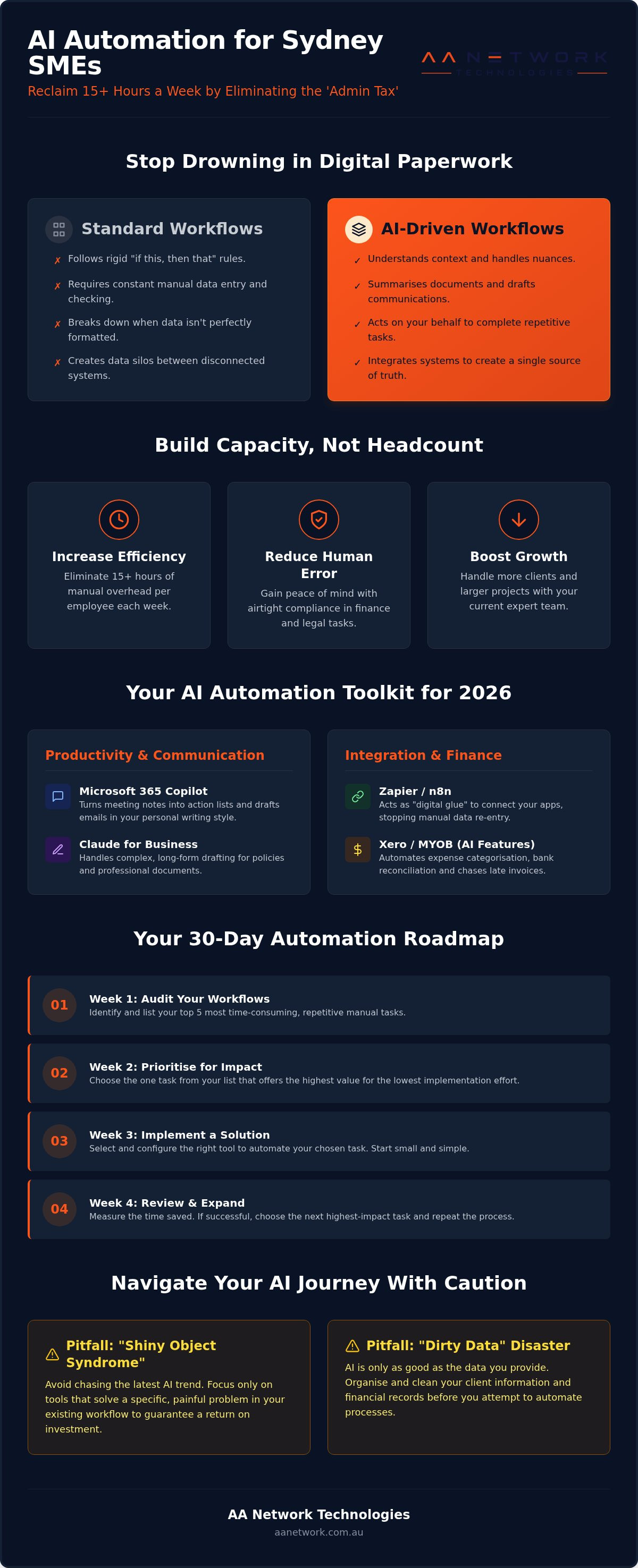
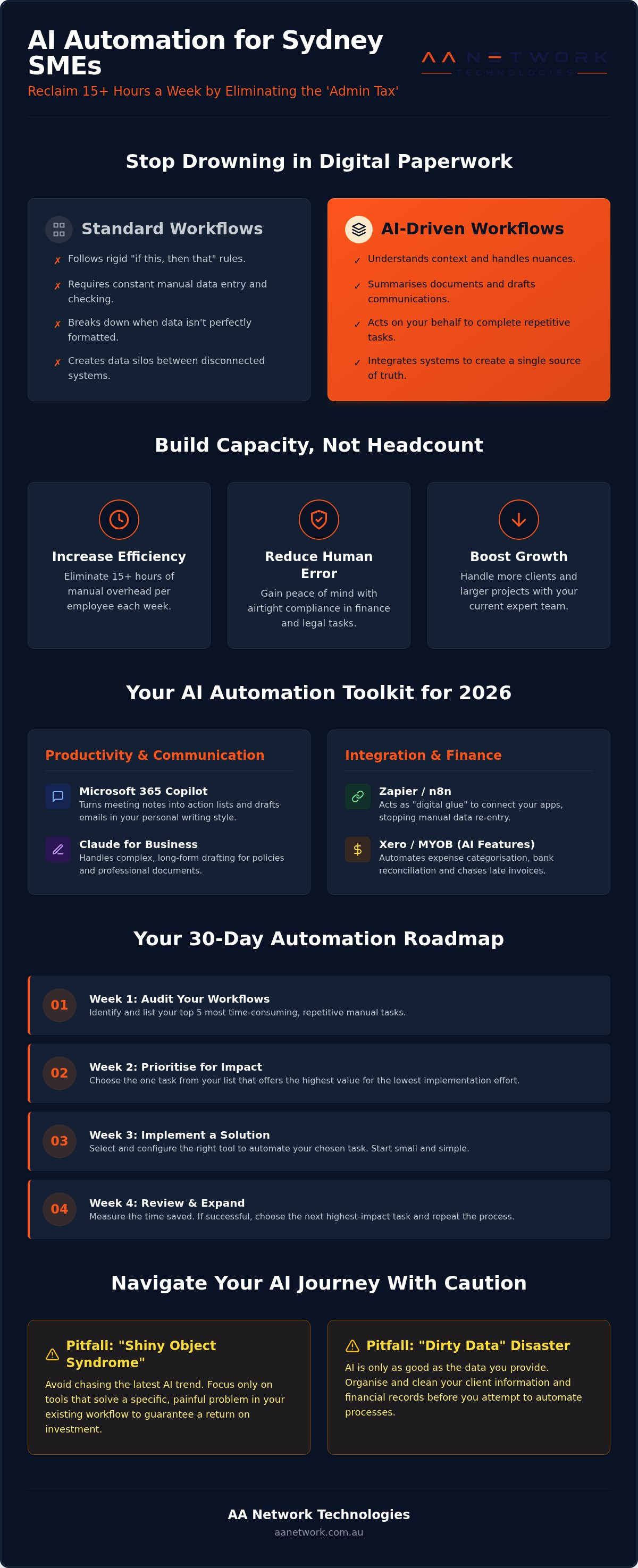
Standard workflows are rigid. They follow "if this, then that" rules, like using a tool to move a lead from a website form to a spreadsheet. While helpful, these systems break if the data doesn't fit a perfect mould. AI-driven workflows are different. They use intelligent agents, like Microsoft Copilot, to handle nuances. An AI agent can review a messy PDF contract, summarise the three most important action items, and draft an email to the client for your approval. For law firms and accountants in Sydney, this flexibility is the key to handling complex documents without the usual late-night headache.
The ROI of Automating Your Local Office
Automating your office isn't just about cutting costs; it is about capacity building. It allows your current team to handle more clients without increasing your headcount or your stress levels. By reducing "human error" in high-stakes fields like law or finance, you gain peace of mind that your compliance is airtight. You don't need a massive IT department to make this work. A focused approach on your most repetitive tasks can yield immediate results.
In 2026, AI automation for small business is defined as the strategic deployment of intelligent agents that eliminate 15 or more hours of manual overhead per week, allowing local firms to operate with the efficiency of a global enterprise.
The Best AI Automation Tools for Small Business Operations
You don't need to commission a custom software build to start seeing results. Most Sydney firms already have powerful AI automation for small business sitting right inside their existing subscriptions. The trick is knowing which features to activate and how to connect them to your daily tasks. When these tools are configured correctly, they stop being "tech toys" and start being reliable members of your team.
Microsoft 365 Copilot is the heavy hitter for professional services in the CBD. It turns a messy hour of Teams meeting notes into a structured action list in seconds and drafts responses in Outlook that match your personal writing style. For more complex writing or local compliance research, Claude for Business is often the preferred choice. It handles long-form drafting with a tone that feels sophisticated and aligned with Australian professional standards. This is particularly useful for drafting updated privacy policies to meet the December 2026 regulatory deadlines.
If your systems don't talk to each other, tools like Zapier Central or n8n act as the digital glue. Zapier is excellent for quick, simple connections between common apps like your CRM and email. For firms that need more complex logic, n8n offers deeper customisation. They ensure data flows between your platforms without any manual entry. This lets your team focus on billable work rather than copy-pasting data between windows.
Finance and Invoicing Automation
Bookkeeping is often the most hated part of running a business. AI features in Xero and MYOB now handle the heavy lifting of expense categorisation and bank reconciliation. This is a primary entry point for AI automation for small business because it solves a universal pain point immediately. These tools can even predict upcoming cash flow gaps by analysing your historical data. They automatically chase late payments with personalised reminders, which keeps your bank balance healthy without you having to play the "bad guy." Having reliable managed IT support Sydney ensures these financial integrations stay secure and synced correctly.
Customer Communication and Quoting
First impressions matter, especially when a new enquiry comes in from a competitive market. AI-powered lead triaging ensures that every potential client gets an immediate, relevant response based on the services they need. You can even use AI to draft quotes directly from a meeting transcript or a brief email. This doesn't mean losing the human touch. Instead, it gives you a solid first draft to review and send in minutes rather than days. If you want to see how these tools fit your specific setup, a quick IT health check is the best place to start.
Industry-Specific Automation for Sydney Professional Services
Generic tools provide a solid foundation, but the real power of AI automation for small business lies in solving industry-specific hurdles. For professional services in the Sydney CBD, the requirements for data handling and compliance are much higher than for a standard retail shop. Off-the-shelf software often gets you most of the way there, but specialised workflows are what finally eliminate those last 15 hours of manual admin. When standard apps don't quite fit your unique operations, custom software development can bridge the gap by building bespoke tools that talk to your existing systems.
Real estate agencies in Sydney are currently using these technologies to manage the high volume of tenant enquiries and maintenance requests. Instead of a property manager spending three hours a day on the phone, an AI agent can triage requests, check them against the lease agreement, and schedule a pre-approved plumber. This keeps your landlords happy and your staff focused on growing the rent roll rather than managing spreadsheets.
Legal and Compliance Automation
For law firms, the "Admin Tax" is often paid during the discovery phase. AI tools can now scan thousands of pages in a document set to flag anomalies or specific clauses that would take a junior solicitor days to find. This isn't about replacing legal expertise; it's about getting to the "truth" of a matter faster. A critical consideration for local firms is data residency. You must ensure your sensitive Sydney client data stays on Australian soil to meet local regulations. Managing these risks is easier when you integrate your automation with a robust cyber security for law firms Sydney strategy.
Streamlining the Accounting Workflow
Accounting firms are moving away from being "data processors" and toward becoming "data advisors." Automation handles the high-volume peaks of tax season by pulling information directly from client source documents without manual intervention. Using advanced character recognition, modern AI systems extract data from a complex invoice with 99% accuracy, virtually eliminating manual re-keying. This allows your team to spend their time on tax planning and business strategy, which are the high-value services your clients actually want to pay for. It turns a stressful EOFY into a manageable, predictable process.
Common Pitfalls: Why Small Business AI Projects Fail
It is easy to get swept up in the hype of new technology. We often see business owners in Sydney fall into the trap of "Shiny Object Syndrome," where they purchase a subscription because it looks impressive in a demo, not because it solves a specific problem. Without a clear goal, AI automation for small business becomes an expensive distraction rather than a tool for growth. You should always start with the business problem first, then find the tool to fix it.
The "Dirty Data" problem is another common hurdle that stops projects in their tracks. If your current file organisation is a mess of duplicate folders and misnamed documents, your AI will simply produce faster, more automated mistakes. Think of it like hiring a brilliant assistant but giving them a filing cabinet that hasn't been organised in a decade. You must clean your digital house before you invite an AI agent to help you run it.
Security remains the most significant concern for professional services in the CBD. Feeding sensitive client information into public AI models can lead to serious breaches and reputational damage. With the updated Privacy Act requirements coming into effect on 10 December 2026, Sydney firms must ensure they are using secure solutions that keep data protected and on Australian soil. Ignoring these "Sovereign AI" principles isn't just a technical risk; it's a legal one.
The Importance of a Solid IT Foundation
You cannot build a high-tech roof on a crumbling house. If your underlying systems are legacy or disconnected, your automation projects will likely stall or fail to deliver the ROI you expect. Cloud readiness is essential; your data must be accessible and structured for an AI to use it effectively. Securing reliable Microsoft 365 support Sydney is a vital first step to ensure your environment is stable and ready for the next level of integration.
Managing the Human Side of Automation
Your team might view new automated "helpers" as a threat to their jobs rather than a benefit. Change management is essential to show staff in Parramatta or the CBD how these tools actually remove the boring, repetitive parts of their day. Setting clear "Guardrails" ensures everyone knows exactly what is and isn't appropriate for AI use in your office. A local IT partner provides the on-site, hands-on training that a distant call centre simply cannot offer, ensuring your team feels confident rather than replaced. If you aren't sure where your current gaps are, you should book an IT health check to get a clear picture of your readiness.
Getting Started: Your 30-Day Automation Roadmap
Moving from manual admin to an automated office doesn't happen overnight, but you can see significant changes in just one month. Starting your journey with AI automation for small business requires a methodical approach rather than a frantic rush to buy every new tool on the market. If you follow a structured plan, you can avoid the common pitfalls and start reclaiming your evenings.
- Step 1: Audit your week. Spend five days tracking every task that feels like "digital paper-shuffling." Identify where those boring 15 hours are going; usually, it is data entry, meeting notes, or chasing invoices.
- Step 2: Pick one "First Win." Choose a single high-impact, low-complexity workflow to automate first. This might be as simple as using an AI agent to categorise incoming enquiries or automating your monthly reconciliation in Xero.
- Step 3: Clean your data environment. AI needs a clean source of truth. Organise your SharePoint and Microsoft 365 folders so your automation tools can find the right information without getting confused by old versions or duplicate files.
- Step 4: Partner with a local expert. Work with a specialist who understands the Sydney business landscape to build the secure bridge between your apps. They ensure your data stays protected and compliant with Australian laws.
- Step 5: Review and iterate. Automation is a journey, not a one-off project. Every month, look at what is working and what still feels clunky, then tweak your systems to gain even more efficiency.
The Local Advantage: Why Sydney CBD Firms Choose AA Network
We are a founder-led firm based right here in Sydney and Parramatta. We live and work where you do, which means we understand the specific pressures of the local market. Unlike faceless corporate providers, we offer a neighborly approachability combined with professional authority. We don't just send you a link to a help document; we come on-site to your office to ensure your AI automation for small business is actually delivering the results we promised. Our 30-minute IT Health Check is designed to be a pragmatic, risk-free starting point for owners who are ready to stop the grind.
Next Steps for Your Business
Trying to implement these tools alone often leads to "shadow AI," where staff use unapproved and insecure apps that put your client data at risk. A local partner can sit down with your team in your actual office to solve real-world bottlenecks, whereas a distant call centre can only read from a generic script. Don't let your firm fall behind more tech-savvy competitors in the CBD. Book a local consultation today to see exactly how much time you could be saving.
Reclaim Your Time and Secure Your Firm's Future
Adopting AI automation for small business is no longer a choice for those who want to lead their industry in Sydney. It is a strategic necessity to eliminate the manual "Admin Tax" that keeps you at your desk late into the night. By auditing your current workflows and ensuring your Microsoft 365 environment is clean and secure, you can transform your operations from a source of frustration into a competitive advantage.
Our founder-led team provides the local, on-site support that professional services in Parramatta and the CBD need to succeed. We specialise in building secure Azure environments and managing the technical burden so you can focus on your clients. We are ready to act as your proactive guardian, ensuring your technology works for you rather than against you.
Book a free 30-minute IT Health Check to start your automation journey
The tools for 2026 are here, and the path to a more efficient office is clear. We look forward to helping you reclaim your time and grow your business with confidence.
Frequently Asked Questions
Is AI automation too expensive for a small business with under 10 staff?
No, it is highly affordable because many powerful features are already included in the software subscriptions you likely already pay for. Tools like Microsoft 365 Copilot and Xero's built-in AI are accessible as low-cost add-ons or standard features. You don't need a massive enterprise budget to start seeing results. Small teams often experience the most significant benefits because they have the least amount of time to waste on manual admin.
Will AI automation replace my administrative staff?
No, it is designed to eliminate the repetitive "digital paper-shuffling" so your staff can focus on higher-value work that requires a human touch. Instead of replacing people, it replaces the boring parts of their jobs like data entry and file organisation. Your team can move into more client-facing or strategic roles. This allows you to increase your office capacity and grow your business without needing to hire more people immediately.
How do I ensure my client data stays secure when using AI tools?
You must use secure, enterprise-grade solutions that keep your data on Australian soil and avoid feeding sensitive information into public models. Secure environments like Microsoft Azure ensure that your Sydney client data isn't used to train public algorithms. We recommend setting strict internal guardrails and using tools that offer "Sovereign AI" protections. This ensures you remain compliant with the updated Privacy Act requirements arriving in December 2026.
Does AA Network provide on-site AI training for my team in Sydney?
Yes, we provide hands-on, on-site training for teams across the Sydney CBD and Parramatta. We believe that technology only works if your staff knows how to use it confidently in their daily tasks. Unlike distant call centres, we come to your office to solve real-world bottlenecks in person. This ensures your team feels supported and understands how these new automated "helpers" actually make their workdays shorter and less stressful.
What is the best AI tool for a Sydney law firm in 2026?
Microsoft 365 Copilot is currently the most effective tool for law firms due to its deep integration with Word, Outlook, and Teams. It handles document summarisation and initial drafting while maintaining the strict security standards required for legal practice. For more complex drafting that needs a sophisticated Australian professional tone, Claude for Business is an excellent secondary choice. Both tools help solicitors manage discovery and matter management with much greater efficiency.
Can I integrate AI automation with my existing Xero or MYOB account?
Yes, AI automation for small business works seamlessly with Xero and MYOB through their built-in features and various third-party connectors. These integrations handle the "nasty" parts of bookkeeping like bank reconciliation and expense categorisation automatically. You can also use tools like Zapier to connect your accounting software to your CRM. This ensures your financial data flows correctly across your business without any manual re-keying or double handling.
How long does it take to see a return on investment from automation?
Most firms see a clear return on investment within the first 30 to 90 days of implementation. The initial setup cost is quickly offset by the billable hours reclaimed from manual administrative tasks. If you save 15 hours a week across a small team, the recovered value is significant for your bottom line. By starting with high-impact, low-complexity workflows, you ensure the productivity benefits are visible to your whole office almost immediately.
Do I need to move to the cloud before I can use AI automation?
Yes, a stable cloud environment is the essential foundation for modern AI automation for small business. Most advanced tools require your data to be accessible via SharePoint or OneDrive to function correctly. If you are still using local servers or disconnected systems, a cloud migration is your vital first step. We specialise in Azure migrations to ensure your data is organised, accessible, and ready for the next level of integration.