Remote IT Support: Australian Small Business Guide (2026)
Real remote IT support is not a technician taking over your mouse cursor after your workstation crashes; it is the silent, background management that prevents the crash from happening at all. If your staff lose billable hours waiting in a faceless call centre queue while software freezes or network links drop out, you already know how damaging reactive tech fixes are to your bottom line. Effective remote IT support for small business should clear operational roadblocks before your team even notices them.
You deserve dependable technology systems that keep hybrid teams connected and client records secure under the Australian Privacy Principles. This guide reveals how proactive remote IT support protects Australian small businesses, cuts downtime, and secures Microsoft 365 environments without bloated overheads. We will examine what genuine practitioner support looks like, how to eliminate hidden productivity drains, and the practical controls your operations need to stay resilient.
Key Takeaways
- Proactive background monitoring identifies system bottlenecks and patches vulnerabilities before they turn into disruptive downtime.
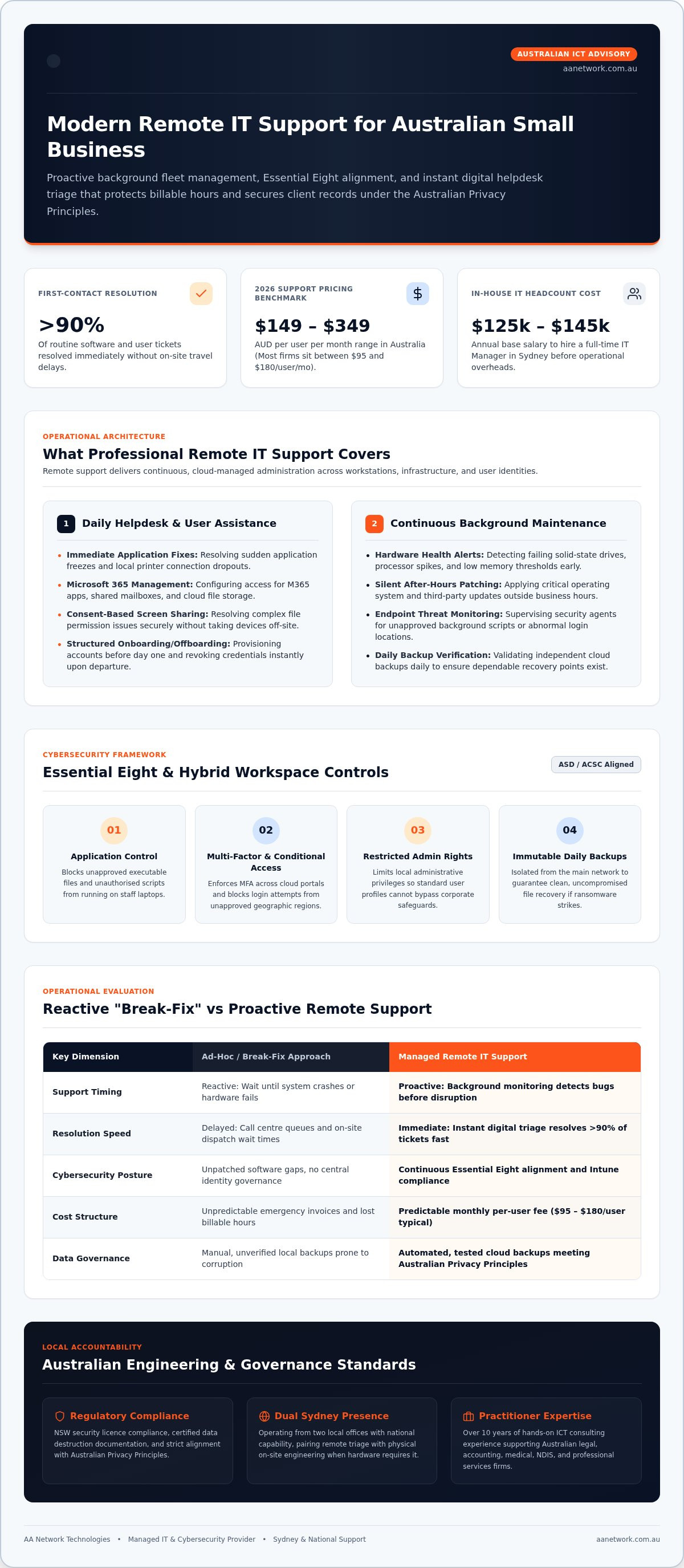
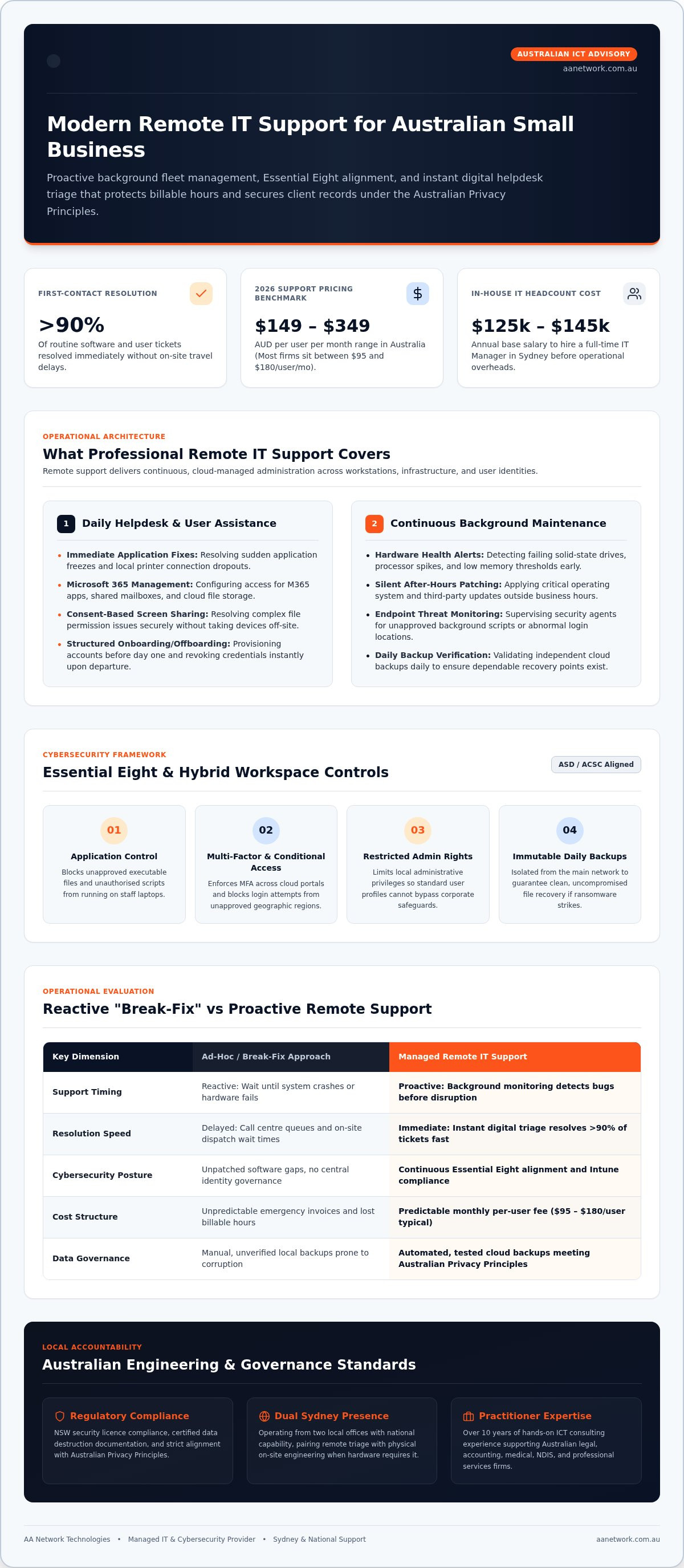
- Modern remote IT support for small business resolves over ninety percent of routine software and user issues immediately without on-site travel delays.
- Aligning hybrid workstations with Essential Eight controls protects sensitive client files across both home and office environments.
- Direct access to accountable Australian engineers removes the frustration of impersonal call-centre queues and delayed email tickets.
- A dependable remote support partnership pairs immediate digital helpdesk triage with local on-site engineering when physical hardware demands it.
What Remote IT Support for Small Business Covers
Remote IT support is often confused with simple screen-sharing software. Buying a remote desktop licence does not provide your firm with an IT department. In practice, understanding what remote support involves at an enterprise grade means looking beyond ad-hoc screen takeovers. Professional remote IT support for small business delivers continuous, cloud-managed administration of your entire workstation fleet, network infrastructure, and user identities.
Daily Helpdesk and User Assistance
When staff encounter software blockers, immediate technical intervention protects billable hours. A structured remote helpdesk handles day-to-day operational hurdles across your organisation:
- Resolving sudden application freezes and local printer connection dropouts.
- Configuring user access for Microsoft 365 apps, shared mailboxes, and cloud document storage.
- Starting secure, consent-based screen sessions to resolve tricky file permission errors without taking workstations off-site.
- Executing staff onboarding tasks, provisioning software accounts and security profiles before a new hire starts their first day.
- Revoking system credentials immediately during offboarding to secure company data.
Continuous Monitoring and Maintenance
The most valuable work happens quietly in the background while your team works undisturbed. Through central monitoring agents, technicians keep machines healthy without disruptive manual tune-ups:
- Tracking hardware health metrics, alerting engineers to failing solid-state drives, processor bottlenecks, and low memory thresholds.
- Applying critical operating system patches and third-party software updates silently outside business hours.
- Supervising endpoint security agents that monitor for unapproved background scripts or abnormal login locations.
- Validating daily cloud backups to ensure verified recovery points exist long before accidental deletion or corruption happens.
This systematic oversight prevents minor workstation bugs from escalating into company-wide downtime, giving business owners quiet confidence in their operational technology.
How Proactive Remote Management Prevents Costly Downtime
Downtime rarely announces itself in advance. It usually starts with an unpatched vulnerability, an undetected drive error, or a staff member clicking a convincing credential-harvesting link. For Australian firms managing client trusts, medical charts, or commercial matters, system downtime directly disrupts billing and exposes confidential files. Adopting foundational cybersecurity best practices for small business through continuous remote monitoring prevents these small issues from snowballing into expensive operational halts.
Aligning Workstations with the Essential Eight
Modern remote IT support for small business uses automation to maintain compliance with the Australian Signals Directorate (ASD) Essential Eight controls. Rather than waiting for a breach, your systems receive structured technical guardrails:
- Application control policies that block unapproved executables and malicious scripts from running on staff laptops.
- Mandatory multi-factor authentication across all cloud portals, email clients, and remote access channels.
- Restricting local workstation administrative privileges so regular user logins cannot bypass corporate security settings.
- Immutable daily backups isolated from the primary network to guarantee clean file recovery if ransomware strikes.
Securing the Modern Hybrid Workspace
With staff split between corporate offices and home dining tables, the traditional office perimeter no longer exists. Effective endpoint administration relies on Microsoft Intune and Entra ID to enforce identity security across every machine:
- Deploying device compliance rules to confirm that home office machines meet encryption standards before accessing files.
- Enforcing Conditional Access policies that instantly challenge or block unusual login attempts from non-approved geographic regions.
- Isolating corporate files within encrypted apps on personal mobile phones to prevent accidental leakage under the Australian Privacy Principles.
- Monitoring data handling in regulated industries like law, accounting, and allied health to ensure patient and client confidentiality remains intact.
When you shift from break-fix troubleshooting to managed oversight, your team gains consistent system speed and demonstrable compliance. If your firm needs an objective assessment of its current setup, feel free to speak with our team about auditing your workstation fleet.
Remote IT Support vs On-Site IT Support: A Practical Comparison
Many business owners assume physical attendance is always superior to digital triage. Waiting hours for a technician to battle Sydney motorway traffic just to reinstall an email profile burns unnecessary time and money. While physical hardware maintenance will always have its place, remote IT support for small business resolves over ninety percent of typical software, credential, and network access hurdles within minutes.
Response Times and Resolution Speed
Speed of intervention is the defining difference between remote and on-site models. Remote engineers connect directly to the affected endpoint without travel delays:
- Technicians access user screens almost immediately upon triage, eliminating travel delays entirely.
- Single-user workstation freezes are diagnosed and remedied before spreading into whole-office disruptions.
- Modern cloud-hosted systems like SharePoint and Microsoft Teams exist entirely off-site, meaning physical desk visits provide zero technical advantage.
When Physical On-Site Attendance Is Necessary
Certain infrastructure demands physical hands on equipment. A sensible IT strategy pairs rapid digital assistance with accessible local engineering:
- Rack-mounting server hardware, configuring managed network switches, and running structured data cabling.
- Deploying meeting room audio-visual systems and running physical business network Wi-Fi site surveys.
- Total office internet dropouts where local modems or perimeter firewalls refuse remote configuration commands.
- Physical solid-state drive failures or liquid damage requiring component-level hardware replacement.
For organisations operating across commercial hubs like the Sydney CBD or Parramatta, an effective hybrid arrangement delivers the best outcome. Routine workstation tickets clear instantly via helpdesk tools, while nearby technicians remain within easy reach whenever physical network hardware requires hands-on attention.
How to Choose the Right Remote Support Provider in Australia
Selecting the right provider for remote IT support for small business requires looking past marketing claims and partner badges. The core issue for most small organisations is accountability. When a billing blocker strikes, do you reach a qualified local engineer who knows your systems, or do you get bounced around an overseas call centre ticketing queue?
A dependable technology partner focuses on direct communication, documented standards, and practical outcomes. You need assurance that your remote support team understands Australian business requirements, from privacy compliance to local communications networks.
Critical Questions for Potential IT Partners
Before entering any managed service partnership, ask targeted questions to reveal how the firm operates behind the scenes:
- Who answers the phone during an urgent operational outage: an Australian systems engineer or an offshore triage operator?
- How does the IT provider secure their own internal management tools and client credentials against supply chain attacks?
- Do you retain complete administrative ownership and access to your Microsoft 365 tenant, network passwords, and system documentation?
- What is the standard review cycle for tracking workstation health, cybersecurity safeguards, and upcoming hardware replacements?
Evaluating Service Level Agreements and Response Windows
A transparent Service Level Agreement (SLA) distinguishes between acknowledging a ticket and actually working to resolve the issue. Many generic providers boast a 15-minute response SLA that simply triggers an automated receipt email without technical triage.
Examine how the vendor categorises incident severity:
- Critical incidents: Total network outages or suspected security events requiring immediate engineering intervention.
- High-priority blockers: Individual workstations halted during active client work, needing direct remote triage within the hour.
- Standard operational tasks: User onboarding, shared mailbox adjustments, and software provisioning managed through predictable scheduling.
Avoid lengthy multi-year contracts that penalise your business while shielding poor technical performance. A trustworthy provider earns your business monthly through dependable service delivery and transparent reporting.
Practical Remote Support with AA Network Technologies
Small organisations rarely get the attention they deserve from large IT service providers. When your firm has 5 to 100 users, being routed through layered ticketing queues and junior triage desks wastes valuable operational hours. AA Network Technologies delivers high-touch, founder-led remote IT support for small business across Australia, ensuring you speak directly with experienced practitioners who take personal ownership of your technology environment.
Practitioner-Led Accountability for Small Business
Our model eliminates the distance of faceless corporate service desks. Founded by Ronit Sriwastav, our team brings over 10 years of hands-on ICT consulting experience to your day-to-day operations:
- Direct access to senior systems engineers who already understand your practice workflows, network architecture, and line-of-business applications.
- Proactive maintenance routines that keep workstations fast, cloud systems tidy, and software licences aligned.
- Strategic guidance on cloud transformations, system consolidations, and security hardening through dedicated managed IT support Sydney services.
- Transparent monthly communication focused on business productivity rather than technical jargon.
Local Presence with Remote Agility
While digital tooling allows us to clear user issues across the country within minutes, true operational peace of mind requires a physical foundation. We operate from dedicated local offices in the Sydney CBD at Suite 1406, 447 Kent Street, and Parramatta at 9 Hassall Street.
This dual footprint gives professional firms the best of both worlds. Whether your team operates in Barangaroo, Parramatta, Norwest, or remotely from home offices, you receive immediate helpdesk triage supported by fast physical dispatch whenever on-site engineering is necessary. We maintain specialised compliance setups for legal practices, accounting firms, medical clinics, and education providers, ensuring your digital records meet Australian standards.
If you want to identify hidden system bottlenecks, security gaps, or licensing waste across your workstations, book a practical 30-minute IT health check to review your operational setup.
Secure Your Firm with Proactive Operational Support
Proactive IT management transforms your technology from an unpredictable distraction into a dependable business asset. Partnering with a dedicated team for remote IT support for small business ensures your staff receive fast helpdesk triage for daily blockers while silent background controls keep workstations patched and systems running smoothly. Enforcing baseline Essential Eight controls across your hybrid endpoints safeguards critical client records without hindering daily productivity.
AA Network Technologies brings over 10 years of hands-on ICT consulting experience directly to your operations. Backed by local offices in the Sydney CBD and Parramatta, our founder-led approach combines rapid digital helpdesk resolution with nearby physical engineering whenever hardware needs on-site attention.
Dependable technical support should give your leadership team peace of mind, leaving you free to focus entirely on serving clients and growing your business.
Frequently Asked Questions
How quickly can a remote IT technician connect to resolve an issue?
Most urgent remote support requests receive triage within minutes. For high-priority blockers halting active work, an Australian technician initiates a secure screen session almost immediately upon logging the call. Less critical administrative tickets, such as setting up a new shared mailbox or adjusting non-urgent permissions, are scheduled within agreed service windows. This direct digital access bypasses travel delays across Sydney traffic, restoring staff productivity rapidly.
Can remote IT support resolve hardware failures or broken screens?
Remote technicians cannot physically mend shattered laptop screens, fried motherboards, or severed network cables. However, remote engineers can run diagnostic tools to pinpoint component failure before ordering replacement parts. For businesses in commercial centres like the Sydney CBD or Parramatta, hybrid providers arrange hands-on engineering dispatch to replace failed parts, deliver loaner laptops, or rebuild physical workstations when software fixes cannot resolve physical damage.
Is it safe to allow an external IT provider remote access to business computers?
Yes, provided the provider uses commercial remote management software protected by multi-factor authentication and role-based permissions. Legitimate providers require explicit user consent before taking control of active screens. Workstation sessions generate auditable logs, ensuring client confidentiality meets Australian Privacy Principles. Reputable practitioners never ask for raw user passwords and align administrative access with Essential Eight principles to prevent unapproved privilege escalation.
What is the difference between break-fix support and managed remote IT services?
Break-fix support reacts only after a system failure occurs, while managed remote IT support for small business operates proactively. With break-fix, you pay hourly rates while dealing with unexpected downtime. Managed services deliver continuous background monitoring, patch management, cloud identity security, and daily backup verification under a predictable monthly model. Technicians identify and resolve silent disk faults and software vulnerabilities before they disrupt your billable operations.
Does remote IT support include Microsoft 365 and cloud management?
Yes, administration of Microsoft 365 environments is a core component of modern remote support. Technicians manage Entra ID identities, provision new user mailboxes, configure SharePoint structures, and deploy security policies via Microsoft Intune remotely. Because Microsoft 365 resides in cloud data centres, engineering changes and user permission updates are executed entirely through digital consoles without requiring on-site visits to your physical office.
How does remote IT support work for staff working from home?
Remote support works identically for home-based employees as it does for staff seated in your main office. As long as the employee has an active internet connection, support agents can access the workstation securely. Providers push operating system patches, monitor endpoint antivirus, and troubleshoot business VoIP or application glitches seamlessly. Modern remote IT support for small business ensures your hybrid team maintains uniform security standards regardless of physical location.
What happens if our office internet goes down completely?
If an office loses internet connectivity completely, remote technicians first perform diagnostics on external gateway connections and ISP status. Technicians guide on-site staff through router power cycles or failover switches via telephone. If hardware failure or physical line damage prevents remote access, local engineering hubs in Sydney CBD or Parramatta dispatch technicians on-site to inspect physical firewalls, test network points, and restore office connectivity directly.