

Microsoft 365 Parramatta: Resource Guide for Professional Services in 2026
Is your Microsoft 365 subscription a genuine security shield for your Parramatta firm, or just an expensive way to send emails? Many professional service providers in Western Sydney pay for premium licences without ever configuring the tools that actually prevent an A$50 million data breach penalty. If you're frustrated by messy SharePoint folders or worried that sensitive client records are vulnerable, you aren't alone. Optimising Microsoft 365 Parramatta wide requires more than just a login; it needs a configuration aligned with Australian standards.
We understand that managing technology shouldn't feel like a second job. You want a secure, reliable environment that lets your team focus on billable work rather than fighting with file permissions. This guide provides a practical roadmap to help you reduce downtime, cut unnecessary licensing costs, and align your business with the Essential Eight framework.
We'll break down the specific benefits of Business Premium, explain how to clean up your digital workspace, and show you how to meet your obligations under the Australian Privacy Principles. From our office at 9 Hassall Street, we see how the right setup transforms local practices into resilient, efficient businesses.
Key Takeaways
- Align your Microsoft 365 configuration with the Essential Eight maturity model to protect sensitive client data and reduce the risk of a Notifiable Data Breach.
- Identify and remove redundant licences to lower your monthly technology spend without sacrificing essential security or productivity features.
- Optimise Microsoft 365 Parramatta wide by moving away from default settings that often leave professional firms vulnerable to common phishing attacks.
- Streamline file management by moving from messy legacy structures to a governed SharePoint environment designed for secure collaboration and easy retrieval.
- Partner with a local, founder-led specialist in the Parramatta CBD to gain the advantage of on-site support and personalised accountability for your firm's success.
Why Microsoft 365 is the Standard for Parramatta Commercial Hubs
Parramatta has evolved into the commercial capital of Western Sydney. It houses some of the region's most prominent legal and accounting firms, many of which are situated along Hassall Street and Smith Street. These businesses operate in high-stakes environments where a single hour of downtime can lead to missed court deadlines or delayed financial filings. For these professionals, Microsoft 365 Parramatta wide has become the foundation for reliable, secure operations. It provides the essential infrastructure required to support hybrid work models, allowing staff to transition between the office and home without losing access to critical client records.
If you are wondering what is Microsoft 365?, it is more than just a collection of apps. It is a unified platform that combines productivity tools with enterprise-grade security. For a local firm, this means maintaining a professional reputation through high-availability services that rarely falter. When the environment is configured correctly, it significantly reduces the risk of technical disruptions that frustrate staff and erode client trust.
The Parramatta Business Environment and Technology Needs
Professional service firms in Westmead and Harris Park deal with sensitive data that requires strict handling under the Australian Privacy Principles. Medical practices and legal chambers cannot afford to wait hours for a remote technician to troubleshoot a critical failure. Having a local partner with a physical presence at 9 Hassall Street ensures that on-site support is available when urgent hurdles arise. Transitioning to managed IT services in Parramatta allows these firms to scale their operations quickly. You can add new staff or expand your service offerings without the heavy capital expenditure or maintenance burden of physical on-premises servers.
Moving Beyond Basic Email and Word Processing
Modern businesses in Western Sydney use the suite for much more than just typing letters or sending emails. They leverage the platform for secure document collaboration and advanced identity management. This ensures that only authorised personnel can access sensitive financial or legal files, even when working remotely. Moving from legacy systems to a cloud-first model is a strategic move for business continuity. If a local power outage or physical incident affects your office, your team can continue working from any location with an internet connection. For a Parramatta professional services firm, the platform acts as a central communication hub, synchronising data across multi-site operations whether your team is in Parramatta, the Sydney CBD, or North Sydney.
Key Components of a Modern Microsoft 365 Environment
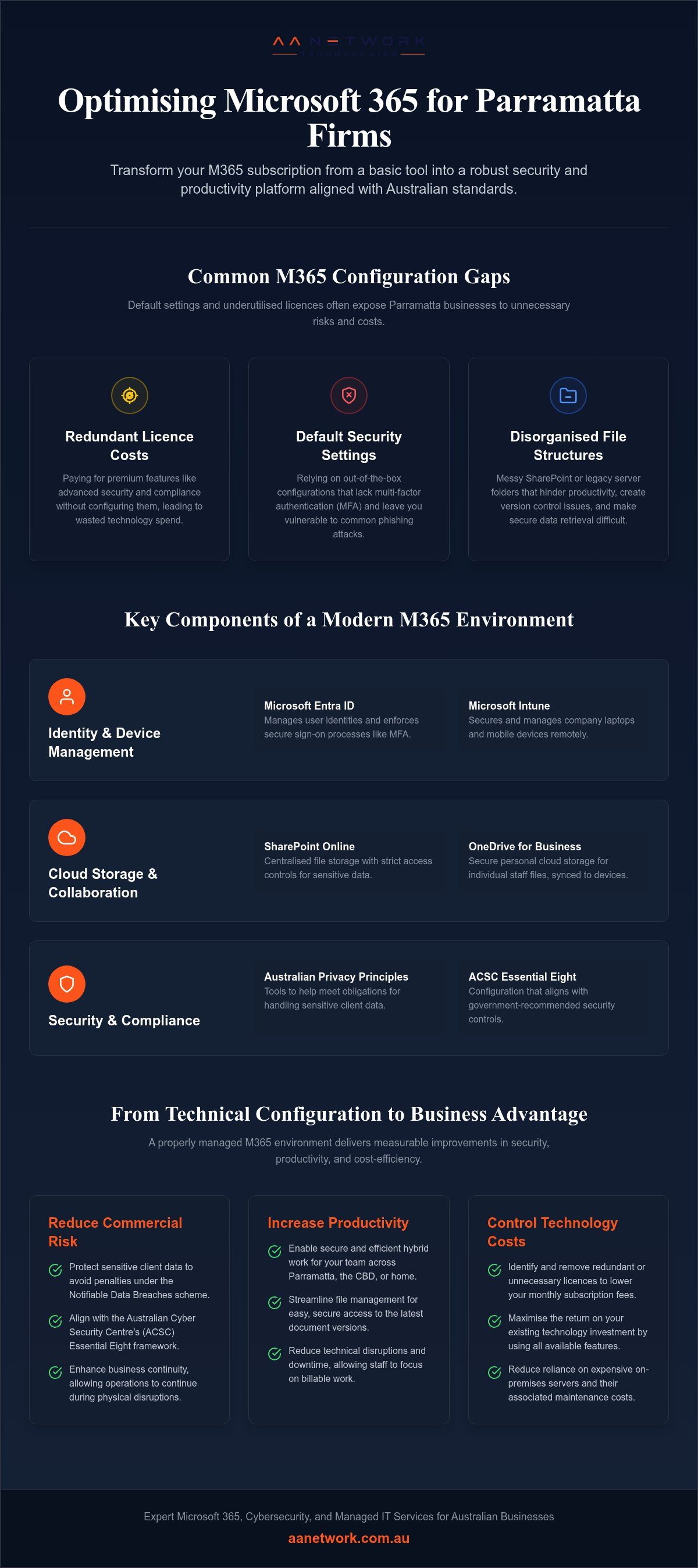
For a professional firm, Microsoft 365 is an integrated cloud platform that provides much more than just productivity apps. It combines advanced security features with device management to create a protected workspace for your staff. When we help businesses configure Microsoft 365 Parramatta wide, we focus on making these tools work together rather than treating them as isolated products. This holistic approach is essential for maintaining visibility over your data, a concept often discussed when managing M365 for enterprises and professional firms alike.
Cloud Storage and Collaboration Tools
SharePoint acts as the backbone for centralised file storage. It allows for customisable document libraries where you can set strict access controls, which is vital for legal or medical firms handling sensitive client records. OneDrive provides personal cloud storage for individual staff files, integrating directly with the local file explorer for ease of use. Collaborative editing allows multiple team members to work on the same document in real-time. This eliminates the confusion of having multiple document versions and ensures everyone is looking at the most recent data.
Identity and Device Management
Microsoft Entra ID, formerly known as Azure AD, manages user identities and ensures secure sign-on processes. It works alongside Microsoft Intune to secure company laptops and mobile devices remotely. Intune ensures that only compliant devices can access your corporate data, protecting your firm from external threats like malware or unauthorised access. You can implement Conditional Access policies to gain granular control. For example, a firm might restrict access to the payroll system so it can only be opened on a company-managed laptop within Australia. This prevents unauthorised logins from overseas locations, significantly reducing the risk of credential theft.
Microsoft Teams serves as the primary communication tool for both internal collaboration and client-facing meetings. It integrates directly with your calendar and document libraries, making it a central hub for professional dialogue. When staff work from home or visit clients, Intune allows you to wipe business data remotely if a device is lost or stolen. This proactive approach to security is a core part of a modern IT strategy. If you aren't sure whether your current configuration is actually protecting your data, you can speak with our team to review your setup.
Aligning Microsoft 365 with Australian Cyber Security Standards
Security is a core business responsibility, not just a technical requirement for your IT department. Malicious or criminal attacks accounted for 59% of notifiable data breaches in early 2025, making professional service firms a primary target. Under the Notifiable Data Breaches (NDB) scheme, serious privacy breaches result in fines of up to A$50 million. When we configure Microsoft 365 Parramatta wide, we ensure the environment aligns with the Australian Cyber Security Centre (ACSC) guidelines to mitigate these risks.
Implementing the Essential Eight within M365
The Essential Eight is the best-practice cybersecurity baseline for Australian businesses. Multi-factor authentication (MFA) remains the most effective way to prevent business email compromise. Recent ACSC updates from November 2023 now emphasise phishing-resistant MFA methods to counter sophisticated attacks. Implementing these controls correctly ensures your firm isn't an easy target for credential theft.
Regular patching of applications and operating systems is automated through Microsoft 365 tools like Intune. This closes security vulnerabilities before they can be exploited by malicious actors. Restricting administrative privileges is another critical step. By ensuring staff only have the access levels necessary for their roles, you ensure a single compromised account cannot bring down your entire network.
Data Privacy and Compliance for Local Firms
Parramatta legal and medical firms must comply with the Australian Privacy Principles and OAIC guidelines. Microsoft Purview helps your firm discover and protect sensitive information through data loss prevention (DLP) policies. These policies automatically detect and block the accidental sharing of credit card numbers or medical records with external parties.
Audit logs and eDiscovery tools are vital for legal firms during compliance reviews or litigation. They provide a transparent record of who accessed specific files and when. Secure sharing settings further prevent data leaks by ensuring documents remain protected even when shared with clients. If you want to confirm your firm meets these standards, our team provides a 30-minute free IT health check to identify potential gaps in your cyber security in Sydney or Western Sydney operations.
Common Microsoft 365 Configuration Mistakes for Parramatta SMBs
Many businesses treat their subscription as a one-time setup. This "set and forget" approach is a primary reason why Microsoft 365 Parramatta implementations fail to provide full value or protection. When you leave default security settings active, you're essentially leaving the front door unlocked. Default settings often lack the aggressive phishing protections and conditional access policies required to stop modern credential theft, which accounted for 20% of reported cyber incidents in early 2025.
A lack of structured SharePoint governance is another common hurdle. Without a clear plan, files end up scattered across personal OneDrives and multiple Teams channels. This "data sprawl" makes file retrieval difficult and increases the risk of sensitive documents being shared with the wrong people. If your team spends more time searching for documents than reading them, your configuration needs a review to restore productivity and security.
The Risks of "Set and Forget" Administration
Technology requires proactive monitoring to identify threats before they reach your users. A secure environment isn't static. You need regular reviews of user access to ensure former employees no longer have entry to your systems. As Microsoft releases new security features, your configuration must be updated to maintain protection against evolving threats. Failing to test backup and disaster recovery protocols is perhaps the most dangerous mistake. While Microsoft provides high availability, you remain responsible for your data. Without a verified backup strategy, a ransomware attack can lead to permanent data loss and significant reputational damage.
Licensing Optimisation and Cost Control
Over-licensing leads to unnecessary monthly costs that eat into your margins. We frequently see firms paying for Business Premium for every staff member when Business Basic or Standard might suffice for certain administrative or part-time roles. Professional IT consulting in Sydney helps identify where your spend is being wasted by matching licences to actual job requirements.
Consolidating third-party tools into the M365 ecosystem can further reduce costs. If you're paying for separate file-sharing or video-conferencing subscriptions, you're likely doubling up on features already included in your Microsoft suite. Streamlining these services simplifies your billing and improves your security posture by reducing the number of platforms you need to manage. This approach ensures your technology spend directly supports your business outcomes rather than just adding to your overheads.
Selecting a Microsoft 365 Partner in Parramatta
Choosing the right partner for Microsoft 365 Parramatta wide is a strategic decision that affects your firm's daily efficiency and long-term security. While many providers offer remote support, a local partner with a physical office at 9 Hassall Street provides the accountability that professional services require. You aren't just another ticket in a queue; you're a neighbour whose success directly impacts our local community. Founder-led firms prioritise personal accountability, ensuring that the person designing your security roadmap is personally invested in the outcome.
Finding a partner who views security and business continuity as core responsibilities is vital for legal, accounting, and medical practices. A provider should act as a proactive guardian, identifying risks before they become downtime. We recommend starting with a free 30-minute IT health check to assess a provider's expertise and cultural fit. This low-friction entry point allows you to see how we work and whether our practitioner-oriented model suits your firm's specific needs.
On-site Support vs. Remote Call Centres
Remote support is efficient for minor software bugs, but complex cloud migrations or hardware failures often require a physical presence. Local technicians understand the operating realities of Parramatta CBD buildings and Western Sydney infrastructure. Having direct access to experienced practitioners like Ronit Sriwastav ensures you receive practical advice rather than technical jargon. If your internet fails or a server goes down, having a specialist who can walk through your door in minutes provides peace of mind that remote call centres simply cannot match.
Questions to Ask Your Potential IT Provider
Before signing a contract, you need to know if a provider truly understands the Australian regulatory environment. Don't be afraid to ask direct questions about their security protocols and business continuity planning. A reliable partner will be transparent about their methods and how they protect your client data.
- How do you align our Microsoft 365 environment with the ACSC Essential Eight maturity levels?
- What is your specific process for managing user onboarding and offboarding to prevent data leaks?
- Can you provide a clear, written roadmap for our Microsoft 365 optimisation over the next 12 months?
- How do you ensure our data remains compliant with the Australian Privacy Principles and OAIC requirements?
Selecting a local specialist ensures your technology spend supports your business goals without unnecessary bureaucracy. Our team is based right here in the heart of the city, ready to help you navigate the complexities of cloud security. You can discuss your requirements with AA Network Technologies at our office at 9 Hassall Street to begin securing your digital workspace.
Securing Your Firm’s Future in Parramatta
Optimising your technology is about more than just productivity; it's about building a resilient foundation that protects your reputation and your clients' data. By aligning your environment with the Essential Eight and resolving data sprawl, you transform your subscription into a strategic asset. Choosing a local specialist for Microsoft 365 Parramatta ensures you have a partner who understands the high stakes of professional services and the specific needs of the Western Sydney commercial hub.
From our office at 9 Hassall Street, Ronit Sriwastav and the team bring over 10 years of experience to help you navigate these technical hurdles. We focus on removing daily frustrations so you can return to your primary work with confidence. A secure, well-configured system is the best defence against downtime and financial risk. It allows your staff to collaborate safely whether they are in the office or working remotely.
You don't have to manage these complexities alone. We are ready to help you build a more secure and efficient workplace for your team.
Frequently Asked Questions
Does Microsoft 365 include backup for my Parramatta business data?
Microsoft doesn't provide a comprehensive backup service as part of your subscription. They operate on a shared responsibility model where they ensure the platform's availability, but you remain responsible for your data. This means you need a separate solution to protect your records against accidental deletion, ransomware, or malicious activity. We recommend implementing a third-party backup to ensure your critical client files and financial records are always recoverable.
How much does Microsoft 365 support cost for a small business in Parramatta?
Support costs depend on the complexity of your environment and the level of management your firm requires. While Microsoft sets the monthly subscription fees for plans like Business Premium, managed support is tailored to your specific needs. Factors such as user count, security requirements, and the need for on-site assistance at your Hassall Street office influence the final investment. We provide a clear breakdown of costs after reviewing your setup during a health check.
Can I use Microsoft 365 to meet Australian Privacy Principle requirements?
You can use the platform to help meet your obligations under the Australian Privacy Principles by correctly configuring its built-in security tools. Features within Microsoft Purview allow you to discover and protect sensitive personal information. By setting up data loss prevention policies and strict access controls, you ensure client data is handled securely. This proactive approach reduces the risk of a Notifiable Data Breach and demonstrates due diligence to regulatory bodies like the OAIC.
What is the difference between Office 365 and Microsoft 365?
Office 365 is the cloud-based suite of productivity apps including Word, Excel, and Outlook. Microsoft 365 is a more comprehensive service that includes those apps plus advanced security features, device management via Intune, and identity protection. For professional firms requiring Microsoft 365 Parramatta wide, the full suite is usually the better choice. It provides the essential security infrastructure needed to protect sensitive legal or medical records from evolving cyber threats.
How long does a Microsoft 365 migration typically take for a legal firm?
A migration for a small to medium legal firm generally takes between two to four weeks from the initial planning to completion. The timeline depends on the volume of your data, the complexity of your existing email system, and how many SharePoint document libraries need to be structured. We use a phased approach to minimise downtime, ensuring your team can continue billable work while we securely transition your records to the new cloud environment.
Do I need a local Parramatta IT partner if Microsoft 365 is in the cloud?
Having a local partner is highly beneficial for professional services that require high availability and rapid response. While the software lives in the cloud, your team works in a physical office where hardware, networking, and internet issues still occur. A partner at 9 Hassall Street can provide on-site assistance for urgent technical hurdles that remote helpdesks can't solve. Local technicians also understand the unique infrastructure and operating realities of the Parramatta CBD.
Is multi-factor authentication (MFA) mandatory for M365?
MFA isn't strictly mandatory by Microsoft for every account yet, but it's a critical requirement for aligning with the ACSC Essential Eight. It's the most effective defence against the 59% of Australian data breaches caused by malicious attacks. We strongly recommend enforcing MFA for every user to prevent unauthorised access. Using phishing-resistant methods ensures your firm meets modern security standards and remains protected against sophisticated credential theft attempts across your Microsoft 365 Parramatta setup.
Can AA Network Technologies help with Azure and Intune setup?
Yes, we specialise in the full deployment and management of Azure and Microsoft Intune for professional firms. We help businesses move away from legacy on-premises servers by setting up secure cloud identities and managing company devices remotely. This ensures that your laptops and mobiles are always patched and compliant with your security policies. Our founder-led team focuses on creating a reliable environment that allows your staff to work securely from any location.
