Local IT Support Company Sydney: How to Choose the Right Partner
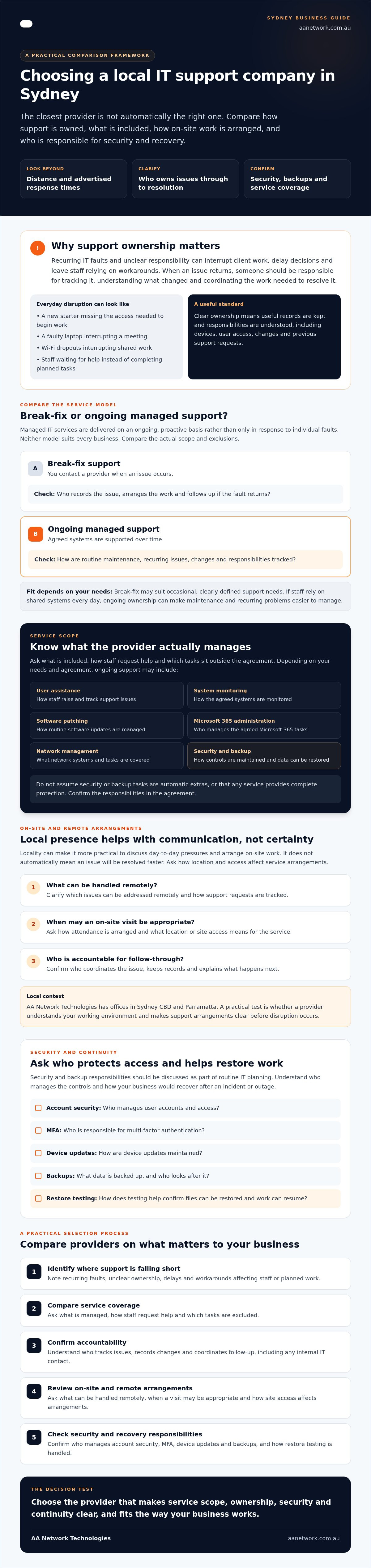
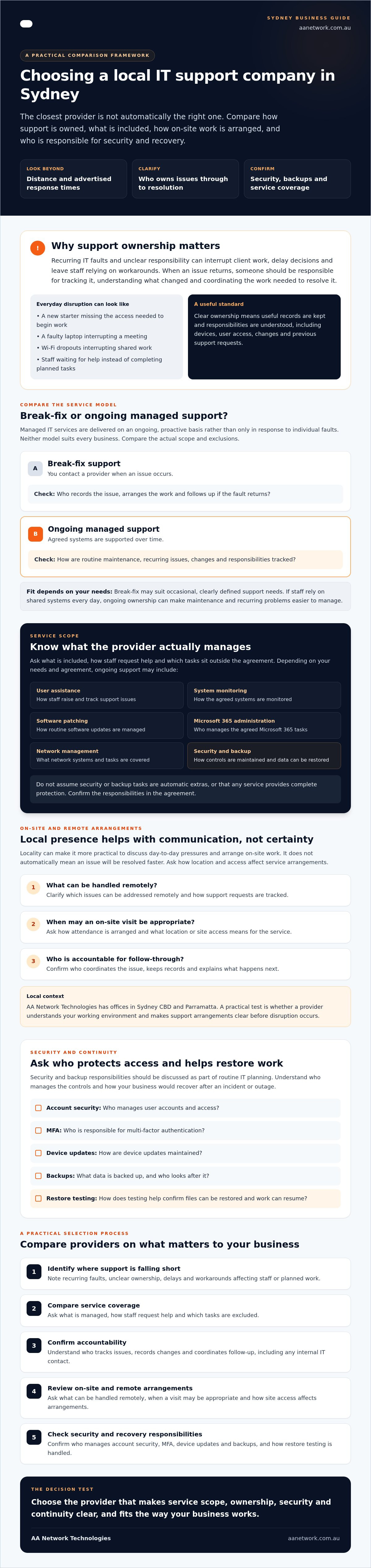
The closest IT provider isn’t automatically the right one. Choosing a local IT support company Sydney businesses can rely on means looking beyond distance and advertised response times. You need to know who handles staff issues, what happens when systems fail and whether security and backups are part of the ongoing service.
If support feels slow or impersonal, your team can lose time waiting for help. And if on-site work is needed, unclear service arrangements can add uncertainty when you’re already dealing with a disruption. It’s reasonable to expect clear ownership of day-to-day IT, security and continuity.
This guide shows you how to compare Sydney IT providers using practical criteria. You’ll assess support models, security and backup responsibilities, continuity planning, and how on-site service works across the city. The aim is to help you identify the support your business needs and the questions to ask before choosing a partner.
Key Takeaways
- Recurring IT faults and unclear responsibility can disrupt staff and planned work. Identify where support is falling short before comparing providers.
- Check whether a local IT support company Sydney businesses consider offers ongoing, proactive support and clearly defined service coverage.
- Ask which issues can be handled remotely and when on-site attendance may be needed, including how location and access affect arrangements.
- Find out who manages account security, MFA, device updates and backups, and how restore testing helps your business recover files and resume work.
- Use a practical selection process to compare service scope, accountability and security, then agree on next steps that fit your business.
Why local IT support in Sydney matters to daily business
An unresolved IT issue can interrupt client work, delay decisions and leave staff finding workarounds instead of doing their jobs. A login problem may stop someone accessing a matter file; an unreliable network can disrupt calls or shared systems. If faults keep returning, it’s worth asking whether anyone owns the problem through to resolution.
For professional services businesses, reliable access to email, files, practice systems and communications is part of delivering work. When access fails, staff may need to reschedule tasks, chase information or explain delays to clients. Choosing a local IT support company Sydney businesses can speak with directly may make it easier to discuss these everyday pressures and agree how support should work.
Business problems a local IT support company can help address
Common issues don’t need to be dramatic to consume time. A new starter without the right access can’t begin work confidently. A faulty laptop may interrupt meetings, while recurring Wi-Fi dropouts can force staff to reconnect or move between workspaces. Each incident can create extra administration and push planned client work back.
Local business IT support is an accountable service relationship that helps a business manage technology issues and keep day-to-day systems working. Locality can make communication and arranging on-site work more practical, but it doesn’t automatically mean a faster resolution. Ask what can be handled remotely, when a visit may be appropriate and how support requests are tracked. For a clear view of the service scope, see managed IT support in Sydney.
Why support ownership matters as a business grows
As staff, devices and systems change, undocumented updates can make familiar faults harder to diagnose. A password reset or network change might fix one issue but leave the underlying cause unclear. Without a record, the next person supporting the business may have to repeat checks or rely on staff to remember what changed.
Clear ownership means someone keeps useful records and coordinates the people involved. That can include tracking devices, user access, changes and previous support requests. If you have an internal IT contact as well as an external provider, agree who handles each task and how information is shared. A Managed Service Provider (MSP) works through an ongoing service model rather than only responding to isolated faults, which can support continuity when responsibilities are clearly defined.
AA Network Technologies has offices in Sydney CBD and Parramatta and takes a hands-on approach to supporting business operations. The practical test is whether a provider understands your working environment, explains who owns each issue and makes support arrangements clear before you need them.
What a local IT support company in Sydney should provide
Support should cover more than fixing a fault after staff report it. Managed IT services means IT support delivered on an ongoing, proactive basis rather than on a break-fix basis. The provider should explain what they manage, how staff get help and which tasks sit outside the agreed scope.
Depending on your needs and agreement, regular support may include user assistance, system monitoring, software patching, Microsoft 365 administration and network management. Cybersecurity and backup should also be discussed as part of routine IT planning, not treated as automatic extras or complete protection. Ask how security controls are maintained and how your business would restore data and resume work if an incident or outage occurs.
Compare reactive support with ongoing managed IT services
Break-fix support: You contact a provider when an issue occurs. Work is arranged in response to the fault, and you should clarify who records the issue and follows up if it returns.
Ongoing managed support: Support covers agreed systems over time. The provider can plan routine maintenance and keep track of issues, changes and responsibilities.
Neither model suits every organisation. Break-fix may work for a business with occasional, clearly defined support needs. If staff rely on shared systems every day, ongoing ownership can make it easier to plan maintenance and spot recurring problems. Compare the actual scope and exclusions rather than assuming a particular model includes every task or response commitment.
Check whether the provider can support your business systems
Ask how the provider handles Microsoft 365, user access, staff devices, patching and network issues. Find out how backup restoration is tested and whether recovery planning covers the files and systems your team needs to continue working. A backup is only useful if you understand what can be restored and who coordinates recovery.
For a clearer picture of typical service scope, review managed IT support in Sydney. Check that the proposed agreement matches your actual setup, including any internal IT responsibilities.
Ongoing support is different from project work. A cloud migration, office move or infrastructure change needs defined planning, approvals, timing and handover. Confirm whether these projects are included in the regular service or scoped separately, so responsibilities and costs are clear before work starts.
Documented support ownership helps keep business operations consistent by making systems, responsibilities and changes easier to track. If you’re reviewing your current arrangements, you can discuss your support requirements with AA Network Technologies and clarify what your business needs from a provider.
How Sydney location affects on-site and remote IT support
A local provider can offer both remote assistance and on-site work, but the best method depends on the fault, your workplace and the access arrangements. Remote support can address many software and configuration tasks without a visit. Physical equipment, cabling or office changes may need someone at your premises.
AA Network Technologies has offices in Sydney CBD and Parramatta. If your business is based in nearby commercial areas such as North Sydney, Chatswood, Macquarie Park or Norwest, confirm whether the provider supports your location and how on-site attendance is arranged. An office address alone doesn’t confirm coverage, travel arrangements or a particular response time.
When remote support may be practical
Remote support can suit tasks such as adjusting software settings, helping staff configure an application or investigating an issue while the user describes what they see. It depends on secure access to the relevant system and clear communication, so staff understand what the technician is doing and can confirm whether the issue is resolved. Remote work is useful, but it won’t remove the need for a site visit in every situation.
When on-site support may be required
Some work involves equipment that needs physical inspection or handling. Examples include checking network hardware, diagnosing a hardware fault that can’t be assessed remotely, or preparing technology during an office move. Ask which tasks the provider will attend in person, how visits are requested and scheduled, and whether building access, parking or loading arrangements need to be coordinated.
Before engaging a local IT support company Sydney businesses should clarify the practical process, not assume proximity guarantees attendance. Use these steps to check what support will look like for your workplace:
- Confirm locations. Give the provider your business address and ask whether it falls within the current service area.
- Map issue types. Discuss which faults are handled remotely and which may need a technician on site.
- Clarify escalation. Ask who decides when remote troubleshooting should move to an on-site visit and how you’ll be kept informed.
- Check access needs. Explain any building entry, visitor registration or equipment access requirements.
- Record the arrangements. Make sure the agreed process, scope and any scheduling conditions are clear before work begins.
This gives you a realistic picture of support across Sydney, whether your team is in the CBD, Parramatta or another commercial area. If you’re comparing options, review the provider’s Sydney CBD IT support information and ask how the stated arrangements apply to your own site.
How to assess a Sydney IT provider’s security and continuity approach
A security plan should explain who manages access, devices, updates and recovery, not just name the tools involved. When comparing a local IT support company Sydney businesses are considering, ask for clear processes and named responsibilities. You want to understand what is checked, how often it is reviewed and how staff are told about issues that affect their work.
Questions to ask about cybersecurity and access
Start with user accounts. Ask who reviews administrator access, removes or changes access when staff join or leave, and checks that multi-factor authentication (MFA) is configured appropriately. Least privilege means giving each person only the access they need for their role, which can limit the impact of an account being misused.
Then ask how the provider handles staff devices and security issues. Find out whether endpoint protection and software patching are monitored, how potential security events are followed up, and who communicates any actions your team needs to take. Staff awareness and practical security procedures may be included in an agreement or scoped separately, so clarify what applies to your business.
The Australian Signals Directorate’s Essential Eight, maintained by the Australian Cyber Security Centre, can help frame a discussion about security improvements. It is a maturity model, not proof that a provider or client is automatically compliant. Ask how a provider uses it to identify priorities and explain progress in terms your business can act on.
Questions to ask about backup and recovery
A backup plan needs to match the information and systems your team relies on. Ask what business data is covered, how long copies are retained, who checks that coverage remains current and when a restore was last tested. A successful test should show that the right files can be recovered, not simply that a backup job reported completion.
Recovery planning should also set practical priorities. The recovery time objective (RTO) is how soon a system needs to be available again. The recovery point objective (RPO) is how much recent work the business can afford to lose. For example, a firm might need email restored before a less-used system, while deciding whether losing the last hour of updates would be acceptable. Ask the provider to help document priorities rather than assume one recovery target suits every system.
Compare providers on documented procedures, clear ownership, regular reviews and plain communication. If you’d like to review your current IT, security and continuity arrangements, you can book a free 30-minute IT health check.
Choosing a local IT support company in Sydney: practical next steps
Use a consistent process to compare providers. It helps you separate a service that fits your business from one that sounds good but leaves key responsibilities unclear.
- Document your needs. Note your users, sites, key systems, recurring issues and business priorities.
- Check the service scope. Confirm what ongoing support covers and how projects or extra work are handled.
- Test accountability. Ask who you’ll speak with, how requests are tracked and how work is communicated.
- Assess security and continuity. Clarify how access, devices, patching, backups and recovery are managed.
- Agree on next steps. Make sure responsibilities, support arrangements and any follow-up are clear before proceeding.
Prepare for an initial provider conversation
A little preparation makes the discussion more useful. Bring a list of staff and locations, the systems your team relies on, your current support arrangements and recurring problems. Include planned changes such as new staff onboarding, an office move or a cloud project, and explain who currently handles IT internally.
You don’t need to know every technical detail. Ask the provider what information they need to understand your environment and recommend a suitable support model. A useful conversation should connect technology decisions to how your team serves clients and gets work done.
What to expect from an initial IT health check
AA Network Technologies is a founder-led Australian provider with offices in Sydney CBD and Parramatta. Founder Ronit Sriwastav brings over 10 years of hands-on experience in ICT consulting, MSP operations and training. The company offers a free 30-minute IT health check as an opportunity to discuss your systems, concerns and support needs.
Treat the conversation as a practical starting point. Discuss what is working, where staff lose time and who is responsible for key IT tasks. The health check is a chance to talk through your environment, not a promise of a formal audit, remediation plan or specific deliverable. You can then decide whether further discussion makes sense.
Choosing a local IT support company Sydney businesses can work with comes down to fit, clear ownership and an agreed support approach. If you’re ready to discuss your requirements, contact AA Network Technologies.
Choose support that gives your business clear ownership
The right IT partner should make it clear who supports your staff, maintains systems and coordinates security and recovery. Compare providers on service scope, accountability, remote and on-site arrangements, and how they manage your business’s specific needs. A local IT support company Sydney businesses can rely on should explain these responsibilities plainly, without leaving you to join the dots between different providers.
AA Network Technologies is a founder-led Australian provider with offices in Sydney CBD and Parramatta, plus a separate Canberra office. Founder Ronit Sriwastav brings more than 10 years of hands-on ICT experience. The team supports businesses across managed IT, cybersecurity, Microsoft 365, backup and networking, helping bring day-to-day support and key technology responsibilities together.
A free 30-minute IT health check offers a practical starting point to discuss your systems, recurring issues and priorities. You can use the conversation to clarify what support model may suit your business.
With clearer requirements and the right questions, you can take the next step towards IT support that fits the way your business works.
Frequently Asked Questions
What does a local IT support company in Sydney do?
A local IT support company Sydney businesses engage can manage day-to-day technology issues and ongoing IT needs. Depending on the agreed scope, this may include staff support, Microsoft 365, devices, network management, patching, cybersecurity and backup. The provider should clarify which tasks are included, how requests are handled and who owns follow-up. Local service can also make it practical to discuss on-site work when a task needs physical attendance.
Is local IT support better than remote IT support?
Neither is automatically better. Remote support can suit account access, software configuration and troubleshooting with staff, while a hardware fault or physical network issue may need an on-site visit. A local provider can offer both approaches, but location alone doesn’t guarantee a particular response time. Ask how the provider decides between remote and on-site assistance, whether your worksite is covered and how attendance is arranged.
Can an IT support company help with both cybersecurity and everyday IT?
Yes, a provider may support everyday IT and cybersecurity under an agreed service scope. This can help clarify who looks after staff access, device updates, security controls and routine support requests. Ask whether cybersecurity work is included or separately scoped, how potential security events are followed up, and how backup and recovery are handled. No provider can promise that every security risk will be prevented, so clear processes matter.
How quickly can a Sydney IT support company attend on-site?
On-site attendance depends on the provider’s service arrangements, your location, the issue and technician availability. Don’t assume a Sydney address means a guaranteed attendance time. Before engaging a provider, ask how urgent issues are assessed, what response targets are written into the agreement, which locations are covered and how visits are scheduled. Confirm whether travel, building access or equipment access affects the process for your workplace.
What should I ask before choosing a managed IT provider?
Ask what the service includes, which tasks cost extra and who is accountable for day-to-day support. Check how the provider handles Microsoft 365, user access, patching, devices, network issues, cybersecurity and backups. Ask how support requests are recorded, how recurring faults are followed up, and how remote and on-site work is arranged. Make sure responsibilities shared with your internal IT staff are documented and understood.
Does a small business need managed IT services?
Not every small business needs the same support model. Managed IT services may suit a business that relies on email, shared files and business systems each day and wants ongoing support rather than help only when something breaks. Consider how often issues arise, who currently owns IT tasks, and whether security, updates and backups are being reviewed. Compare the proposed service scope with your team’s actual needs before deciding.
Does AA Network Technologies have a Sydney office?
Yes. AA Network Technologies has an office in Sydney CBD, as well as an office in Parramatta and a separate office in Canberra. These are confirmed office locations, not a promise of a physical office in every Sydney service area. The founder-led Australian provider supports businesses with managed IT, cybersecurity, Microsoft 365, backup and networking. Ask about service coverage and on-site arrangements for your specific workplace.