IT Support Contract Checklist: What Australian Businesses Should Review
A support contract can leave important operational questions unanswered. An IT support contract checklist helps Australian businesses see what’s covered, what counts as additional project work and who owns key tasks when something goes wrong. If the agreement is vague, you may be unsure about response commitments, onsite arrangements or responsibility for restoring data.
A contract should do more than describe a monthly support arrangement. It should set clear boundaries, explain how issues are prioritised and show where the provider’s responsibilities end and yours begin. That clarity helps your team plan, manage risk and avoid surprises during an outage or staff change.
This practical checklist covers the terms to review before signing an IT support agreement, including scope, response and escalation, onsite support, cybersecurity, backups, disaster recovery and offboarding. Use it to identify gaps and have a more informed discussion with a managed IT services provider.
Key Takeaways
- Use an IT support contract checklist to map covered users, devices, locations and services, and distinguish ongoing support from project work.
- Separate acknowledgement, initial response, escalation and resolution so you understand what each service commitment measures.
- Clarify who is responsible for access control, patching, monitoring, backup, recovery and returning business data when the agreement ends.
- Relate recovery-time and recovery-point objectives to how long your business can operate without systems and how much recent data it can afford to lose.
- Compare your needs with the contract, record any gaps and agree on actions with your IT provider. AA Network Technologies provides hands-on support from its Sydney CBD and Parramatta offices.
Why an IT support contract checklist matters for your business
Clear contract terms reduce misunderstandings about what support covers, who owns each task and how planned work is handled. An IT support contract checklist helps you find gaps before they lead to delayed decisions, unexpected approvals or confusion during an IT issue. It is a guide to reviewing the agreement, not a substitute for reading the terms themselves.
An IT support contract is a written agreement that sets out the technology services being provided, each party’s responsibilities and how the support arrangement operates. It may include a service-level agreement (SLA), which describes agreed service standards. The Service-Level Agreement (SLA) is one part of the arrangement, not necessarily the whole contract.
What an IT support contract should make clear
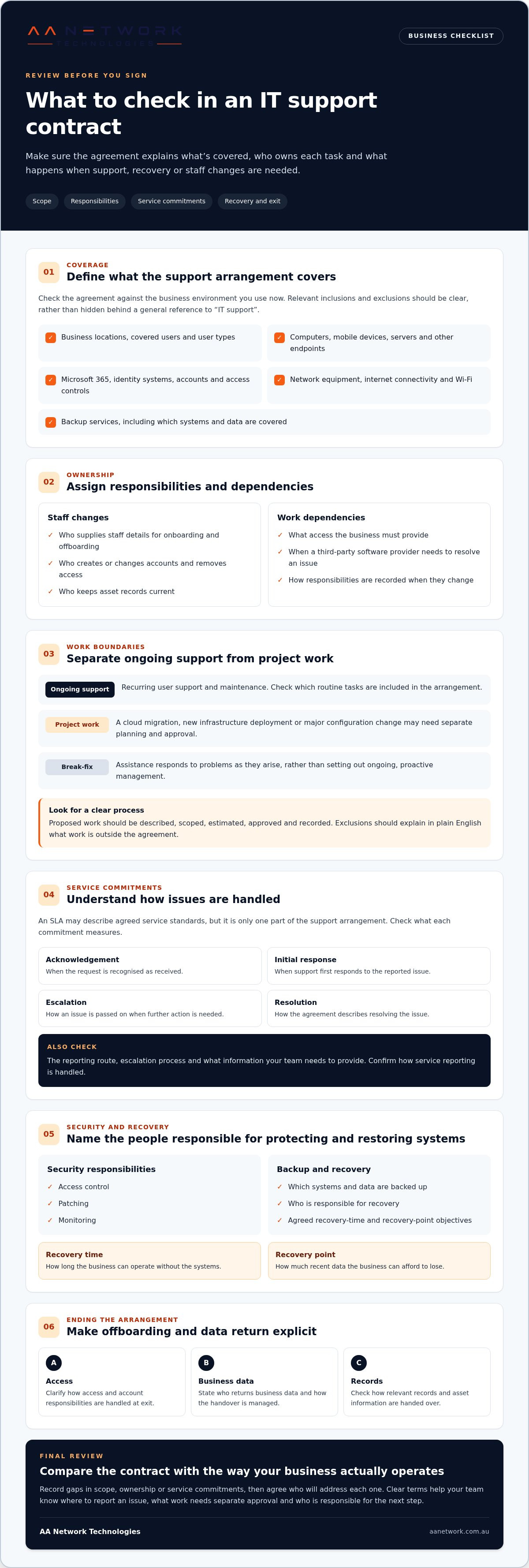
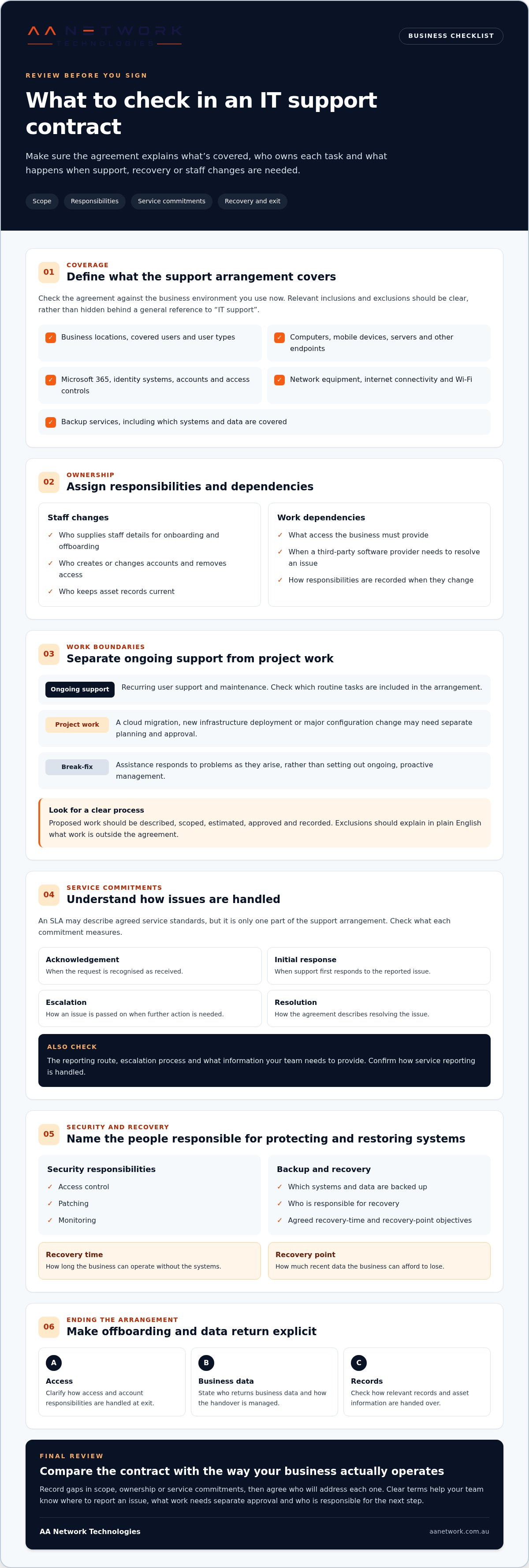
Check that the agreement identifies the correct businesses and describes the environment it covers. This may include the relevant locations, users, devices, systems and services, such as Microsoft 365 or network support. A general reference to “IT support” can leave both parties with different ideas about what is included.
The agreement should also explain each party’s responsibilities, exclusions, dependencies and process for recording changes. Ongoing managed IT services may cover recurring support and maintenance, while a cloud migration, new-office setup or other substantial change may be treated as a separate project. Break-fix assistance is different again: it responds to problems as they arise rather than setting out ongoing, proactive management. Clear boundaries help you plan work and understand when approval or a separate project arrangement is needed.
Why vague support terms create day-to-day friction
Hypothetical example: Staff can’t access Microsoft 365, and the office manager isn’t sure whether to report the issue to the support provider or the organisation that manages the account. The provider may be waiting for account access while the business assumes troubleshooting has started. A clear agreement can document the reporting route, access responsibilities and escalation process, so everyone knows what to do next.
Project boundaries matter too. If it’s unclear whether a planned system change is included in recurring support, work may stall while someone checks the scope, seeks approval or arranges a separate quote. That can affect scheduling and staff preparation, even when the change itself is straightforward.
Documented ownership supports smoother handovers and escalations. It also helps managers decide who needs to act, what information to provide and whether proposed work needs separate planning. Review the wording against how your business operates, not just the service names listed in the agreement.
Check the IT support contract scope, responsibilities and exclusions
Your contract needs to match the systems your team actually uses. If a business location, user group or key service is missing from the scope, staff may not know where to direct a support request or who is expected to act. Use this part of your IT support contract checklist to compare the agreement with your current environment.
Map the systems and users included in support
Check that the contract inventory reflects your business today, not just when the agreement was prepared. Depending on your setup, review:
- Business locations, covered users and user types
- Computers, mobile devices, servers and other endpoints
- Microsoft 365 services and identity systems, including user accounts and access controls
- Network equipment, internet connectivity and Wi-Fi
- Backup services and the systems or data they cover
Not every business needs every item. The goal is to make relevant inclusions and exclusions clear. The Australian Government's cyber security checklist can help you identify security practices that may need an owner in your support arrangements.
Assign ownership for onboarding and offboarding. The agreement should clarify who supplies staff details, creates or changes accounts, removes access when someone leaves and keeps asset records current. Without that division of work, accounts or devices can be missed during staff changes, leaving access unclear and handovers incomplete.
Separate ongoing support from projects and additional work
Routine user support and maintenance differ from a migration, new infrastructure deployment or major configuration change. Fixing an existing account issue may sit within recurring support, while moving systems to a new cloud environment requires planning, testing and coordination as project work. The contract should explain how that boundary is managed.
Look for a process for describing proposed work, estimating its scope, obtaining approval and recording changes. The agreement should also identify dependencies, such as the business providing access or a third-party software provider resolving an issue in its own service. Exclusions should be specific and written in plain English. “Out of scope” is less useful if the agreement doesn’t explain what work that means.
For a practical overview of ongoing managed IT support, see how support can sit alongside separately planned improvements. If you’re reviewing an agreement, talk with AA Network Technologies about how its scope fits your business.
Compare response, escalation and reporting commitments in the agreement
Service commitments are useful only when both sides understand what each one measures. An acknowledgement confirms that a request has been received. It doesn’t necessarily mean someone has started investigating the issue or that it will be resolved by a particular time. Use this part of your IT support contract checklist to distinguish each step.
Acknowledgement: Confirmation that the support request has been received and recorded.
Initial response: The point at which a support person begins engaging with the issue, for example by contacting the user or starting an assessment.
Escalation: The process for passing an issue to a suitable specialist or a more senior support contact when needed.
Resolution: The issue has been fixed, or an agreed workaround or next step is in place. The contract should explain what this term means.
Response targets and resolution times are different commitments. A provider may acknowledge a request or begin work within an agreed period, while resolution depends on the cause, business impact and any third-party dependencies. Don’t interpret a response target as a promise that the underlying fault will be fixed within the same timeframe.
Understand response targets and escalation paths
Check what starts the service clock. Does the request need to be logged through a portal, email address or phone channel? Does the target apply during stated business hours? The agreement should identify which channel creates a recorded support request and explain how requests made through other channels are handled.
Priority definitions should reflect business impact, not just technical labels. An issue affecting a core business process or several staff may need different treatment from a problem affecting one non-critical device. Review how urgent issues are escalated, who can raise the priority and how updates reach the person responsible for the incident.
Check reporting, reviews and onsite support arrangements
Look for agreed reporting frequency and review arrangements. Useful reporting can show open and recurring issues, patterns affecting productivity, work completed and actions assigned to either party. Confirm how those actions are tracked and reviewed, so items raised in a meeting have an owner and a next step.
Clarify how remote assistance is provided and how onsite work is requested, scheduled and approved. The agreement should explain the process and any relevant conditions, rather than leave staff to assume attendance is automatic. For local context, read AA Network Technologies’ Sydney managed IT support guide, which outlines its support offering for businesses in the area.
Review cybersecurity, backup and exit terms before signing
Security and recovery work best when the agreement assigns clear owners. Review who manages day-to-day safeguards, who acts during an incident and how your business can access its systems and data if the arrangement ends. This part of an IT support contract checklist helps identify gaps that could slow decisions or recovery.
Confirm security and backup responsibilities
Check the agreement against your systems and operating needs. Record who is responsible for each relevant task:
- Access control: Who manages multi-factor authentication (MFA), user permissions and administrator access, including changes when staff join or leave?
- Patching and endpoint protection: Who maintains devices and applies security updates, and how are missed or failed updates handled?
- Monitoring and incident communication: What systems are monitored, who reviews alerts and who contacts your nominated person if a security issue is identified?
- Backup coverage: Which systems and data are backed up, how long are copies retained and who checks the backup process?
- Restore testing and recovery planning: Who arranges tests, records results and maintains recovery steps so the business knows what action is needed?
Don’t assume that having a backup means a restore has been tested or that every business system is covered. The agreement should identify the responsibilities, records and communication steps involved. AA Network Technologies provides cybersecurity services alongside managed IT support.
Plan for continuity, data ownership and exit
Recovery objectives should reflect how your business operates. A recovery-time objective (RTO) is the target time for restoring a system or service. A recovery-point objective (RPO) is the amount of recent data, measured over time, your business could tolerate losing. Consider the practical effect of each: how long could staff work without a key system, and how much recent work could be recreated if it wasn’t recoverable?
Ask who agrees and documents these objectives, and how they relate to backup frequency and recovery plans. A generic target may not suit every system. For example, the acceptable interruption for a non-essential file store may differ from that for a system staff need to serve clients.
Before signing, locate the terms for data handling, account access and documentation. They should explain your access to business data and systems, who maintains configuration records, and how credentials and relevant records are handed over. Check what transition assistance is described, how access is transferred and what each party must do to end the service in an orderly way.
Put the IT support contract checklist into practice with AA Network Technologies
A checklist is most useful when it leads to clear decisions. Turn your findings into a short support brief, compare it with the agreement and record what needs clarification before signing or changing the arrangement. This gives your business a practical basis for discussing responsibilities, service expectations and priorities with an IT partner.
Turn checklist findings into a clear support brief
Group your notes under five headings: scope, service expectations, security, continuity and transition. For each item, record what the contract says, what your business needs and what remains unclear. Assign an internal owner to each open discussion, then record agreed actions and who is responsible for them.
Consider how your business operates across its locations. A team based in Sydney CBD or Barangaroo may work with colleagues in Parramatta, Westmead, North Sydney or St Leonards. Staff in Chatswood, Macquarie Park, North Ryde, Burwood, Strathfield, Rhodes, Norwest, Bella Vista, Castle Hill or Blacktown may also rely on shared systems. Make sure your support brief captures relevant sites and users, as well as the practical difference between remote assistance and work that needs to be arranged onsite.
An environment review can connect the paperwork with the systems staff rely on. AA Network Technologies offers a free 30-minute IT Health Check to discuss your current environment and support needs, including responsibilities or documentation that may need attention.
Discuss your managed IT support requirements
AA Network Technologies provides managed IT support alongside cybersecurity, Microsoft 365 and backup services. A useful discussion connects those services to your systems, staff and business priorities. The founder-led team has local offices in Sydney CBD, Parramatta and Canberra, and brings more than 10 years of hands-on ICT consulting, MSP operations and training experience.
Read the managed IT support Sydney guide for more context on the service. Bring your current agreement, a list of key systems and users, and your priority questions to turn any contract gaps into clear next steps.
Make your next IT support agreement clearer
A clear IT support contract gives your business a shared understanding of what’s covered, who owns each task and how support commitments work. Use your IT support contract checklist to compare the agreement with your actual systems and priorities, then record gaps and agreed actions. Pay particular attention to the difference between ongoing support and project work, how issues are handled, and who is responsible for security, backup, recovery and a future handover.
If you’d like a practical discussion about your environment, AA Network Technologies offers a free 30-minute IT Health Check. The founder-led team brings more than 10 years of hands-on ICT consulting, MSP operations and training experience, with local offices in Sydney CBD, Parramatta and Canberra.
Agreeing on responsibilities now makes support easier to manage and gives your business a clearer basis for action when priorities change.
Frequently Asked Questions
What should an IT support contract include?
An IT support contract should define the services and systems covered, the users and locations in scope, and each party’s responsibilities. A practical IT support contract checklist also covers support channels, priority and escalation definitions, security and backup duties, reporting, approval and change processes, and exit arrangements. Compare the written agreement with your actual systems and operational needs. Suitable terms depend on your environment, not just a general service summary.
How do IT support response times work in a contract?
Response commitments usually describe separate steps: acknowledgement confirms a request was received, initial response means support has begun engaging with it, escalation moves it to another support contact, and resolution means the issue is fixed or an agreed next step is in place. Check priority definitions, support hours, when the service clock starts and how updates are provided. Don’t assume a response target is a resolution deadline. Check how the agreement handles issues that take longer to resolve.
Does an IT support contract include cybersecurity and backups?
Cybersecurity and backup coverage varies, so the agreement should state what’s included and who owns each task. Check responsibility for identity access, multi-factor authentication, patching and endpoint security, then review which systems and data are backed up, retention arrangements and restore testing. Clarify who approves changes and who communicates during an incident. Don’t assume a support contract automatically covers every security measure or recovery activity your business may need.
Should an IT support contract include onsite support?
An agreement can describe remote support, onsite arrangements, the business locations covered and how onsite work is requested. Check whether attendance is scheduled, arranged as needed or governed by another specific term. Don’t assume the contract promises guaranteed or emergency onsite service unless its wording clearly says so. Consider which tasks require physical access, such as work on office network equipment, and whether the arrangements suit your locations in Sydney CBD, Parramatta or elsewhere.
What happens to our data and systems when an IT support contract ends?
The contract should explain your business’s ownership of its data and how access to accounts, systems and documentation is maintained or handed over. Check for configuration records, credentials and third-party access where relevant, as well as each party’s transition responsibilities. Plan the process before changing providers and make sure it is covered by the agreement. Don’t assume a particular transfer period or exit service is standard; review the specific terms that apply to your arrangement.
How much does an IT support contract cost?
The fee structure depends on factors such as covered users, systems, locations, service scope and project work. Review what recurring support includes and what sits outside scope, including how additional work is estimated and approved. Check how changes affect billing and how charges are explained in the agreement. Compare the fees with the services and responsibilities described in writing so you understand what your business is paying for.
Can a small business use managed IT support without an internal IT manager?
Yes. Managed IT services provide ongoing support and infrastructure management for businesses without a dedicated internal IT team. The agreement should still name your decision-makers and approval contacts, and clarify tasks your staff retain, such as reporting staff changes or approving system updates. Clear roles help external support and internal staff coordinate effectively. The right arrangement depends on your systems, operational priorities and the time your team can commit to IT tasks.