Office IT Relocation Sydney: The 2026 Strategy for Zero Downtime
Treating a commercial move like a standard furniture shuffle is the fastest way to lose days of billable work. When managing an office IT relocation Sydney businesses often face severe operational bottlenecks: uncoordinated cabling contractors, misplaced client records, and internet connections that fail to fire on day one.
You already know the stress of juggling building managers, telco carriers, and staff expectations. The worry of walking into a new site on Monday morning only to find silent phones, dead network ports, and offline servers is entirely justified, particularly when your clients expect uninterrupted service.
An office move should never be an operational gamble. Handled strategically, it provides a clean opportunity to modernise your systems, strengthen security protocols, and improve network speeds without forcing you to handle the technical heavy lifting. Below is the pragmatic 2026 strategy to safeguard your data, eliminate transition downtime, and ensure your team is fully operational from the first minute of trading.
Key Takeaways
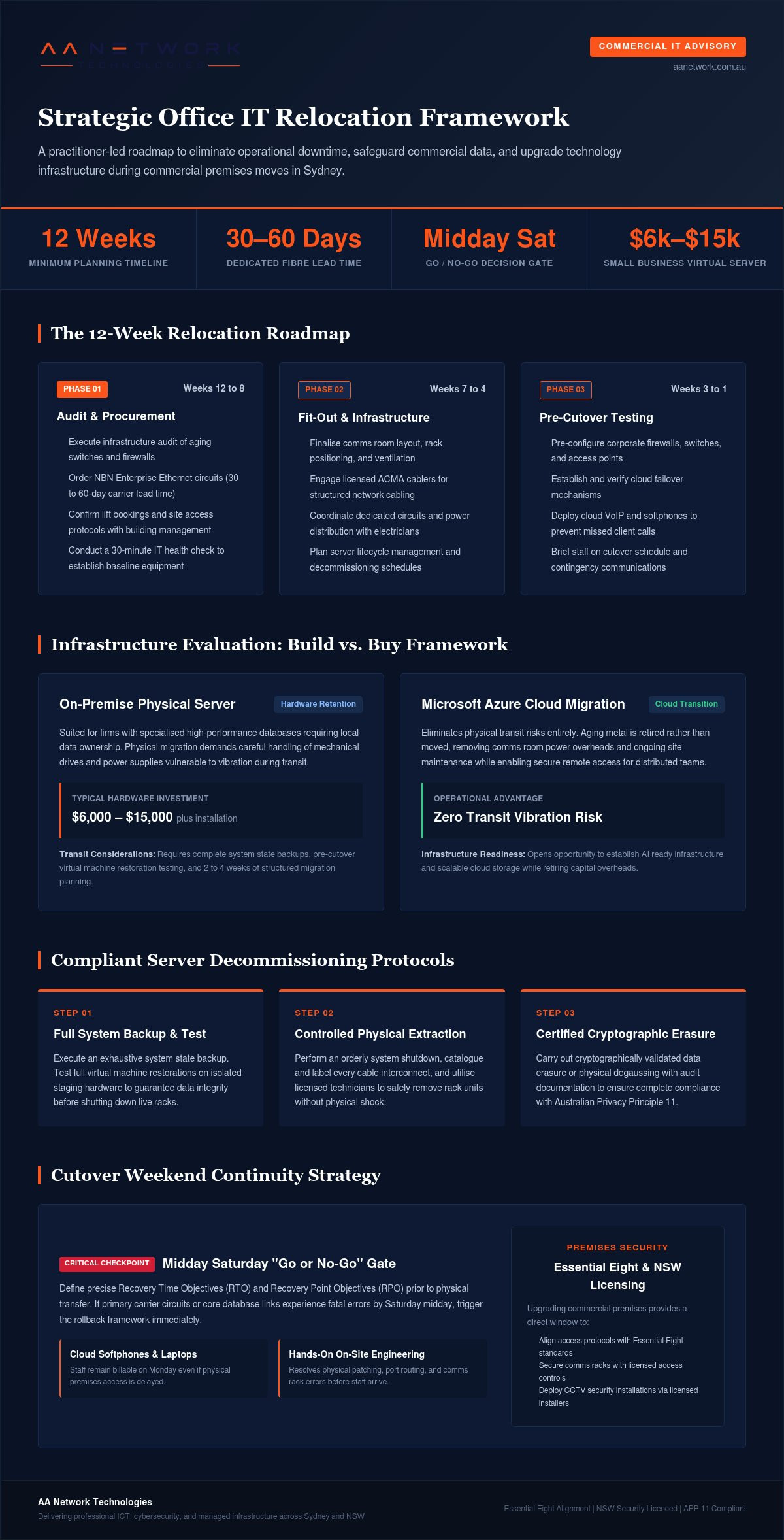
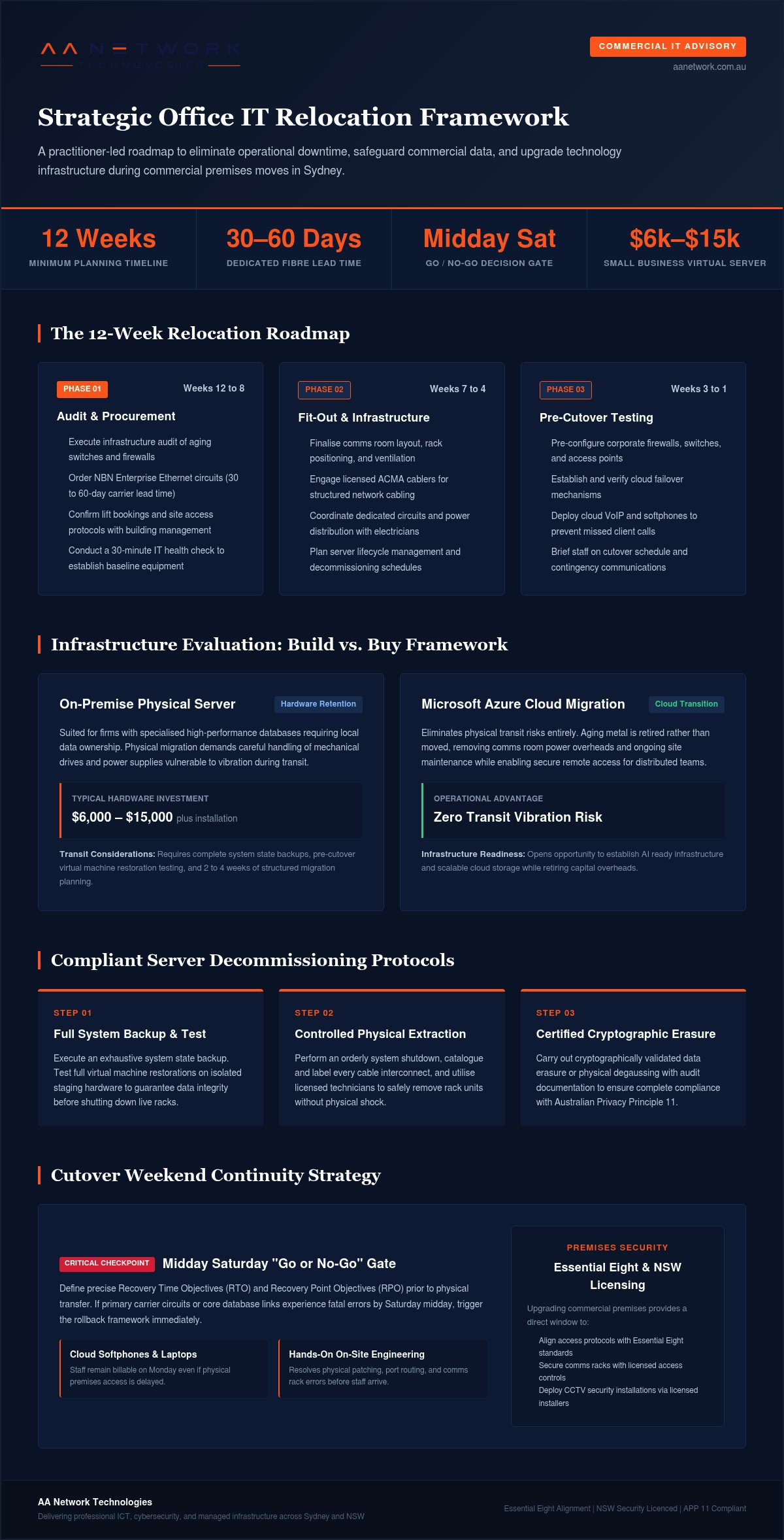
- Planning an office IT relocation Sydney businesses can rely on requires a 12-week timeline to audit legacy equipment and account for carrier lead times.
- The transition creates a practical checkpoint to evaluate the build vs. buy framework, helping you choose between moving physical servers or migrating workloads to Microsoft Azure.
- Securing dedicated fibre like NBN Enterprise Ethernet and switching to cloud VoIP well in advance prevents Day 1 internet drops and missed client calls.
- Having hands-on, on-site technical support during the cutover weekend resolves physical setup issues instantly so your team can work uninterrupted on Monday morning.
- Updating your physical premises provides an immediate opening to align with the Essential Eight and secure your comms rack with licensed access controls and CCTV.
Planning Your Office IT Relocation in Sydney
Professional service firms in commercial precincts like Barangaroo, North Sydney, and the CBD cannot treat a technology move as a last-minute task. A successful office IT relocation Sydney wide demands at least 12 weeks of structured preparation. Moving high-density workstations, sensitive client data, and communications gear requires strict coordination between building facilities managers, freight lift schedules, and external technical teams.
Starting with a practitioner-led audit ensures you understand the state of your infrastructure before packing a single cable. An audit pinpoints aging switches, failing battery backups, and physical servers nearing warranty expiry. Booking a 30-minute IT health check gives you a clear baseline of what needs migration, replacement, or safe decommissioning under NSW security and e-waste standards.
The 12-Week Relocation Roadmap
A structured timeline prevents opening day disasters. Fibre internet leads the critical path. Dedicated symmetric connections like NBN Enterprise Ethernet routinely take 30 to 60 business days to deliver, especially if internal riser cabling or street works are required. Key milestones include:
- Weeks 12 to 8: Conduct the full infrastructure audit, order new ISP fibre circuits, and confirm lift bookings with building management.
- Weeks 7 to 4: Finalise comms room layout, engage licensed ACMA cablers, and schedule power distribution with electrical contractors.
- Weeks 3 to 1: Pre-configure network firewalls, establish cloud failover systems, and brief staff on transition logistics.
Defining Business Continuity Goals
Effective business continuity planning requires setting precise Recovery Time Objectives (RTO) and Recovery Point Objectives (RPO) before the physical transition. For an accounting or legal firm, unbudgeted downtime can cost thousands of dollars per hour in lost billable capacity and client disruption.
Establish a firm "go or no-go" checkpoint for midday Saturday during the cutover weekend. If primary data links or core systems show fatal faults, your team needs an immediate rollback plan. Equipping staff with cloud-based softphones and laptops ensures that normal client billing continues uninterrupted on Monday, even if physical access to the new premises is temporarily delayed.
Server Lifecycle Management and Hardware Procurement
Relocating physical servers is not a simple matter of unbolting metal boxes and loading them onto a moving truck. Mechanical drives, power supplies, and older hypervisors are vulnerable to vibration during transit. An office IT relocation Sydney firms undertake should be viewed as an infrastructure overhaul, allowing you to choose between moving existing machines or transitioning key workloads directly into Microsoft Azure.
Applying a build vs. buy framework clarifies this choice. Buying physical infrastructure provides local data ownership, but requires capital outlay and routine maintenance. Building out a cloud environment removes physical transit risks entirely. If you operate specialized databases that require on-premise performance, migrating servers locally makes sense. Otherwise, retiring aging metal eliminates ongoing site overheads.
The Server Decommissioning Process
Server lifecycle management represents the structured oversight of hardware from initial provisioning and maintenance through to retirement and compliant data destruction.
When retiring legacy racks during a move, adhere to disciplined protocols that mirror the NIST IT contingency planning guidelines to prevent data compromise:
- Step 1: Perform a complete system state backup and test full virtual machine restorations on isolated test hardware.
- Step 2: Execute an orderly shutdown, label every cable connection, and have licensed technicians remove the physical units.
- Step 3: Carry out certified, cryptographically validated data erasure or physical degaussing to remain compliant with Australian Privacy Principle 11.
Budgeting for New Infrastructure
For organisations that continue using on-premise hardware, a small business server with virtualisation typically costs between $6,000 and $15,000 plus installation. Factoring this cost into your relocation budget prevents unexpected capital strain while modernising compute performance.
A premises change also serves as the ideal window to upgrade to GPU-enabled host units, ensuring your internal network supports AI ready infrastructure for local automation tools. Alongside core servers, procuring modern meeting room video bars and installing security equipment requires licensed specialists. In New South Wales, CCTV cameras, access control sensors, and comms rack enclosures must be installed by licensed security installers under the Security Industry Act 1997.
If you are reviewing whether your current hardware stack justifies the cost of a physical move, you can speak with our technical consulting team to evaluate your server retirement options.
Business Networking and VoIP Solutions for New Offices
A dropped call during a critical client consultation isn't just a technical glitch; it's a direct threat to your firm's professional reputation. During an office IT relocation Sydney businesses often overlook the difference between consumer-grade broadband and commercial infrastructure. Commercial precincts from Parramatta to Macquarie Park demand structured data cabling and access points engineered to handle dense device loads without signal drops.
Sydney Connectivity Comparison
Standard retail broadband provides asymmetric bandwidth that struggles under heavy concurrent video conferences and cloud data syncs. We recommend prioritising NBN Enterprise Ethernet to ensure 2026-grade call quality and symmetric upload capacity. Dedicated business fibre provides 99.95% target uptime backed by enterprise service level agreements.
To eliminate single points of failure, your new comms room should pair primary fibre with a business 5G failover connection managed by an intelligent dual-WAN firewall. Implementing strict network segmentation across guest, staff, and management subnets aligns your site with the ACSC Essential Eight framework by limiting unauthorized network movement. Our team configures business networking and Wi-Fi setups using predictive site mapping, ensuring every corner of your floorplan receives balanced coverage.
Modernising with Business VoIP
Leaving an aging on-premise PBX cabinet behind frees up comms room space and eliminates fixed copper line fees. Transitioning to modern business VoIP solutions routes calls through SIP trunking straight into Microsoft Teams Calling or desktop softphones. This setup lets staff receive direct client calls on their work laptops or mobile devices without waiting for desk handsets to be plugged in.
Structured testing before opening day makes all the difference. Your ICT partner must simulate live call flows, ring groups, and automated receptionist menus during the weekend cutover window. Verifying external dialling and voicemail routing before staff walk through the door protects your billable hours on Monday morning.
Minimising Downtime During the Physical Move
Executing an office IT relocation Sydney wide comes down to how your partner manages the transition weekend. CBD logistics present distinct friction points, including strict commercial loading dock schedules, tight freight elevator access, and clear-way traffic rules on arterial streets. Without a clear timetable, simple transport delays quickly roll into Monday morning trading losses.
A successful relocation isolates technical workloads from standard office furniture moves. Office furniture removals handle the desks and task chairs; specialized ICT engineers take responsibility for server chassis, patch leads, core routing hardware, and delicate monitors. This separation ensures that core systems arrive undamaged, fully accounted for, and ready for systematic patching.
The Move Weekend Schedule
Zero downtime depends on a methodical weekend sequence that protects your operational data at every turn:
- Friday PM: Shut down non-essential systems, execute final immutable backups, and unmount servers and rack equipment once staff have finished trading.
- Saturday: Transport fragile gear in anti-static, shock-absorbing flight cases, re-rack switches and appliances in the new facility, and establish core uplink routing.
- Sunday: Patch workstation points, test network printers, verify VoIP handsets, and complete automated user login simulations across all departments.
On-Site Troubleshooting and Support
Relying on an offshore service desk or automated ticketing system during a physical premises shift is an operational error. Founder Ronit Sriwastav and our senior engineers deploy directly to your new office floor, bringing over 10 years of hands-on ICT consulting experience to the cutover weekend.
Having boots on the ground resolves the minor friction points that routinely plague day one. When staff arrive, technical issues rarely involve complex server software; they involve unseated display cables, misplaced laptop docking ports, unexpected Wi-Fi blind spots in enclosed boardrooms, and local network printer mapping. We run a comprehensive hardware and connectivity check across every single desk on Sunday afternoon, ensuring every user can authenticate, send print jobs, and take client calls immediately at 8:30 AM.
Cyber Security and Post-Move Optimisation
Changing physical premises resets your business perimeter. An office IT relocation Sydney firms undertake often exposes hidden security vulnerabilities when static IP addresses change, legacy firewall exceptions linger, and staff plug equipment into untested data drops. Treating day one as an operational reset ensures configuration oversights are caught before client data travels across your new network.
Physical security must mirror digital controls. Modern tenancy fit-outs require locked server cabinets and controlled comms room entry. Pairing licensed CCTV monitoring over your comms rack with restricted access fobs ensures that core switching and storage hardware cannot be tampered with by unauthorised contractors or visitors.
Essential Eight Realignment
Rebuilding your network environment creates a clean slate to implement baseline cyber defences. A realistic first-year budget for a small business to reach Essential Eight Maturity Level One is between $15,000 and $60,000. Investing in this baseline during a premises transition prevents costlier security remediation later.
As staff settle into their new desks, enforce strict application whitelisting, mandatory multi-factor authentication, and least privilege access across all accounts. Automated patch management and remote endpoint monitoring should also be confirmed across every workstation before allowing access to core business databases.
Post-Move Microsoft 365 Review
A physical premises change provides the logical moment to conduct a structured cloud audit. Restructuring your SharePoint structures lets you align document libraries and access controls with new working arrangements, removing clutter and legacy permissions that have accumulated over years of operations.
This review also tightens user lifecycle management, ensuring accounts for departed personnel are fully decommissioned. Updating Conditional Access policies within Microsoft Entra to recognize your new office static IP adds an extra layer of perimeter protection against unauthorized remote logins.
To safeguard your operational data and modernise your systems during your move, Contact AA Network Technologies to discuss your Sydney office relocation requirements.
Delivering Zero Downtime on Your Sydney Move
A smooth tenancy transition comes down to deliberate preparation rather than luck. Ordering enterprise fibre links well in advance, testing workstation endpoints before opening day, and completing a cloud security review turn a stressful relocation into a genuine infrastructure upgrade.
Backed by over 10 years of ICT consulting experience, AA Network Technologies provides founder-led, hands-on guidance from our Sydney CBD and Parramatta offices. We take complete ownership of the technical heavy lifting, coordinating carrier handoffs, server migrations, and comms room hardware fitted by NSW security licensed installers. Entrusting your office IT relocation Sydney wide to dedicated local engineers ensures your client data stays protected at every stage.
With a structured cutover plan and specialist engineers on site during the weekend, your staff will walk into the new premises on Monday morning ready to trade without missing a single client call.
Frequently Asked Questions
How much does an office IT relocation in Sydney typically cost?
Total project pricing depends entirely on user headcount, rack complexity, and whether physical servers are migrated or replaced. For ongoing technology management, managed IT support pricing in Australia typically ranges from $149 to $349 per user per month in 2026. A small business server with virtualisation typically costs between $6,000 and $15,000 plus installation if local hardware replacement is required.
When should I start planning my office IT move?
Commercial firms should start planning at least 12 weeks before the physical lease start date. This window allows adequate time to audit legacy infrastructure, coordinate electrical fit-outs, and order high-speed data circuits. Starting early prevents the compressed deadlines that frequently lead to communication outages during an office IT relocation Sydney wide.
Can we move our own servers to the new office?
Moving operational server hardware without professional equipment poses severe data loss and hardware failure risks. Mechanical drives, server chassis, and sensitive hypervisors can suffer internal damage from basic road vibrations or improper shutdown sequences. We recommend letting licensed ICT technicians manage system shutdowns, anti-static packing, secure transit, and re-racking in the new comms room.
What is the lead time for getting internet connected in a new Sydney CBD office?
Dedicated enterprise fibre services like NBN Enterprise Ethernet require standard delivery lead times of 30 to 60 business days across Sydney commercial centres. Lead times expand if the building requires extensive civil works or internal riser cabling. For this reason, high-capacity dual-WAN routers with 5G wireless backup should always be provisioned for opening day redundancy.
Do I need to upgrade my hardware when I move offices?
You do not need to replace every device, but an office move provides the cleanest window to retire out-of-warranty hardware. Moving old, unreliable equipment often results in post-move hardware faults and unnecessary relocation costs. A structured pre-move audit determines whether migrating to cloud services like Microsoft Azure makes better commercial sense than moving aging on-premise units.
How do you ensure our data remains secure during the physical move?
Data integrity is protected through air-gapped immutable backups, encrypted storage snapshots, and strict physical custody protocols throughout transit. Decommissioned hardware undergoes certified data erasure to meet Australian Privacy Principles compliance. Once installed, physical perimeter security is established using locked comms enclosures and surveillance cameras fitted by licensed security installers.
What happens if our IT systems aren't working on the first Monday?
Having a documented cutover timeline eliminates first-day surprises by establishing a Saturday midday rollback checkpoint. If unforeseen carrier delays impact physical fibre lines, pre-configured 5G failover routes maintain internet access immediately. Meanwhile, cloud-hosted softphones and Microsoft 365 environments allow staff to handle urgent client communications from laptops without interruption.
Does AA Network Technologies provide on-site support during the move weekend?
Yes, AA Network Technologies provides hands-on, on-site technical support rather than routing your team to an off-site call centre. Founder Ronit Sriwastav and senior engineers manage the physical re-racking, network patching, and Sunday workstation testing directly at your premises. We also provide on-site floor support on Monday morning to resolve any user setup queries instantly.