IT infrastructure planning for small business: 2 pricing types
TL;DR: Effective IT infrastructure planning for small business requires balancing upfront capital expenditure for local control against predictable monthly operating expenses for cloud-based flexibility.
- Preparation for typical small business server migrations requires 2 to 4 weeks of planning.
- Pure cloud models are unsuitable for office teams processing massive files or heavy rendering.
- On-premises infrastructure suits single-office firms needing physical control and high-speed local data access.
- The article details a 5-step migration process designed to keep business downtime near zero.
Choosing between CapEx and OpEx models determines how your small business allocates technology capital. On-premises server migrations typically require two to four weeks of preparation before cutover, while cloud subscriptions shift costs to predictable monthly operating expenses. The decision questions stay the same from first audit to final cutover: how much cash you lock upfront, how much downtime you can absorb, and whether your team works from one office or many.
Local, cloud or hybrid: match the setup to how your team works
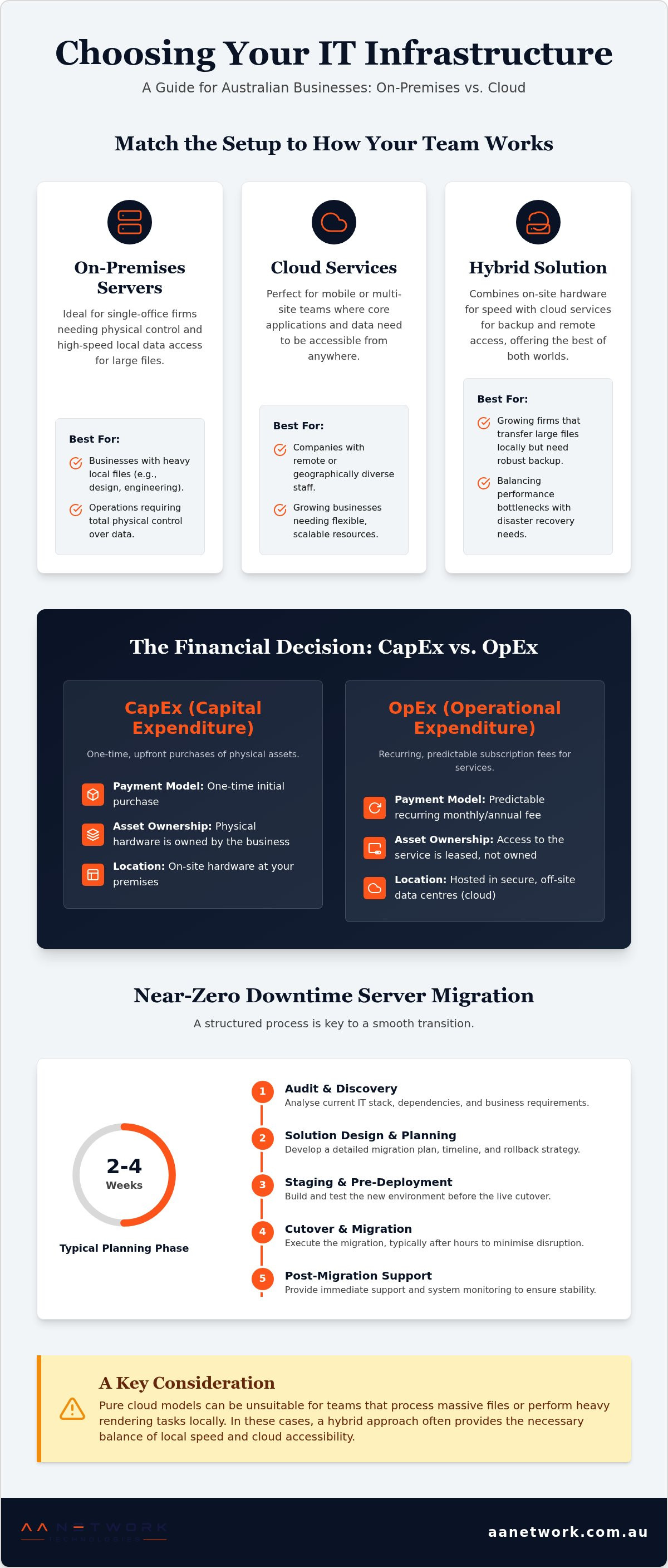
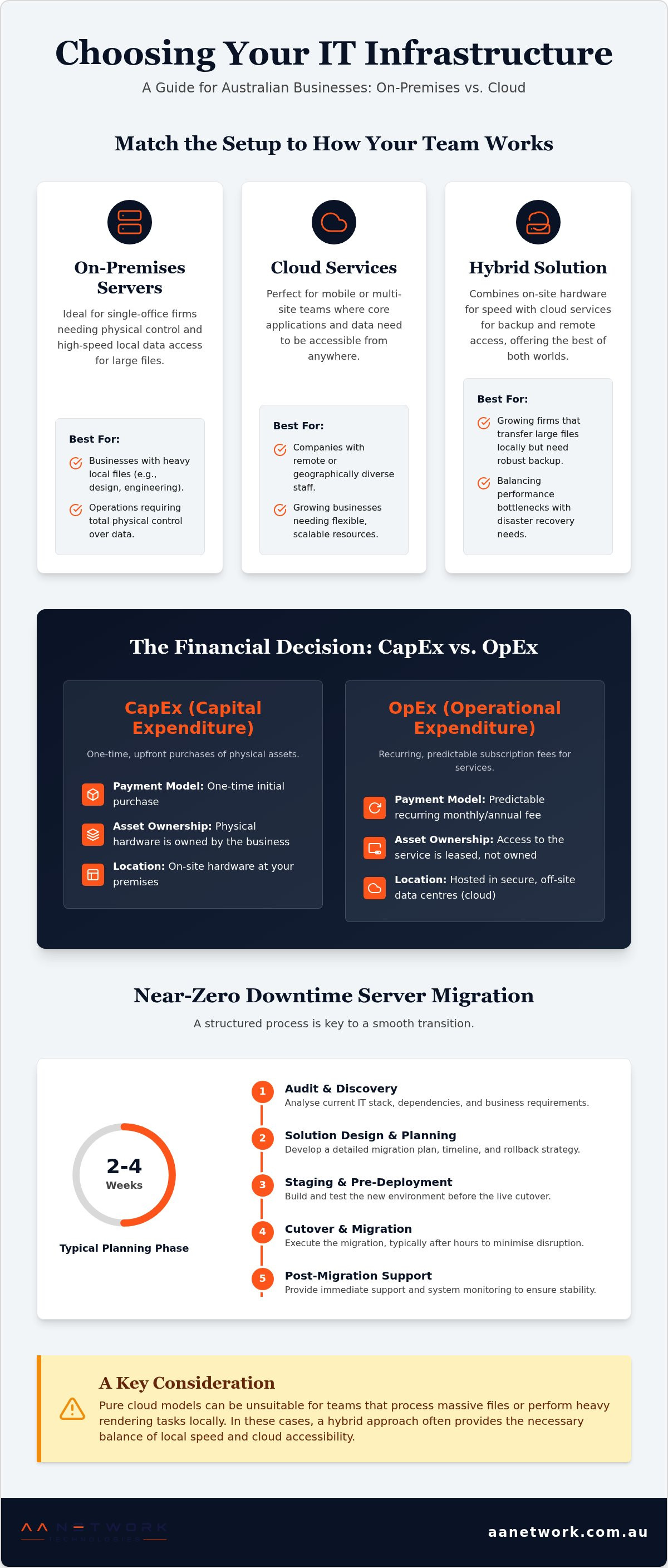
Your business model dictates whether local servers, cloud services, or a mix of cloud and local (hybrid cloud) suits you best. Three patterns show up repeatedly:
- Fixed single office with heavy local files: keep on-site hardware (on-premises infrastructure) for physical control, then add off-site backup.
- Mobile or multi-site staff: move core apps and email to cloud services so access follows the team.
- Growing Sydney CBD firm that still renders or transfers large files on site: combine local speed with cloud backup so neither bandwidth nor recovery becomes the bottleneck.
Leaders often choose setups based on short-term hardware costs rather than long-term flexibility. Buying local servers without considering remote access usually leads to expensive reconfigurations later. If you run a fixed office, on-site hardware provides total physical control over your files. Remote teams gain more flexibility through cloud services. For growing Sydney CBD firms, combining local speed with cloud backup offers a strong balance.
Running local servers can also increase your outdated tech costs (technical debt) over time. Safeguard your staff with proactive protection, such as Cyber Security Sydney | Small Business Cyber Security.
Cloud systems suit mobile teams, while local setups favor data-heavy, single-office Operations. Schedule a complimentary IT Health Check with the founder to map which path matches your model.
CapEx vs OpEx: how the 2 pricing types shape your cash flow
Capital Expenditure (CapEx) involves upfront technology purchases, while Operational Expenditure (OpEx) covers ongoing monthly service subscriptions.
Choosing between buying servers or paying monthly fees shapes your cash flow. Purchasing on-site hardware creates high upfront costs, yet it gives you total asset ownership. Moving workloads to hosted platforms shifts expenses to predictable recurring operating budgets.
Structured planning keeps those spending models aligned with real Operations. According to the ITIL framework guide on Wikipedia (2026), structured IT service management aligns technology spending directly with business goals.
| Feature | CapEx (Upfront) | OpEx (Subscription) |
|---|---|---|
| Payment Model | One-time initial purchase | Predictable recurring fee |
| Asset Ownership | Physical hardware owned | Service access leased |
| System Location | On-site hardware | Hosted cloud systems |
CapEx suits established businesses with cash reserves, whereas OpEx fits growing teams needing flexible scale. For local voice and collaboration context, see Sydney Small Business Cloud Phone Systems: 2026 Guide. Book a free IT Health Check with our founder today.
Hardware purchase vs cloud fees: calculate true ROI before you commit
Calculating your tech return on investment requires looking beyond initial purchase tags to evaluate total operational costs.
Buying on-site hardware creates predictable upfront capital expenses, but it forces you to pay full maintenance expenses. Hosted subscriptions trade heavy capital spending for recurring operational fees. Poorly managed cutovers still create risk: email loss or staff downtime can erase the savings you expected.
Outdated tech costs quietly bleed capital through slow processing times and energy bills. Physical servers act like old gas-guzzling cars, racking up stealthy fuel and repair bills every month.
To raise yield on the same headcount, explore Top AI Automation Tools for Australian Small Business and streamline workflows across Parramatta workplaces. Local firms with steady workloads suit physical servers, while growing teams gain more from cloud flexibility. Request a personalised quote to compare exact figures for your Sydney CBD setup.
Cloud or on-premises: choose architecture around daily Operations
Selecting the right setup depends on your daily operational needs and location strategy. Cloud hosting offers flexible remote access, while keeping on-site hardware provides total control over your physical systems.
Sydney CBD businesses often rush into full transitions without preparing for operational risks. A move to hosted platforms needs careful sequencing so mail flow and staff access stay intact.
Your physical setup choice shapes your company's foundation. As defined on Wikipedia's Infrastructure page from 2026, structural systems supply the essential services that support a society or enterprise.
A mix of cloud and local environments suits growing teams that still need fast local disks. Securing either model affects budget, so reviewing the Small Business Cyber Security Cost Australia: 2026 Pricing guide helps clarify expected defensive investments.
Evaluate bandwidth first: cloud systems fit flexible teams, whereas local servers suit heavy, bandwidth-intensive applications.
Audit your current IT stack before you spend another dollar
Assessing your tech setup involves auditing hardware, software, user access, and security risks across your entire office.
Checking physical gear often reveals hidden vulnerabilities. Loose cables or unsecured server racks can compromise your network instantly. Start by reviewing your on-site hardware to confirm every device is covered by support.
Next, map every software account and file location. If a platform change is on the roadmap, inventory mail routing and shared drives before any cutover window. Also verify who installs your physical security gear. Compliance with NSW security licence requirements means CCTV installers hold a Class 2 security licence as mandated by the Security Industry Act 1997.
Tip: Always verify that physical security installers, such as CCTV technicians in NSW, hold a Class 2 security licence under the Security Industry Act 1997.
5 Steps that keep server migration downtime near zero
Careful planning protects your business Operations from downtime during a server transition. A typical small business server migration takes two to four weeks of planning and preparation, with the cutover done over a weekend or after hours.
Skipping initial audits creates unexpected delays later; solid groundwork stops data loss. Inventorying legacy user permissions before copying files prevents broken access rights on the target system. Treat the move like relocating an office: label dependencies first so nothing critical is left behind.
- Audit environment: Catalog all hardware, active applications, and system dependencies.
- Design target: Outline your new setup, whether choosing on-site hardware or a mix of cloud and local.
- Backup data: Perform full system backups and test recovery processes.
- Execute migration: Transfer databases, application settings, and user profiles to the destination platform.
- Validate systems: Test functional workflows before opening access to staff.
Tip: Allow two to four weeks for preparation and schedule the final cutover during off-peak weekend hours to avoid business operational downtime.
Why pure cloud subscriptions stall growing office teams
Pure internet setups often slow down companies that process massive files or run local Operations. Relying entirely on web services can trigger bandwidth bottlenecks and unexpected ongoing fees.
Growing teams struggle when internet outages halt local Operations completely. Local hardware handles heavy daily rendering or massive file transfers far faster than standard connections.
A mix of cloud and local infrastructure balances rapid local performance with simple off-site backups for expanding firms. Fully remote teams suit pure cloud models, while office teams with large files need local storage.
Learn the essential steps for a smooth cloud migration that avoids common pitfalls like lost emails or staff downtime during your transition. Arrange a free IT Health Check to review whether your Sydney CBD workload still needs local disks.
Pick an IT consultant who owns hardware and cloud together
Select a local provider that offers reliable hardware advice, secure vendor options, and ongoing IT support (managed IT services). You need a team that takes full accountability for your entire setup.
AA Network Technologies is an Australian IT consulting, managed services and cybersecurity company. Direct work with Sydney CBD and Greater Sydney firms shows that poorly fitted systems collapse under sudden growth; treat tech choices as the foundation layer, not an afterthought.
Choose local experts who handle your physical equipment and cloud tools together so you gain faster responses and clear communication. Book time with the founder for a free IT Health Check and a single accountable plan.
Frequently asked questions
Why is a good IT infrastructure important for small businesses?
A reliable setup prevents costly system downtime and protects your sensitive customer files. Ignoring outdated tech costs often leads to sudden system crashes or security breaches. Local support keeps your team online and secure when something fails.
Which types of IT infrastructure are suitable for small businesses?
Small teams usually benefit from cloud platforms or a mix of cloud and local systems. Hosted tools help staff work from anywhere when the cutover is sequenced properly. For physical installations like security cameras, Australian rules state that CCTV installers must hold a Class 2 security licence under the Security Industry Act 1997.
Do small businesses need customized or standardized IT solutions?
Standardized tools work well for core tasks like email, while tailored setups handle unique trade processes. Keeping a central data folder (single source of truth) helps maintain team productivity across all systems. Custom setups suit complex workflows; standardized packages fit general administration more closely.
How to evaluate the existing IT infrastructure for small businesses?
You evaluate your current systems by reviewing hardware age, network speeds, and potential security gaps. A typical small business server migration takes two to four weeks of planning and preparation before cutover. You can book a free IT Health Check to review your setup in Sydney CBD, Parramatta, or Greater Sydney.
How to choose the right IT consultant for small businesses?
Choose a qualified local provider that understands your specific industry requirements and compliance obligations. AA Network Technologies is an Australian IT consulting, managed services and cybersecurity company that offers direct founder accountability. Look for providers offering ongoing IT support so Operations continue without hidden surprises.
Future-Proof Your Growth
Effective IT infrastructure planning for small business ties back to the same CapEx versus OpEx questions you started with: how much capital you freeze in hardware, how predictable you need monthly costs to be, and how much local performance your files still demand in 2026.
Our Sydney team brings genuine Australian company provenance to every project. We maintain full compliance with NSW security licence requirements to keep your systems safe. When evaluating on-site hardware, proper setup prevents costly downtime. Clear network blueprints protect companies from unexpected tech bottlenecks; planning early safeguards daily Operations.
Contact the AA Network Technologies team today to receive a customized infrastructure assessment and quote.