Server Maintenance Sydney: A Practical Guide for Businesses
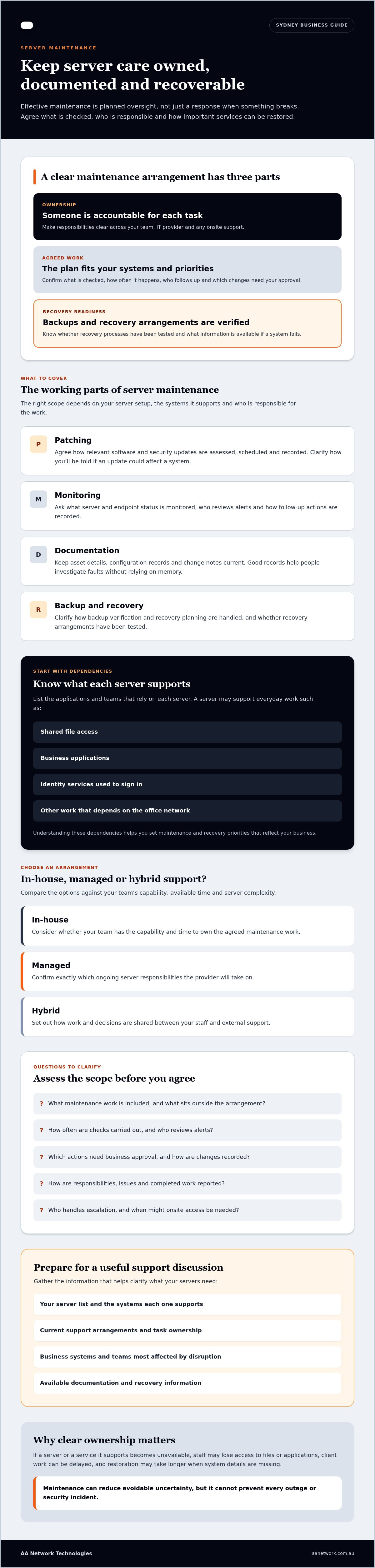
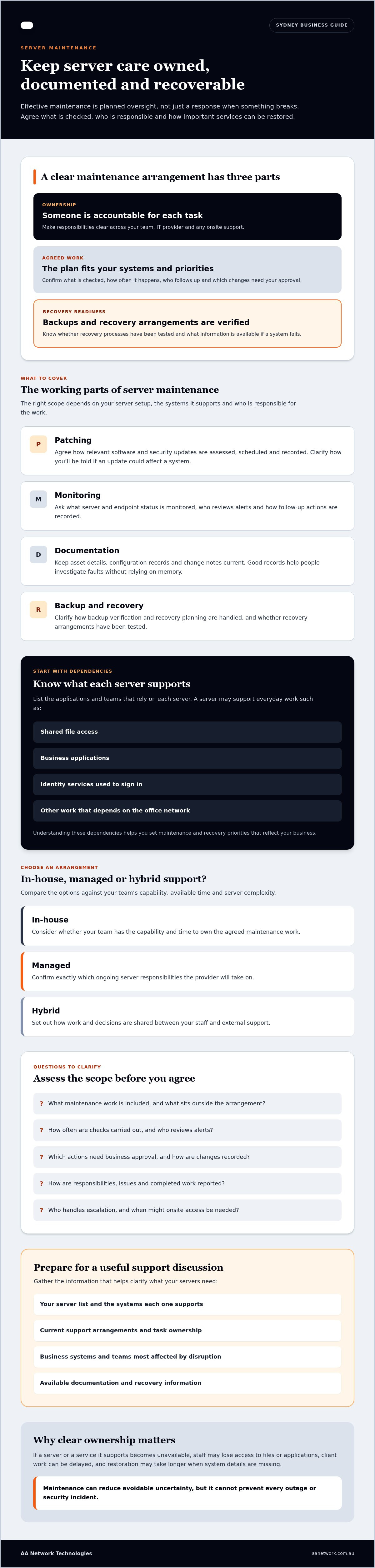
A server can seem fine until an update fails, storage fills or staff can’t access the systems they need. Effective server maintenance in Sydney is about more than fixing faults after they interrupt work. It relies on clear ownership, documented checks and a practical plan for restoring important services if something goes wrong.
It’s worth checking whether patching, monitoring and backups are handled consistently. To understand the support you’re receiving, ask what work is done, how often it happens, how it’s recorded and who takes responsibility when an issue needs attention.
This guide explains what to check in a server maintenance arrangement, including updates, system health, backup verification and recovery planning. It also covers how to assess reporting, support processes and local arrangements for businesses in areas such as Sydney CBD and Parramatta. Use the questions below to compare IT partners and clarify what your servers need, whether you’re reviewing an existing setup or considering ongoing managed IT services.
Key Takeaways
- Set clear expectations for server ownership so routine maintenance doesn’t fall between your team and your IT provider.
- Agree on a maintenance plan that reflects your systems, business priorities and recovery needs. Don’t assume every service includes the same tasks.
- Compare in-house, managed and hybrid support based on your team’s capability, available time and server complexity.
- When assessing server maintenance Sydney providers, ask what work is included, what needs approval and how activity is documented and reported.
- Prepare for an initial discussion by listing your servers, dependencies, current support arrangements and the business systems that matter most.
Why server maintenance matters for Sydney businesses
Server maintenance is the planned oversight of the servers your business relies on. It includes keeping track of system health, updates, configuration changes and recovery arrangements, rather than waiting for a fault to disrupt work. For businesses looking for server maintenance in Sydney, the practical goal is to make responsibilities clear and identify issues that may need attention before they affect staff or clients.
Without regular checks, issues can go unnoticed, such as an update that hasn’t been applied or a recovery process that hasn’t been tested. If a server or a service it supports becomes unavailable, staff may lose access to files or applications, client work can be delayed, and restoring normal operations may take longer if system details are missing. Maintenance can reduce avoidable uncertainty, but it can’t prevent every outage or security incident.
Ongoing server care differs from a one-off setup or migration project. Setup establishes an environment, migration moves systems or data, and break-fix support responds to a fault. Ongoing oversight focuses on agreed operational responsibilities over time. Recovery planning is part of the wider approach to business continuity planning, which considers how an organisation will manage disruption and resume important work.
Which business systems depend on a maintained server?
A server may support shared file access, business applications, identity services used to sign in, or other work that depends on the office network. The exact dependencies vary by business and server configuration. Start by listing the applications and teams that rely on each server. If a system used to prepare client documents or manage appointments depends on it, an interruption could affect both internal tasks and client-facing work. Knowing these dependencies helps you set sensible maintenance and recovery priorities.
When does a business need ongoing server maintenance?
Consider ongoing oversight if no one can identify who owns patching, system documentation is incomplete, or recovery arrangements haven’t been verified. A server may need attention even when it appears to be running normally; visible faults aren’t the only useful signal. The right schedule and scope depend on your environment, business needs and support arrangements, so avoid adopting a generic checklist before you know what you operate.
For Sydney SMEs, responsibility may be shared between internal staff, remote IT support and onsite work. Agree who monitors the environment, who approves changes, how issues are escalated and when physical access may be needed. AA Network Technologies supports Sydney businesses with managed IT support in Sydney, which can include server oversight when the scope is agreed. Clear ownership helps prevent important tasks from falling between teams.
What server maintenance should cover, from patching to recovery
Server maintenance should follow an agreed service plan, not an assumed universal checklist. The right scope depends on your server setup, the systems it supports and who is responsible for each task. For server maintenance Sydney businesses can rely on, make sure the plan explains what is checked, how often, who acts on issues and which actions require your approval.
Monitoring, updates, documentation and recovery work each have a practical purpose: they help your team understand system status, manage changes and make informed decisions if an issue occurs. Monitoring can flag potential problems, but it cannot guarantee that downtime or security incidents won’t happen. A current record of assets, configurations and changes also helps staff or support providers investigate faults without relying on someone’s memory.
Patching, monitoring and server documentation
Patching means applying relevant software and security updates through an agreed process. That process should clarify how updates are assessed, scheduled and recorded, and how the business is informed if a change could affect a system. Monitoring provides visibility of server and endpoint status so potential issues can be investigated. Ask what is monitored, who reviews alerts and how follow-up actions are recorded. Keep asset details, configuration records and change notes current to support informed decisions.
Ongoing operational ownership may sit with internal staff, an external provider or both. A managed IT provider can take responsibility for agreed work, but the scope still needs to be explicit. AA Network Technologies’ Sydney managed IT support can be discussed as part of an arrangement that defines server responsibilities alongside other IT support.
Backup, restore testing and recovery planning
Having backups doesn’t confirm that the data your business needs can be restored successfully. Backup & Disaster Recovery planning should identify what is protected, who checks the process and how selected data or systems are tested for restoration. A restore test can reveal practical gaps before staff need to rely on a backup during an interruption. Ask what was tested, what the result was and whether any follow-up actions remain.
Set recovery objectives in business terms. Recovery time objective (RTO) is how quickly a service needs to be restored. Recovery point objective (RPO) is how much recent data the business could accept losing, measured by the time between the latest recoverable copy and the disruption. These targets may differ for a core business application and less time-sensitive files, so agree them around operational priorities.
If you’re unsure what your current plan covers, a discussion with AA Network Technologies can help clarify server scope, recovery expectations and ownership before changes are made.
In-house maintenance or a Sydney managed IT provider?
There’s no single right model for every business. In-house staff may suit an environment where someone has the time and skills to manage servers routinely. A managed IT provider can take on agreed operational tasks, while a hybrid arrangement can keep internal staff involved in decisions and business priorities. The choice depends on your team’s capability, server complexity, documentation and available time.
When comparing server maintenance Sydney businesses should focus on clear responsibilities, not just whether support is labelled internal or outsourced. Establish who monitors systems, approves changes, manages access and records completed work. Ask how the provider will coordinate with your internal IT contact and existing software or network vendors. The arrangement should also explain how scheduled maintenance is handled and what happens when a request falls outside the agreed scope.
What to compare between in-house and outsourced support
Internal ownership can keep decisions close to the business, but routine server work still needs time, current skills and clear records. Outsourcing can provide ongoing support without making a staff member responsible for every operational task. A hybrid model may work well when an internal contact understands business priorities and an external team handles agreed technical work. Read this managed IT support overview for broader service-model context.
Outsourcing should make accountability clearer, not harder to trace. Confirm which people or teams can access systems, how access is approved and removed, and where documentation is kept. Agree how the provider will hand over information if responsibilities change. These details help prevent uncertainty when a staff member is away or a different vendor needs to investigate an issue.
When onsite server support may matter in Sydney
Many support tasks can be handled remotely, particularly when systems are accessible and well documented. Onsite assessment may be relevant if work requires physical access to server equipment, cabling or network hardware, or if a fault depends on the local environment. Ask a prospective provider which tasks can be completed remotely, when an onsite visit may be needed and how that work is arranged. Don’t assume a particular response time unless it’s clearly agreed.
AA Network Technologies has a Sydney CBD headquarters and a Parramatta office. It supports businesses across Sydney, including those in Sydney CBD and Barangaroo, Parramatta and Westmead, North Sydney, St Leonards and Chatswood. Businesses in Macquarie Park, North Ryde, Burwood, Strathfield and Rhodes, as well as Norwest, Bella Vista, Castle Hill and Blacktown, can also discuss support requirements. For each site, confirm where server equipment is located, which tasks can be handled remotely and when physical access may be needed. Local presence can be useful when discussing onsite work, but the right support model still depends on your setup and agreed scope. Before selecting an arrangement, document your server environment, current owners, vendor contacts and any gaps in routine maintenance. This gives both your staff and provider a practical starting point.
How to assess a server maintenance provider before you engage
A useful provider review starts with clear scope, not broad promises. For server maintenance Sydney businesses should be able to identify which systems are covered, who makes operational decisions and how work is recorded. Use these steps to check whether a proposed arrangement fits your environment.
- Define the scope. List the servers, applications and key dependencies you expect the provider to oversee. Ask what work is included, what sits outside the agreement and which tasks need your approval.
- Document the environment. Check that server details, configurations, access arrangements and vendor contacts are recorded and kept current.
- Confirm responsibilities. Identify who approves patches, reviews monitoring alerts, communicates escalations and authorises access.
- Review reporting and handover. Ask what reports you’ll receive, how changes and completed work are logged, and how administrator access and documentation will be handed over if the provider changes.
Questions to ask about scope and accountability
Ask the provider to explain how they work with your internal IT contact and existing vendors. Clarify how scheduled maintenance is communicated, what happens when a request falls outside scope, and who keeps the records. Ask for a sample of the reporting format if one is available. A clear answer should help you understand not only what the provider does, but also how your business stays informed and involved.
Questions to ask about security and continuity
Ask how system access is controlled, who can use privileged accounts and how those accounts are reviewed. Confirm how backup status, retention arrangements and restore tests are documented. Discuss recovery expectations in terms of the services your business needs back first and how much recent data it can accept losing.
Where security improvements are part of the discussion, ask whether recommendations can be mapped to relevant Australian guidance, such as the ASD’s Essential Eight. Treat this as a way to identify and prioritise potential improvements, not as evidence of certification or guaranteed compliance. For work beyond routine maintenance, such as infrastructure planning or a major change, IT consulting in Sydney may be relevant.
Before signing, make sure you can explain the arrangement to a colleague: what’s covered, who owns each decision, how issues are reported and how the business retains access to its own systems and records. If those answers are unclear, resolve them before handing over responsibility.
Server maintenance in Sydney: plan the next step with AA Network Technologies
Choosing a support partner starts with understanding your environment, not committing to a standard checklist. AA Network Technologies is a Sydney-based, founder-led provider offering managed IT and infrastructure support. Founder Ronit Sriwastav brings more than 10 years of hands-on ICT consulting, MSP operations and training experience.
A useful first discussion should establish which servers and applications are in scope, what depends on them, who currently manages them and which business priorities matter most. That helps identify where server oversight could sit alongside your existing support, network management and Backup & Disaster Recovery arrangements. The aim is to clarify the work and ownership, not promise that every issue can be avoided.
What to prepare for an initial server review
You don’t need perfect records before starting. Bring what you have and note any gaps. These details can make the discussion more focused:
- A current list of servers and business applications, including the teams that rely on them.
- Recurring issues, known maintenance tasks and who currently handles support or approvals.
- Existing backup arrangements and any available restore-test records.
- Your recovery expectations for important services, plus planned changes such as a server refresh or office move.
This information helps connect technical tasks with business needs. For example, if an application supports daily client work, its dependencies and recovery expectations should be clear before maintenance or infrastructure changes are planned.
How server maintenance fits into broader managed IT
Server oversight can form part of an agreed managed IT arrangement, alongside related responsibilities such as network management and Backup & Disaster Recovery. Keep the server scope specific: identify what is monitored, maintained and documented, and how that work relates to wider IT support. AA Network Technologies has a Sydney CBD headquarters and a Parramatta office, and supports businesses across Sydney without implying an office in every suburb.
If you’d like to discuss your environment, you can book a free 30-minute IT Health Check. Use the conversation to clarify server scope, dependencies, current ownership and priorities. You can also ask what information would help prepare for a more detailed environment review.
Put clear server ownership in place
Effective server maintenance depends on agreed responsibilities, accurate system records and recovery plans that are checked, not simply assumed. The right support model should suit your server environment and business priorities, whether maintenance is handled internally, externally or through a hybrid arrangement.
For server maintenance Sydney businesses, AA Network Technologies offers a practical starting point for discussing server requirements alongside Managed IT Services, Backup & Disaster Recovery and Network Management. Founder Ronit Sriwastav brings more than 10 years of hands-on ICT experience. The company has a Sydney CBD headquarters and a Parramatta office.
Bring your server and application details, current support arrangements and recovery priorities to the conversation. A clear picture of your environment makes it easier to identify responsibilities and sensible next steps.
With the right questions and a clear plan, you can make server support easier to understand and manage.
Frequently Asked Questions
What does server maintenance include for a small business?
A suitable server maintenance plan may cover monitoring, patching, documentation, access and backup oversight, depending on your environment and the agreed scope. Ask which servers and applications are included, who approves changes and how completed work is recorded. Backup status alone doesn’t confirm that data can be recovered. Check whether restore testing is planned, what it covers and how results are documented.
How often should a business server be maintained?
There’s no single maintenance schedule that suits every server. Frequency depends on the system, software, security requirements and your business’s change processes. Ask the provider how updates are assessed, when planned work is communicated and what monitoring is in place. The aim is a documented routine that fits the environment and keeps responsibilities clear, rather than applying an arbitrary interval to every server.
How much does server maintenance cost in Sydney?
Server maintenance costs depend on factors such as the number and type of servers, applications, support scope and the quality of existing documentation. AA Network Technologies hasn’t provided a server maintenance price for this guide, so generic market figures shouldn’t be treated as its pricing. Request a scoped assessment and written proposal that explains inclusions, exclusions and any additional project charges before comparing providers.
Can server maintenance prevent downtime?
Server maintenance can help your business identify issues, manage updates and prepare recovery processes, but it can’t guarantee that outages won’t occur. Ask what the provider monitors, how incidents are communicated and how backup restores are tested. A practical plan also records system dependencies and recovery expectations. That gives staff a clearer understanding of who is responsible and what steps to follow if a service becomes unavailable.
Does server maintenance include backup and disaster recovery?
It may, but confirm the details in the service scope rather than assuming they’re included. Ask whether backup monitoring, retention checks, restore testing and disaster recovery planning are covered or arranged separately. Discuss recovery time and acceptable data loss in business terms. A backup isn’t proof that information is current or recoverable, so clarify what evidence is recorded and who is responsible for reviewing it.
Should I use an in-house IT manager or an external server maintenance provider?
The right choice depends on your server environment, internal capability and the time available for ongoing work. Some businesses manage servers internally, others engage an external provider, and a hybrid model can share responsibilities. Compare who approves changes, controls access, maintains documentation and communicates issues. If you outsource, confirm how the provider will work with internal staff and existing vendors so accountability stays clear.
Can a Sydney IT provider maintain servers remotely?
Yes, some server management tasks can be handled remotely, depending on the equipment, access arrangements and work required. Other issues may call for physical access or onsite assessment. Ask how the provider decides which approach is suitable, how remote access is controlled and what local support arrangements apply. AA Network Technologies has offices in Sydney CBD and Parramatta, and supports businesses across Sydney. Confirm the specific arrangements before engaging a provider.