Email Migration to Office 365 Sydney: The 2026 Business Guide
Imagine it is 8:30 AM on a Monday morning in your Sydney office, but instead of starting your week, you are staring at an empty inbox and a "connection failed" error. For many local firms, the thought of an email migration to Office 365 Sydney feels like a gamble with their most precious client data. You likely worry about missing critical messages during the cutover or getting stuck in a loop with a faceless overseas call centre while your staff sit idle.
We understand that you need your technology to just work without the technical jargon or the "Monday morning drama." This 2026 guide is designed to help you master your transition to Microsoft 365 with a local perspective that eliminates downtime and secures your legacy data. We will walk you through the latest Australian pricing updates, how to manage slow NBN speeds during data uploads, and why having a partner who can actually walk into your office in Parramatta or the CBD is your best security measure. By the end of this article, you will have a clear roadmap to a more secure, server-free office environment.
Key Takeaways
- Learn why local firms are ditching on-site servers to better support hybrid teams across the Sydney CBD and Parramatta.
- Discover how to select the right email migration to Office 365 Sydney strategy to ensure your transition happens without a single lost message.
- Understand how to maintain data sovereignty and satisfy Australian privacy regulations by keeping your sensitive client information in local data centres.
- Get a practical 5-step roadmap for auditing your current NBN speeds and licensing needs before the cutover begins.
- See why founder-led, on-site support is the only way to guarantee a "drama-free" Monday morning for your staff.
Why Sydney Firms are Prioritising Email Migration to Office 365 in 2026
For years, many Sydney businesses relied on physical servers tucked away in back rooms or under desks. In 2026, that setup isn't just old; it's a liability. An email migration to Office 365 Sydney has become the standard for professional firms because it replaces fragile hardware with the resilience of the cloud. It is no longer about just moving mail. It is about ensuring your business can survive a power outage in the CBD or a hardware failure in Parramatta without losing a single client lead.
Switching to a subscription model removes the "bill shock" of emergency server repairs. Instead of facing a surprise $5,000 invoice when a cooling fan dies on a Friday afternoon, you pay a predictable monthly fee. This scalability allows you to add or remove users as your team grows, making it a far more agile choice for growing law or finance firms that need to manage cash flow while staying competitive.
The Risk of Aging On-Premise Servers
Physical servers in Sydney offices face unique environmental challenges. Our summer heatwaves put immense strain on office cooling systems, and a single power surge during a storm can fry an unprotected motherboard. Relying on on-site backups is equally risky. Modern cyber threats, particularly ransomware, often target the local backup drive first to ensure you can't restore your data. By moving your data off-site, you gain the protection of Microsoft's multi-billion dollar security infrastructure, which no small office server can match. It effectively removes the physical single point of failure from your business.
Enabling Productivity Across Greater Sydney
The way we work has fundamentally changed. Whether your team is commuting to the CBD or working from a home office in the Hills District, they need instant access to their files. Cloud-based email ensures that if a solicitor starts an email on their desktop in the office, they can finish it on their phone while waiting for a meeting in Parramatta. There is no need for clunky VPNs that slow down your connection or drop out at the worst moment.
This seamless syncing is only possible when your cloud environment is correctly configured. Many local businesses rely on managed IT support Sydney to handle these remote connections and ensure security protocols are followed across every device. It's about giving your staff the freedom to work from a café or a client site without compromising your firm's data integrity. Real-time collaboration becomes the default, not a technical hurdle.
Ultimately, an email migration to Office 365 Sydney serves as a gateway to digital transformation. Once your mail is in the cloud, you can easily adopt other tools within the Microsoft 365 suite, such as AI-driven automation and advanced document collaboration. It is the first step toward a fully digital, future-proof business model that can scale without the need for more physical hardware.
Choosing Your Migration Path: Cutover, Staged, or Hybrid?
Selecting the right path for your email migration to Office 365 Sydney is the most critical decision in the project. It determines how much downtime your staff will experience and how quickly you can return to billable work. While Microsoft provides several technical routes, the best choice for a Sydney law firm or financial agency usually comes down to the size of your database and your current server setup.
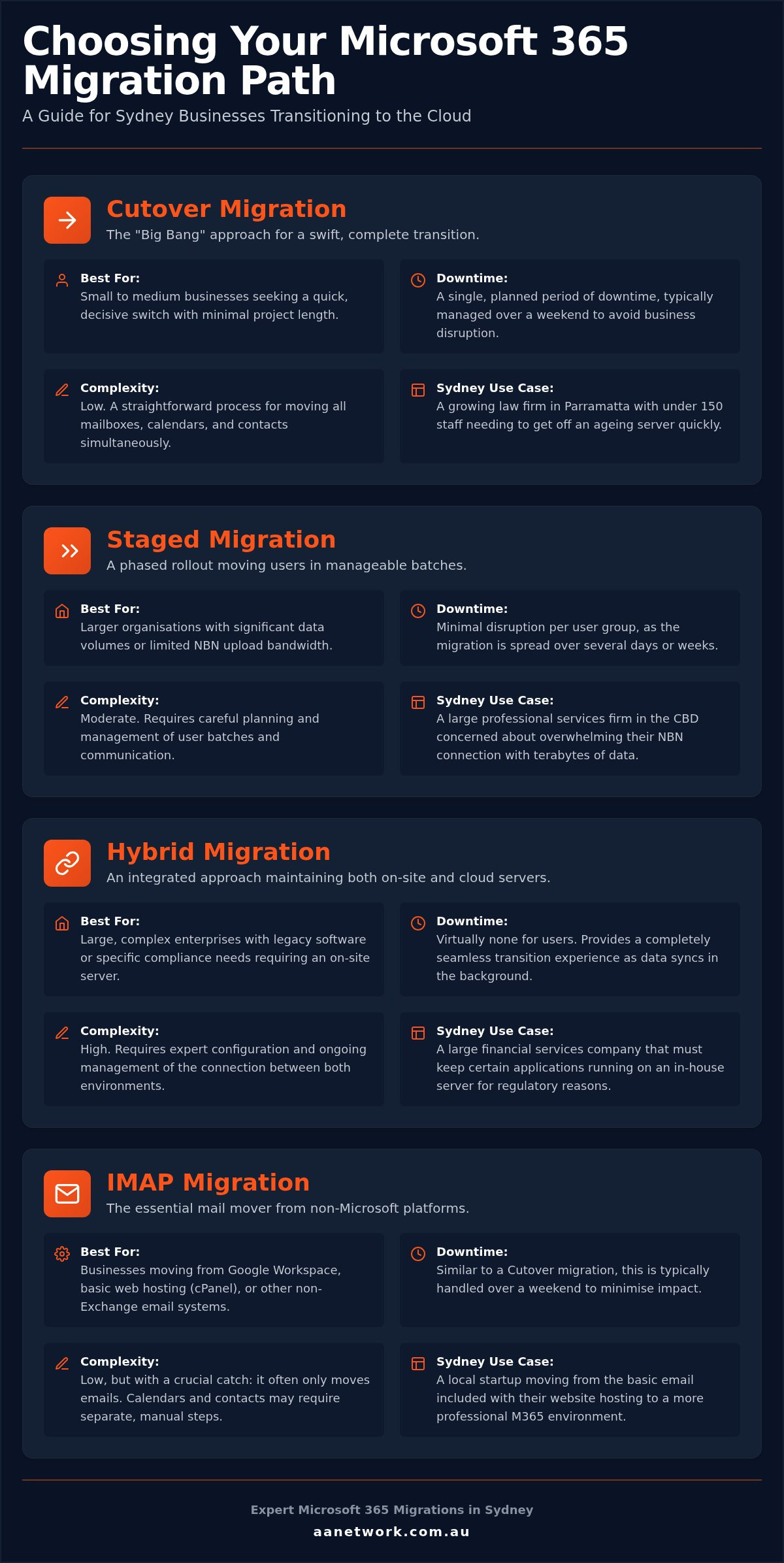
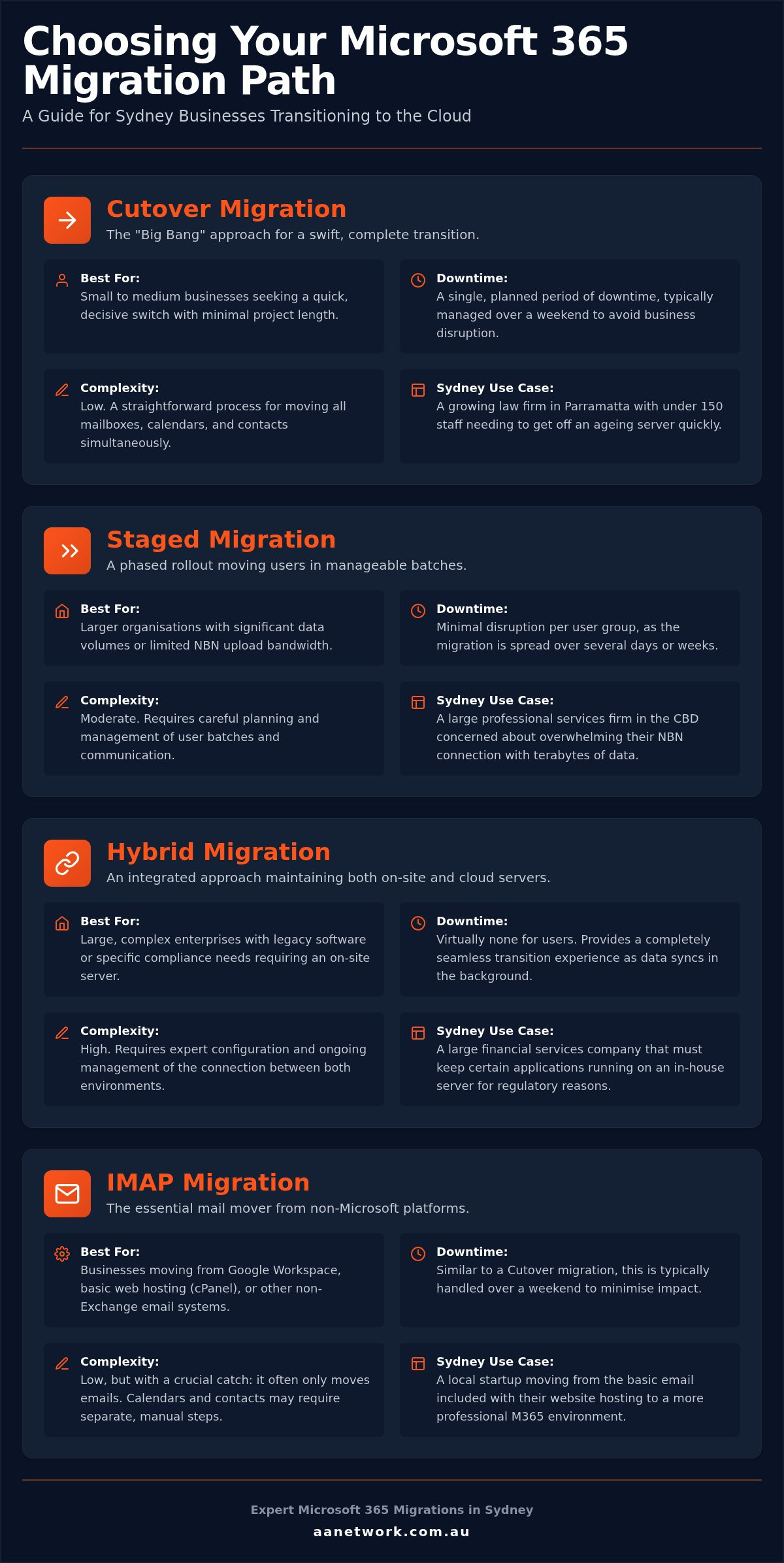
There are four primary ways we handle these transitions:
- Cutover Migration: This is the most popular "Big Bang" approach where every mailbox moves simultaneously.
- Staged Migration: We move users in smaller batches over several weeks, which is ideal if you have a massive amount of data and limited NBN bandwidth.
- Hybrid Migration: You maintain a connection between your old on-site server and the cloud. This is typically reserved for complex environments with legacy software.
- IMAP Migration: This is the standard path when moving away from Google Workspace or basic web-hosting mail.
IMAP migrations are particularly common for Sydney start-ups moving off basic "cPanel" mail. While this method moves your emails, it doesn't always bring across your calendars or contacts automatically. This is where manual configuration or specialised tools come into play to ensure your entire digital history is preserved. If you aren't sure which method fits your current setup, a local IT health check can help clarify your requirements before you start.
The Cutover Migration: Best for Sydney SMBs
We recommend the weekend cutover for most firms with under 50 staff. By starting the process on Friday evening, we can complete the heavy lifting while your office is empty. The most technical part is the "DNS switch"; this redirects your email traffic from the old server to Microsoft's data centres. When handled correctly, no emails are lost in the ether. Your staff simply log in on Monday morning to find their folders and history exactly where they left them, just in a faster and more secure environment.
Preparing staff for that first login is just as important as the data move itself. We provide clear, plain-English instructions so your team knows exactly what to expect when they open Outlook. Having a local team on standby means that if a password doesn't work or a signature needs resetting, we can resolve it in minutes rather than hours.
Tenant-to-Tenant Migrations for Mergers
Business growth in Sydney often leads to mergers and acquisitions. When two firms combine, you often need to consolidate two separate Microsoft environments into one. A tenant-to-tenant migration is a surgical data move between two cloud identities. This process is more complex than a standard server move because it involves unlinking domains and re-aligning security permissions without disrupting active workflows. It requires precise timing to ensure that neither brand experiences a gap in communication during the merger.
Data Sovereignty and Security Compliance for Professional Services
A successful email migration to Office 365 Sydney isn't just about moving folders; it is about meeting your legal obligations. For professional services in law or finance, where your data lives is just as important as how it is accessed. Many firms don't realise that cloud data can sometimes bounce through international servers, potentially exposing it to foreign jurisdictions. We prioritise keeping your information on home soil.
We ensure your data stays within Australian borders. Microsoft's local data centres in Sydney and Melbourne provide the residency you need to satisfy local regulators. Data sovereignty ensures your client information remains under Australian legal jurisdiction. This means your sensitive case files or financial audits aren't subject to the laws of another country just because they are stored in the cloud. It provides the peace of mind that your business remains compliant with local standards.
Security must be baked into the migration from day one. We implement Multi-Factor Authentication (MFA) as a non-negotiable layer. This simple step stops the vast majority of identity-based attacks. We also deploy Advanced Threat Protection (ATP) to guard against the sophisticated phishing emails that target Sydney firms every day. These tools help your business align with the "Essential Eight," which is the cyber security framework recommended by the Australian government to mitigate modern threats.
Compliance for Law and Accounting Firms
Sydney legal practices face strict data retention and privacy rules. The Australian Privacy Act requires you to take reasonable steps to protect personal information from unauthorised access. Microsoft 365 provides the audit logs and encryption tools needed to prove you are doing exactly that. For a deeper look at protecting your practice, see our guide on cyber security for law firms Sydney. It covers the specific compliance hurdles you'll face in 2026 and how to stay ahead of them.
Shared Responsibility in the Cloud
Many business owners assume Microsoft handles everything once the migration is finished. This is a dangerous myth. Microsoft secures the underlying infrastructure, but you are responsible for securing the data inside it. Think of it like an apartment building; Microsoft provides the secure lobby and the walls, but you still need to lock your front door. We help you set up conditional access policies. These ensure that your remote staff in Sydney can only log in from approved devices and locations, adding an extra shield against stolen credentials.
The 5-Step Sydney SMB Email Migration Roadmap
Moving your entire firm's communication history isn't a task for a spare Saturday afternoon. A successful email migration to Office 365 Sydney requires a disciplined sequence of events to ensure no data is left behind. We use a proven five-phase roadmap that prioritises your billable hours and protects your legacy data from the first audit to the final staff training session.
- Phase 1: Environment Audit and NBN Capability Check.
- Phase 2: Licensing Optimisation and Security Architecture.
- Phase 3: Pre-Migration Data Cleansing and Pilot Testing.
- Phase 4: The Weekend Cutover and MX Record Update.
- Phase 5: On-Site "Floor Walking" Support and Staff Training.
Step 1: The Local Environment Audit
We start by checking your physical office network in Sydney before moving a single byte of data. It's a common mistake to ignore the local infrastructure. If your NBN connection has poor upload speeds, the initial "seeding" of your data to the cloud will crawl; this potentially delays your go-live date. We test your bandwidth to ensure it can handle the heavy lifting of several hundred gigabytes of mail.
During this audit, we also hunt for legacy PST files. These are old archive folders often tucked away on individual hard drives or local servers. Many automated migration tools miss these files entirely, leading to "lost" emails that staff can't find after the move. We identify these massive mailboxes early and create a specific plan to ingest them into Microsoft 365, ensuring your firm's entire history remains searchable and secure.
Once the audit is complete, we move into licensing and security architecture. In 2026, many Sydney firms are opting for Microsoft 365 Business Premium (indicatively A$32.90 per user/month) to gain access to advanced AI and security features. We then run a pilot test with a single "power user" to identify any potential glitches before the full weekend cutover begins. This "measure twice, cut once" approach is what prevents Monday morning chaos.
Step 5: Post-Migration "Floor Walking"
The most critical hour of any migration is 8:30 AM on Monday morning. While overseas providers might leave you with a PDF manual and a support ticket number, we believe in being physically present. Our technicians provide on-site "floor walking" support in your Sydney CBD or Parramatta office. We walk from desk to desk to help staff with their new Outlook profiles and re-configure mobile phones for the new environment.
This hands-on approach addresses "day one" frustrations immediately. Whether it's a missing shared calendar or a signature that needs resetting, we resolve it on the spot. It turns a potentially stressful technology shift into a positive experience for your team. If you want to ensure your transition is handled with this level of care, start with our free 30-minute IT health check to map out your specific migration needs.
Why a Local Sydney Partner Beats a Faceless Call Centre
Choosing a partner for your email migration to Office 365 Sydney is about more than just finding someone who can move data. It is about accountability. When you work with a founder-led firm, you aren't just another ticket in a queue. You are dealing with experts who have a personal investment in your success. We understand the specific pressures of the Sydney business environment, from the high stakes of a CBD court date to the rapid pace of Parramatta's financial sector.
We don't just "remote in" and hope for the best. We know the local NBN quirks that can turn a simple upload into a multi-day headache. By being physically present, we see the things a remote technician misses, like the physical security of your hardware or the specific way your team interacts with their devices. This local knowledge ensures that your transition is tailored to the reality of your physical office, not just a digital blueprint.
The migration is just the beginning of your Microsoft 365 journey. Once your mail is stable, we help you optimise the rest of the suite to improve your workflow and security. This ongoing partnership means your technology evolves alongside your business, rather than becoming a stagnant expense. We focus on long-term results that help you get the most value out of your monthly subscription.
The Frustration of Remote-Only Support
Many large Managed Service Providers (MSPs) rely on overseas call centres to keep their costs down. This often leads to scripted support and long wait times when you need immediate answers. If your email goes down, you don't want to explain your office layout to someone in a different time zone. You want a partner who has been to your office and knows exactly how your team operates. Straight-talking local advice saves more time than any technical script. AA Network Technologies prides itself on being a high-touch alternative to faceless competitors, offering a level of attention that larger organisations simply can't match.
Starting with a Free 30-Minute IT Health Check
A successful migration starts long before the first file is moved. We use our health check to identify potential risks, such as hidden legacy data or insufficient bandwidth, before they become expensive problems. You won't get a confusing technical report; instead, you'll receive a clear, plain-English summary of your cloud readiness. This ensures that when we do pull the trigger on your move, every variable has been accounted for. It is the mandatory first step for any firm looking for a risk-free transition. To get started, book your Free 30-Minute IT Health Check to kickstart your migration strategy and ensure your firm is ready for the future.
Take Control of Your Firm's Digital Future
Moving your practice to the cloud is a strategic decision that protects your billable hours and ensures long-term data security. By following a structured roadmap and choosing a migration path tailored to your team, you can eliminate the risks of data loss or Monday morning downtime. Maintaining data sovereignty and meeting local compliance standards are non-negotiable for Sydney's professional services; our approach ensures your sensitive information stays under Australian jurisdiction.
Your email migration to Office 365 Sydney deserves more than a remote-only support ticket. Our founder-led team provides the local expertise and on-site support needed for offices in the CBD and Parramatta. We specialise in the strict compliance requirements of law and finance firms, acting as a proactive guardian for your digital assets. We take on the technical burden so you can focus on your clients.
Don't let legacy hardware or complex licensing hold your business back. Book your free 30-minute Sydney IT health check today to map out a risk-free transition and identify any hidden vulnerabilities. We are ready to help you build a more resilient, efficient, and secure office environment.
Frequently Asked Questions
How long does a typical email migration to Office 365 take for a Sydney office?
A standard email migration to Office 365 Sydney usually takes between two and four weeks from the initial audit to the final hand-over. While the technical cutover happens over a single weekend to avoid disrupting your business hours, the preparation phase is where the heavy lifting occurs. This includes auditing your local network, cleansing old data, and setting up security protocols to ensure a smooth transition on Monday morning.
Will we lose any emails or calendar appointments during the migration?
You won't lose any data when the migration is handled by experts. We use specialised tools that synchronise your existing mailboxes with the new environment in the background well before the switch. A final "delta" sync is performed during the cutover weekend to catch any last-minute messages or calendar appointments. This ensures that every bit of history is preserved and ready for your team on Monday morning.
Is our data stored in Australia if we move to Microsoft 365?
Yes, your data is stored in Australian data centres located in Sydney and Melbourne. Microsoft provides local data residency, which is vital for meeting the requirements of the Australian Privacy Act and other local regulations. During the setup, we specifically configure your Microsoft 365 tenant to ensure your information remains on home soil, providing you with full data sovereignty and legal peace of mind.
Do we need to upgrade our office NBN before migrating our email?
You don't always need to upgrade your NBN, but we must audit your current connection first. If your office has slow upload speeds, the initial transfer of large mailboxes can take significantly longer. In some cases, we might recommend a temporary speed boost or use different seeding methods to ensure the migration stays on schedule without choking your daily internet usage for other office tasks.
Can we keep our old version of Outlook after moving to Office 365?
We strongly recommend using the latest version of Outlook included with your Microsoft 365 subscription. Older versions, particularly those older than 2021, often lack the necessary security updates and modern authentication features required for the cloud. Using the most recent version ensures that your staff can access all the new collaboration tools and AI features without the frustration of constant connection errors or sync issues.
What is the cost of an Office 365 migration for a small business with 15 staff?
The total investment for a 15-staff migration depends on the volume of data and the complexity of your current server. You'll need to account for monthly licensing, such as Microsoft 365 Business Premium which is indicatively $32.90 AUD per user/month in 2026. The service component covers the audit, data transfer, and on-site support. We provide a clear breakdown of these costs after your initial IT health check.
Will our email be down during the migration process?
Your email service will remain active throughout the entire process. We perform the cutover during a weekend when your office is closed, so there is no impact on your billable hours. Emails will continue to arrive in your old inbox until the DNS switch is made, at which point they will start flowing into your new Office 365 environment. This zero-downtime approach is our standard for all email migration to Office 365 Sydney projects.
What happens to our shared mailboxes and public folders during the move?
Shared mailboxes and public folders are migrated alongside your individual accounts. Microsoft 365 handles shared mailboxes exceptionally well, and they are usually free of charge for up to 50GB of data. We map out these shared resources during the audit phase to ensure permissions are correctly transferred, so your team retains access to their collaborative folders and "info@" addresses from the moment they log in.