Microsoft 365 Setup for Sydney Small Businesses: The 2026 Step-by-Step Guide
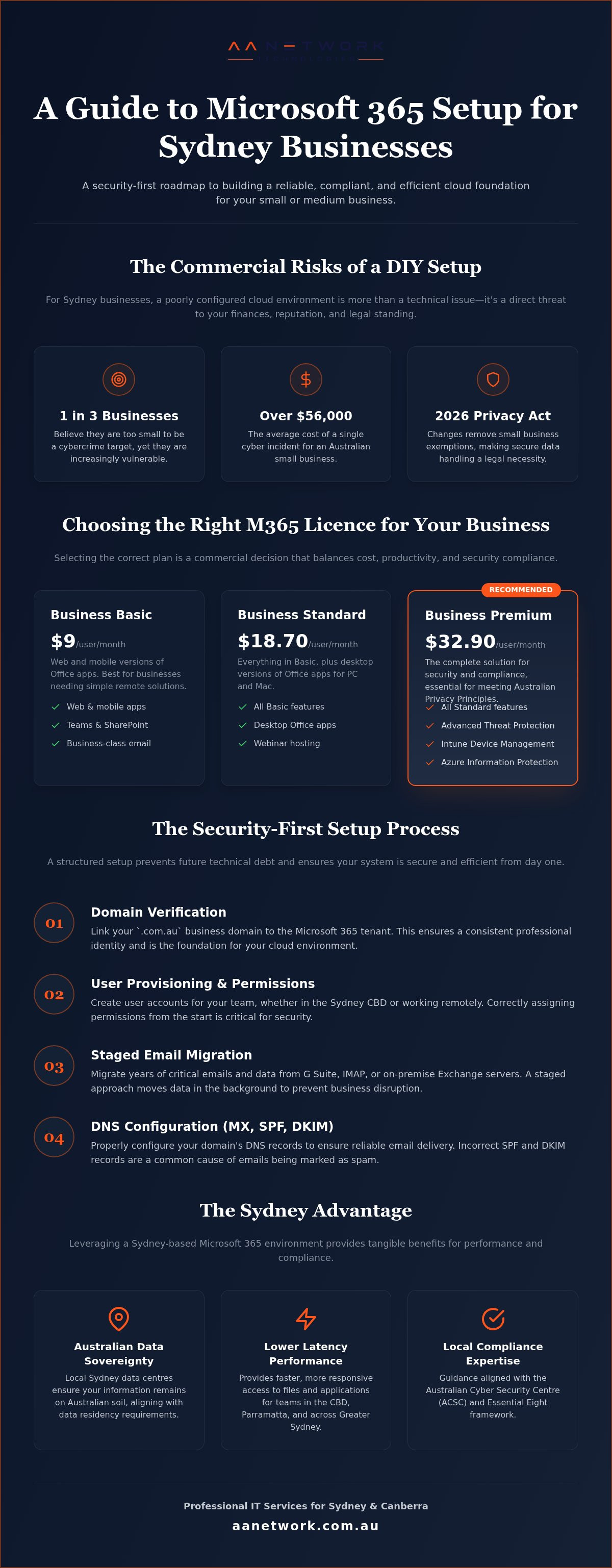
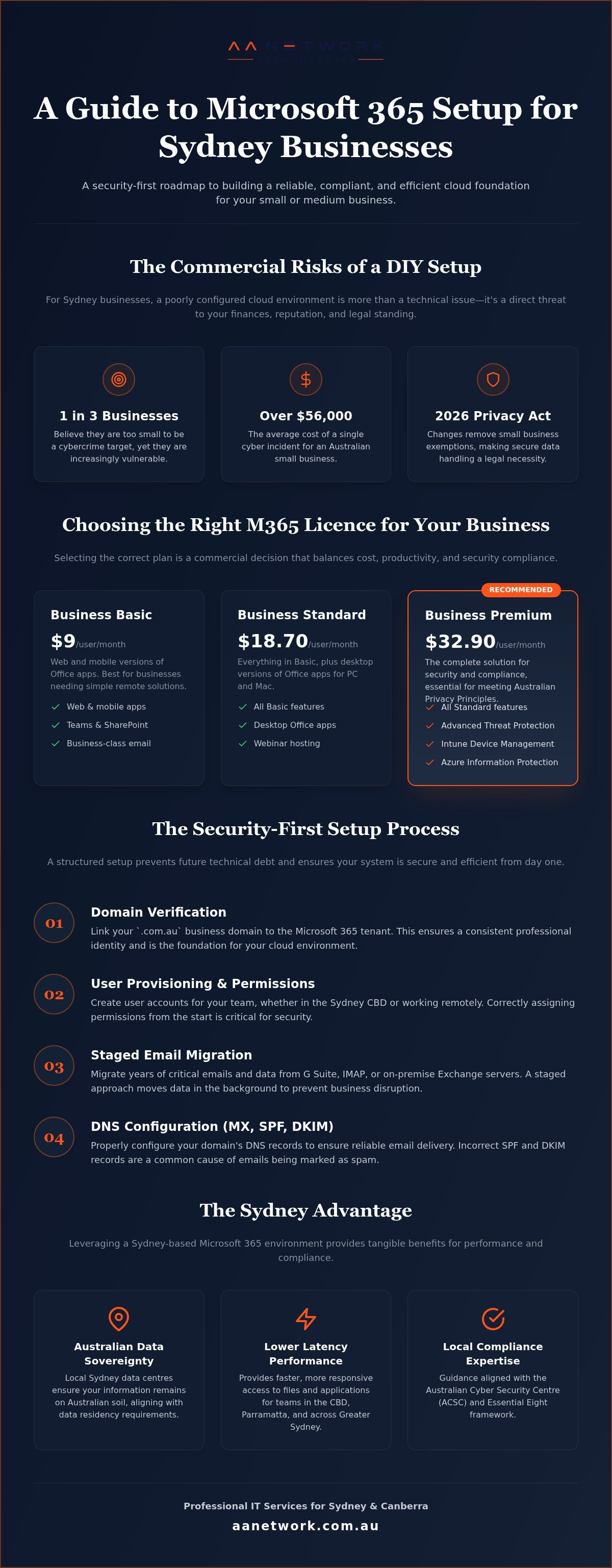
One in three Australian small businesses believe they are too small to be a target for cybercrime, yet the average cost of a single incident has climbed to over $56,000. If you're planning a Microsoft 365 setup small business Sydney project, a botched migration isn't just a technical hiccup; it's a significant commercial risk. Between the 2026 Privacy Act changes and the removal of small business exemptions for many sectors, getting your cloud environment right from day one is now a legal necessity.
It's understandable if you're feeling overwhelmed by confusing licensing tiers or the fear of losing years of critical emails during a migration. You want a system that just works, whether your team is collaborating in a Sydney CBD boardroom or finishing a report from home in Parramatta. This guide provides a professional, security-first roadmap to master your transition without the usual downtime or frustration.
We'll walk through the exact steps to configure SharePoint for secure file sharing, set up robust identity protection, and align your business with the ACSC Essential Eight framework. By the end of this article, you'll have a clear plan to build a reliable digital foundation that protects your reputation and empowers your staff to work efficiently from anywhere in Greater Sydney.
Key Takeaways
- Learn why Microsoft 365 is the critical foundation for Sydney professional services to meet 2026 privacy regulations and security standards.
- Follow a structured process for a Microsoft 365 setup small business Sydney owners can rely on to link domains and provision users without data loss.
- Avoid the common DIY traps that lead to downtime by leveraging local on-site expertise across the Sydney CBD and Parramatta.
- Organise SharePoint and Teams with a logical file system that supports seamless collaboration between your office and remote locations.
- Establish a proactive maintenance routine with regular IT health checks to ensure your digital environment remains secure and efficient.
Why Microsoft 365 is the Backbone of Sydney Small Business in 2026
The transition from legacy "Office" software to a cloud-first ecosystem is now the standard for successful firms. For most owners, a Microsoft 365 setup small business Sydney project is no longer just about installing Word and Excel; it's about building a secure, compliant infrastructure. In 2026, the suite has evolved into a unified platform where security and productivity are inseparable. Understanding what Microsoft 365 includes is the first step in moving beyond basic email to a system that protects your commercial reputation.
Sydney's professional services sector faces stricter rules this year. As of 1 July 2026, many accountants, lawyers, and real estate agents are now regulated under the Privacy Act due to the removal of small business exemptions for those under AML/CTF Tranche 2. This makes the built-in compliance tools in Microsoft 365 vital. When your Outlook, Teams, and SharePoint environments are properly integrated, sensitive data stays protected. Local Sydney data centres ensure your information remains on Australian soil, providing the "Sydney Advantage" of lower latency for teams working in the CBD or Parramatta.
Understanding 2026 Licensing for SMBs
Choosing the right plan is a commercial decision, not just a technical one. Following the July 2026 price increases for Business Basic and Standard, the value has shifted toward Business Premium. While Basic is now $9 and Standard is $18.70 per user, Premium has held steady at $32.90. For a Sydney office, Premium provides the advanced security needed to meet Australian Privacy Principles without purchasing extra third-party software. We often find firms overpay by holding legacy licenses they don't use; auditing these is a quick win for your bottom line.
Cloud vs Hybrid: What Works Best in NSW?
The days of the noisy server room in a North Sydney or CBD office are largely over. Most firms find that a 100% cloud environment is more reliable and cost-effective than maintaining on-premise hardware. With Sydney NBN speeds now supporting high-capacity cloud sync, handling large files in SharePoint is efficient. Moving to the cloud removes the risk of physical hardware failure and simplifies remote work for staff commuting from Western Sydney or Norwest. You can explore our Microsoft 365 support Sydney services to see how we manage these transitions for local firms.
Step-by-Step: Setting Up Your Microsoft 365 Environment Properly
Setting up your tenant correctly from the start prevents a world of technical debt later. For a Microsoft 365 setup small business Sydney project, the first priority is domain verification. You need to link your .com.au address to the Microsoft tenant to ensure your professional identity remains consistent. Once the domain is verified, user provisioning begins. This involves organising accounts for your core Sydney CBD team and any staff working remotely from locations like Parramatta or the Norwest Business Park. Getting this structure right ensures everyone has the correct permissions without compromising security.
Email migration is often the most stressful part of the transition. Whether you are moving data from G Suite, a legacy IMAP provider, or an old on-premise Exchange server, data integrity is your biggest concern. You cannot afford to lose years of client correspondence or critical attachments. A staged migration allows you to move data in the background while your team continues to work. During this phase, you must also secure your Global Admin account. This account holds the "keys to the kingdom" and should only be used for configuration, never for daily tasks like checking email or browsing the web.
DNS Configuration for Australian Domains
Australian domain registrars often have specific interfaces that can be finicky during DNS propagation. You must update your MX, SPF, and DKIM records precisely to ensure your new emails don't land in your Sydney clients' spam folders. These records act as digital signatures that verify your identity to other mail servers. A common pitfall for local firms is neglecting the SPF record, which can lead to your legitimate business emails being blocked by major providers. If you need a hand with these technical hurdles, you can reach out to our Sydney team for assistance.
Security Hardening: Aligning with the Essential Eight
The Essential Eight is a prioritised list of practical security controls developed by the Australian Signals Directorate to help organisations mitigate cyber threats. Mandating Multi-Factor Authentication (MFA) across your entire team is the most effective way to stop unauthorised access. We also recommend configuring conditional access policies for staff working from home in Western Sydney or North Sydney. These policies ensure that logins are only permitted from trusted devices and locations. Following the FTC's guide to cybersecurity, professional oversight during setup prevents the simple configuration gaps that hackers exploit. This proactive approach protects your firm from the financial and reputational damage of a data breach.
The DIY Trap: Why Local Sydney Support Beats the Call Centre
Many business owners start a Microsoft 365 setup small business Sydney project thinking it's a simple case of "next, next, finish." This DIY approach often leads to the "DIY Trap," where a minor configuration error causes significant operational downtime. When you rely on generic online guides, you're following advice that doesn't account for local variables like Sydney's specific NBN infrastructure or the nuances of .com.au domain propagation. If your migration stalls at 11:00 PM on a Sunday, an offshore community forum won't help you get your team back online for Monday morning meetings.
The benefit of a local partner is the ability to provide on-site support when it matters most. Whether your office is in the Sydney CBD or a tech hub in Parramatta, having a technician who can physically visit your premises is invaluable. Beyond just fixing errors, local support includes personalised training. We help your staff actually use the new tools, ensuring your investment in Microsoft 365 translates into real-world efficiency rather than just another monthly subscription cost. You can learn more about our approach through our managed IT support in Sydney.
Comparison: DIY Setup vs Managed Local Setup
Choosing between a self-managed setup and a professional engagement often comes down to risk management. The differences are stark when you look at the long-term impact on your operations:
- Time commitment: DIY setups often consume 15 to 20 hours of a director's time. A managed setup allows you to focus on business as usual while we handle the technical heavy lifting.
- Security risk: Default settings are notoriously permissive. We provide a hardened professional configuration that closes common loopholes and aligns with Australian standards.
- Ongoing support: Call centre queues can leave you stranded for hours. We offer a direct line to a Sydney expert who understands your specific digital environment.
Case Study: A Sydney Law Firm's Migration
A boutique law firm recently approached us with a significant challenge: migrating 20 years of legacy email while maintaining strict compliance with the Australian Privacy Principles. They couldn't afford a single minute of downtime or the loss of a single client file. We designed a phased weekend migration, moving data in batches to ensure the integrity of every record. By Monday morning, the firm was fully operational on the new tenant with zero data loss and an immediate boost in staff productivity. This proactive approach is a core part of our IT support for Sydney CBD firms, providing the peace of mind that comes from expert management.
Optimising Your Workspace: Moving Beyond Basic Email
Most firms treat their Microsoft 365 setup small business Sydney as just a modern way to host email. This is a missed opportunity for efficiency. By 2026, the suite has moved toward deep integration where SharePoint, Teams, and OneDrive work as a single unit. Adding AI tools like Microsoft 365 Copilot into the mix allows Sydney teams to automate meeting notes and draft complex reports in seconds; freeing up time for high-value client work. This transition requires a strategic approach to ensure your staff aren't just using new tools in old, inefficient ways.
SharePoint Best Practices for Professional Services
SharePoint is the engine room of your firm's data. For Sydney legal or accounting practices, a "default" setup with loose permissions is a liability. You need a logical file system that ensures sensitive client data stays private while remaining accessible to the right staff. When we manage a Microsoft 365 setup small business Sydney project, we prioritise a "security-first" SharePoint architecture. We recommend moving away from deep, nested folder structures and using metadata instead. This makes finding files faster and reduces the risk of long-path errors that plague legacy systems. If you're still weighing up your options, our Microsoft 365 vs Google Workspace: 2026 Sydney Guide breaks down the choice for local firms.
Teams for the Hybrid Sydney Office
Microsoft Teams is more than a chat tool; it's a unified communications hub. For firms with staff split between the CBD and home offices in Parramatta, integrating VoIP allows your Sydney phone system to live entirely within Teams. This means your team can take landline calls on their laptops or mobiles without needing physical desk phones. We also configure secure external guest access, allowing you to collaborate with clients or contractors in a controlled environment. Using the "Planner" app within Teams channels helps managers track projects and deadlines across the whole organisation without endless follow-up emails.
OneDrive for Business provides the final piece of the puzzle by securely syncing personal work files across all your devices. Unlike SharePoint, which is for shared team data, OneDrive is for your individual drafts and working documents. It ensures that if a laptop is lost on a Sydney train, your data remains encrypted and retrievable from the cloud. This layered approach to data management is what separates a professional, hardened setup from a basic, risky one.
Future-Proofing Your Sydney Office with AA Network Technologies
The success of your Microsoft 365 setup small business Sydney project doesn't end on launch day. True efficiency comes from proactive monitoring that identifies and fixes potential issues before your staff even notices a glitch. AA Network Technologies acts as a watchful ally; managing the background technicalities so you can focus on your core billable work. This ongoing oversight ensures your digital environment remains stable as your firm grows and security threats evolve. We take on the burden of technical management so you don't have to.
Scalability is a primary advantage of a managed cloud environment. Whether you are moving into a new office in the Sydney CBD or expanding your team in Parramatta, AA Network Technologies can provision new staff accounts and secure devices in minutes. Our quarterly IT health checks ensure your configuration remains at peak performance and continues to meet the latest Australian security standards. As a founder-led team, we take personal ownership of your success; providing a level of accountability that large, faceless corporations simply cannot match.
Why Sydney Professional Services Trust AA Network Technologies
Professional services firms in the legal, medical, and financial sectors have unique compliance obligations that generic IT providers often overlook. AA Network Technologies possesses deep expertise in navigating the Australian Privacy Principles and the specific data handling requirements of these industries. Our approach integrates security directly into your workflow; ensuring that your Microsoft 365 setup small business Sydney is hardened against unauthorised access from the start. You can explore how we support local firms in our guide to Managed IT Support Sydney: Local Expertise for Professional Services in 2026.
We believe in the power of physical presence. While we manage most tasks remotely for speed, AA Network Technologies provides hands-on, on-site support across Greater Sydney when a situation requires a human touch. This localised service model means we understand the specific pressures of the Sydney business environment. We don't just offer technical fixes; we provide commercial solutions that reduce downtime and protect your firm's reputation.
Your Next Steps: Secure Your Sydney Setup
Transitioning from a messy, DIY configuration to a professionally managed environment is the most effective way to secure your business data. If you're currently struggling with slow sync speeds, confusing permissions, or a lack of clear security policies, now is the time to act. AA Network Technologies offers a free 30-minute IT health check to audit your current setup and identify any critical gaps in your security or performance.
This audit provides a clear roadmap to modernise your digital workspace without the stress of a typical migration. We handle the technical heavy lifting; ensuring your data is protected and your team is ready to work efficiently from anywhere in NSW. Don't leave your firm's security to chance with a default configuration that leaves your data exposed.
Organise your Microsoft 365 setup with AA Network Technologies today
Secure Your Digital Future with a Local Partner
Successfully managing a Microsoft 365 setup small business Sydney project requires a strategic focus on both security and productivity. We have discussed how moving beyond basic email to a hardened SharePoint architecture and integrated Teams environment protects your reputation and streamlines your workflow. With the 2026 Privacy Act changes now in effect, ensuring your firm meets Australian cyber security compliance is no longer optional; it's a commercial necessity for every professional services firm.
You deserve a technology partner that offers more than just a remote helpdesk. Our founder-led team provides local accountability and hands-on, on-site support across the Sydney CBD and Parramatta. We take the stress out of migration and ongoing maintenance, allowing you to focus on your clients while we act as the proactive guardians of your digital workspace. This partnership ensures your technology remains an asset rather than a source of daily frustration.
Take the first step toward a more reliable and secure office today. We are here to help you build a digital foundation that empowers your team to thrive in the years ahead. Let's work together to make your technology work for you.
Frequently Asked Questions
How long does a Microsoft 365 setup take for a small business in Sydney?
A standard setup usually takes between three to five business days, depending on the volume of data being migrated. For a typical Sydney office with 10 to 20 staff, we often perform the technical cutover during a weekend to ensure zero downtime on Monday morning. Larger firms with complex SharePoint structures or legacy servers may require a phased approach over two weeks to maintain data integrity throughout the process.
Can I keep my existing .com.au email address with Microsoft 365?
Yes, you can retain your professional .com.au email address by verifying your domain within the Microsoft 365 tenant. During the Microsoft 365 setup small business Sydney process, we update your DNS records at your registrar to point to Microsoft’s servers. This ensures your brand identity remains consistent while gaining the advanced security and collaboration features of the cloud ecosystem without needing to change your contact details.
Do I need to upgrade my Sydney office internet for Microsoft 365?
Most Sydney firms find that a standard NBN business connection is sufficient for daily operations. However, if you are moving large volumes of data to SharePoint or using Teams for frequent video conferencing, we recommend a connection with at least 20Mbps upload speed. We audit your current speeds in the CBD or Parramatta to ensure your network can handle the increased cloud sync traffic without slowing down your staff.
Is Microsoft 365 compliant with Australian privacy laws for law firms?
Microsoft 365 is fully compliant with the Australian Privacy Principles when configured correctly. For Sydney law firms, we implement specific security hardening that aligns with OAIC requirements and the 2026 Privacy Act updates. This includes data residency settings to ensure your client files stay within Australian data centres and robust encryption to protect sensitive correspondence from unauthorised access, fulfilling your professional and legal obligations.
What happens to my old emails during a Microsoft 365 migration?
Your old emails are safely migrated from your legacy provider into your new Microsoft 365 mailboxes. We use specialised tools to move your entire history, including folders, calendar appointments, and contacts, without losing data. This process happens in the background, so your team can continue working on their old system until the final cutover is ready. This ensures a seamless transition for your Sydney office without missing critical client communications.
Can I use Microsoft 365 offline when I'm travelling outside of Sydney?
You can work offline using the desktop versions of Word, Excel, and Outlook. Any changes you make are saved locally and will automatically sync to the cloud once you reconnect to the internet. This is particularly useful for staff travelling between Sydney and Canberra or working from locations with limited connectivity. Your OneDrive files are also available for offline access if you select the specific folders for local sync.
Is it better to buy Microsoft 365 licenses directly or through a Sydney partner?
Purchasing through a local Sydney partner often provides better value because it includes personalised support and billing in Australian dollars. While direct pricing is available, a partner like AA Network manages the complex backend configuration and provides a direct line for technical help. This removes the frustration of waiting in offshore call centre queues when you need urgent assistance with your tenant or user permissions.
How does Microsoft 365 protect my business from ransomware in 2026?
Microsoft 365 uses advanced threat protection to scan attachments and links for malicious code before they reach your inbox. In 2026, the suite includes automated detection that can roll back files in OneDrive or SharePoint if it detects a ransomware attack. When combined with a Microsoft 365 setup small business Sydney configuration that follows the Essential Eight, your firm gains a multi-layered defence against modern cyber threats and financial loss.