Microsoft 365 vs Google Workspace: 2026 Sydney Guide
The "cheapest" cloud suite might be the most expensive mistake your Sydney firm makes this year. If your team is losing hours to platform outages or struggling with clunky collaboration tools, you're paying a price that doesn't show up on a monthly invoice. Choosing between Microsoft 365 vs Google Workspace for small business is about more than just email. It's about how your staff work together from the CBD to Parramatta and whether your data remains compliant with the latest Australian privacy standards.
You likely want a smooth transition between office and remote work without the technical headaches or hidden storage fees. We agree that IT should be a predictable monthly cost, not a source of daily frustration. This guide promises to help you identify which platform will actually fuel your growth while keeping your client information locked down tight.
We'll break down the July 2026 landscape, including the A$9.00 Microsoft 365 Business Basic pricing and Google's latest Workspace updates. It's a straight-talking look at the tools your business needs to stay competitive and secure.
Key Takeaways
- Understand how the latest AI-first ecosystems in 2026 can automate your daily workflows and significantly reduce manual admin across your entire Sydney team.
- Evaluate Microsoft 365 vs Google Workspace for small business to determine which suite aligns with your specific needs for document precision or real-time collaboration.
- Navigate Australian privacy regulations and data residency requirements to ensure your firm's sensitive information stays secure and compliant on local servers.
- Learn the essential steps for a smooth cloud migration that avoids common pitfalls like lost emails or staff downtime during your transition.
- See why having on-site support in Sydney CBD or Parramatta is the ultimate safeguard against the "Time Zone Trap" of overseas help desks.
The 2026 Productivity Showdown: Microsoft 365 vs Google Workspace
By July 2026, the choice between Microsoft 365 vs Google Workspace for small business has moved past simple email hosting. We've entered the era of AI-first ecosystems. It's no longer just about where you type; it's about how much of that typing is done for you. Both platforms have evolved into proactive assistants that can draft emails, summarise meetings, and predict your next move before you've even finished your morning coffee in the CBD.
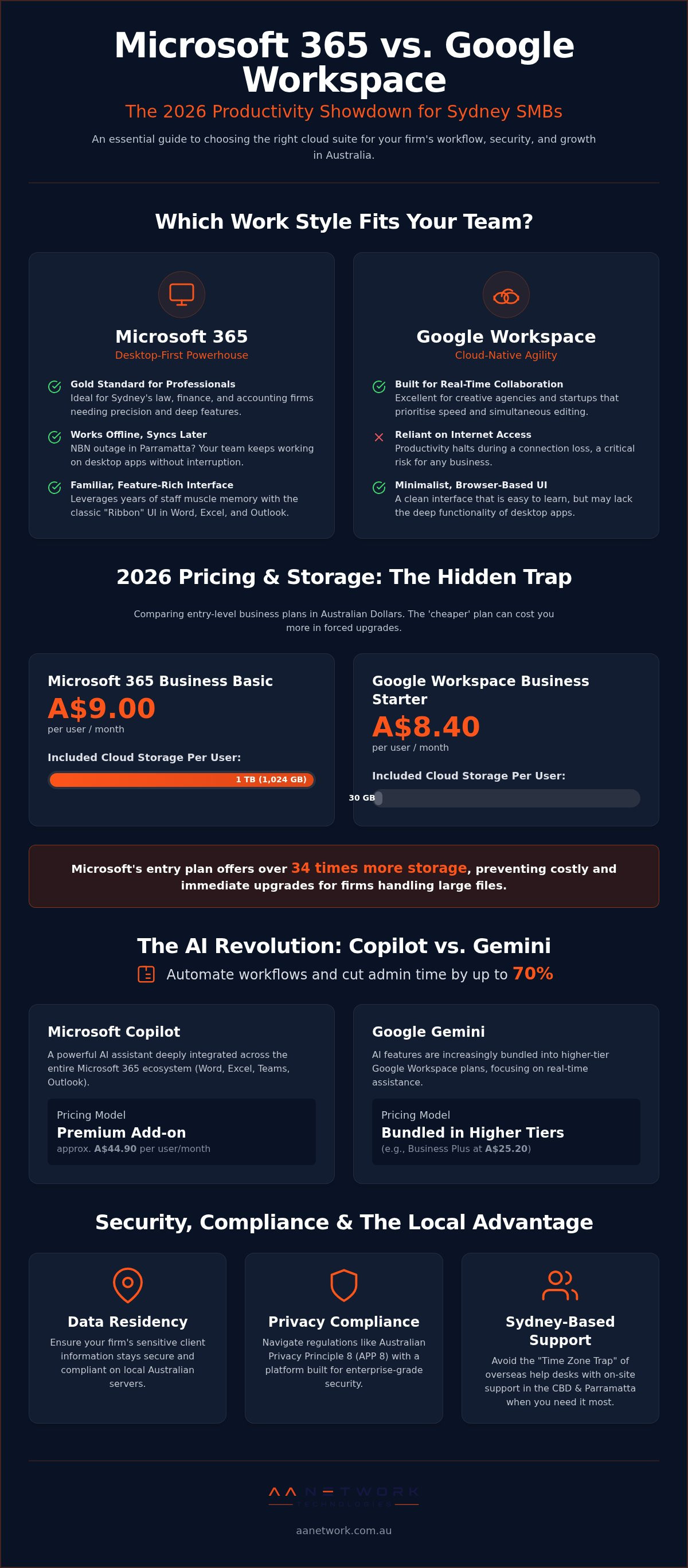
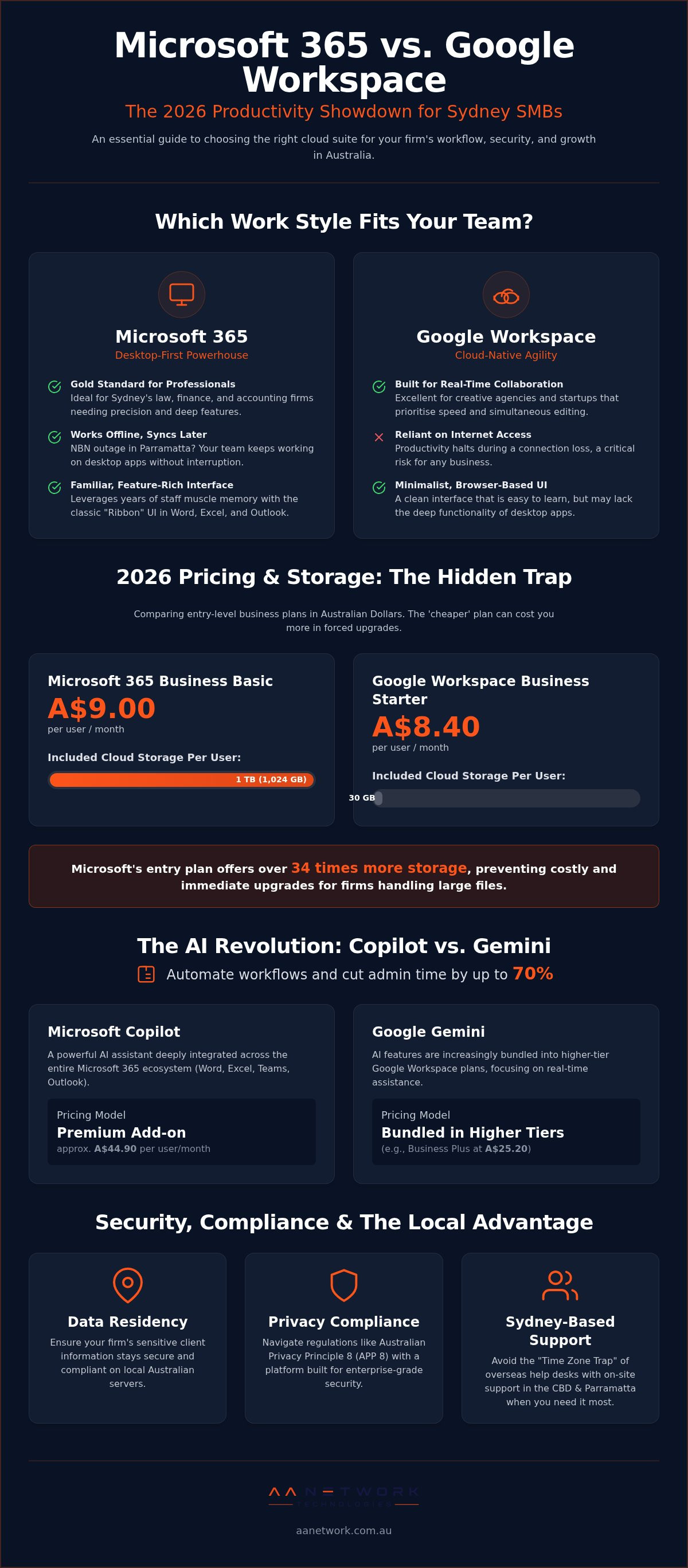
Microsoft 365 remains the gold standard for document-heavy professional firms. It's the powerhouse behind Sydney's law and accounting sectors, providing the precise formatting and deep functionality that complex contracts require. Google Workspace, on the other hand, is the browser-based challenger. It prioritises real-time agility and is often the go-to for creative agencies that value speed over deep feature sets. Many Sydney startups fall into the "free" trap, assuming Google is the budget choice. In reality, running a professional firm on a personal Gmail account is a security risk. Real business tools come with a real price tag, and the gap between the two is narrower than you might think.
The Core Philosophical Difference
Your choice often comes down to office culture. Microsoft 365 is desktop-first. Your staff use the familiar "Ribbon" interface they've known for years. Google Workspace is cloud-only, favouring a minimalist menu. Muscle memory matters more than most owners realise. Forcing a team of veteran accountants to switch from Excel to Sheets can lead to a significant drop in morale and productivity.
Reliability is another factor. If the NBN goes down in Parramatta, Google users often find themselves staring at a loading screen. Microsoft 365 allows your team to keep working on desktop applications, syncing their files once the connection returns. For a comprehensive comparison of office suite features, it's clear that Microsoft's hybrid approach offers a safety net that pure cloud players can't match.
2026 Pricing for Australian SMBs
Let's look at the actual costs in Australian Dollars. As of July 2026, Microsoft 365 Business Basic is A$9.00 per user. The Standard tier is A$18.70, while Business Premium, which includes the security tools most Sydney firms actually need, is A$32.90. Google Workspace starts at A$8.40 for Business Starter and goes up to A$25.20 for Business Plus.
Watch out for the hidden storage trap. Google's Starter plan only gives you 30 GB of storage. Microsoft's Basic plan starts with 1 TB. If your firm handles large files, Google's "cheaper" entry price will vanish the moment you're forced to upgrade. AI costs also vary. Microsoft Copilot is an add-on at approximately A$44.90 per user, whereas Google has started bundling Gemini into its higher tiers. Choosing the wrong plan often leads to higher IT support bills later as you struggle to patch together missing features.
Comparing the Core Ecosystems: From Storage to AI Integration
The decision between Microsoft 365 vs Google Workspace for small business often rests on how your team handles their heaviest daily tasks. For a law firm in the Sydney CBD, document precision isn't optional. Microsoft Word remains the undisputed heavyweight for complex legal templates and version control. While Google Docs is excellent for a quick brainstorm, it often lacks the deep formatting tools required for professional contracts. Similarly, Sydney's accounting firms rarely look past Excel. The Power Pivot and advanced data modelling capabilities simply aren't matched by Google Sheets. If your business lives in spreadsheets, Excel is your engine.
Communication tools follow a similar divide. Microsoft Teams acts as a central hub for your entire office, integrating chat, files, and calls into one window. Google Meet is simpler to join, but it can feel disconnected from your actual work files. Outlook remains the choice for those who need to organise a high volume of client correspondence directly within their inbox. Gmail's search-first approach is fast, but it can feel chaotic when you're trying to track a specific project across multiple months of threads.
The AI Factor: Microsoft Copilot vs Google Gemini
Artificial Intelligence has changed the game for Sydney offices in 2026. Microsoft Copilot is baked into every app, from drafting a Word document to summarising a Teams meeting you missed. It costs approximately A$44.90 per user per month. Google Gemini is now included in Business Standard and Plus plans, but it remains heavily tied to the browser. If your staff prefer working in desktop apps, Copilot provides a more smooth experience that justifies the seat fee.
Cloud Storage: OneDrive & SharePoint vs Google Drive
Managing a complex file structure requires a disciplined system. SharePoint is designed for established firms that need strict permissions and logical folder hierarchies. Google Drive often suffers from "data sprawl," where files are scattered across individual My Drive folders instead of a central company repository. We often see Sydney teams struggle with the "red X" on their files when syncing from home. This is usually a configuration issue rather than a platform failure. If your cloud setup feels messy, a quick IT & Cyber Security Review can often identify where your file structure is breaking down and how to fix it.
Security, Compliance, and the 'Australian Privacy' Factor
For a Sydney law or accounting firm, a data breach isn't just a technical glitch. It's a reputational disaster that can end a practice. When comparing Microsoft 365 vs Google Workspace for small business, security isn't just a checkbox; it's a legal requirement. "Secure enough" is a dangerous phrase. If you're handling sensitive client files, you need a platform that stands up to the scrutiny of the Australian Privacy Principles (APP) and the Notifiable Data Breaches (NDB) scheme.
Data residency is a critical part of this equation. You need to know exactly where your data lives. Both Microsoft and Google offer Australian data centres, but Microsoft's Azure regions in Sydney and Melbourne are often seen as the gold standard for local compliance. Under APP 8, you must take reasonable steps to ensure overseas providers don't breach Australian privacy standards. Having your data stay on Australian soil makes this much simpler. Recent privacy law changes in May 2026 also require you to be more transparent about how you use AI and where you store data. Managed IT support plays a vital role here. We don't just set up the software; we configure the security "knobs" to ensure your configuration matches your legal obligations.
Advanced Threat Protection for SMBs
Sydney firms are prime targets for sophisticated phishing campaigns and ransomware. You need a proactive defence. Microsoft 365 Business Premium includes Intune, which allows us to secure your team's laptops and mobiles remotely. If a staff member loses their phone at a café in Parramatta, we can wipe the business data instantly. Multi-Factor Authentication (MFA) is also non-negotiable. It's the single most effective way to stop account hacks. If you haven't turned it on, you're leaving your front door unlocked.
Backup and Disaster Recovery
Many business owners fall for the "Shared Responsibility" myth. They assume that because their files are in the cloud, Microsoft or Google is backing them up. This is incorrect. These providers ensure the service is available, but the data is your responsibility. If a staff member accidentally deletes a folder or a sync error corrupts a file, the provider won't always be able to get it back. We implement a 3-2-1 backup strategy: three copies of your data, on two different media types, with one copy off-site. This ensures your Sydney office stays online and functional even if the primary cloud service suffers a rare outage.
Migration Realities: Moving Your Sydney Team Without the Downtime
The fear of a "migration monster" keeps many Sydney firms stuck on outdated systems. We've seen it often. A business owner tries a DIY switch over the weekend, only to find their staff unable to send emails on Monday morning. When evaluating Microsoft 365 vs Google Workspace for small business, the technical transition is where the most hidden costs reside. A botched migration leads to lost correspondence, broken file links, and a team that's ready to mutiny before lunch.
A successful move requires a clear roadmap. We follow a proven five-step process to ensure your Sydney office stays productive throughout the change. This begins with a deep audit of your existing data. You don't want to pay to move "digital junk." We help you decide what to migrate to your new live environment, what to archive for compliance, and what to bin entirely. This keeps your new cloud suite lean and your storage costs predictable.
The Technical Heavy Lifting
The "plumbing" of your IT system is what makes or breaks a migration. We handle the complex MX record changes and DNS configurations that ensure your emails actually arrive in the right inbox. Moving legacy files from an old on-premise server in your Parramatta office to SharePoint or Google Drive requires precision. We also ensure your essential third-party integrations, like Xero for your accounts or LEAP for your legal practice, don't break during the cutover. If these connections fail, your billing stops. We make sure they stay rock solid.
Post-Migration Optimisation
The first 48 hours after a switch are the most critical. This is why we provide on-site support across the Sydney CBD and surrounding suburbs to put out fires immediately. We don't just leave you with a login and a "good luck" email. We review your permissions to ensure the right people have access to the right folders. Finally, we run a "Success Training" session for your staff. This helps them overcome the initial hurdle of learning a new interface and ensures they actually use the new tools you've paid for. If your current setup feels like it's holding you back, you can book a free IT & Cyber Security Review to plan your move without the stress.
Beyond the Subscription: Why Local Support Beats a Faceless Call Centre
The decision between Microsoft 365 vs Google Workspace for small business is only half the battle. The other half is ensuring that your chosen suite actually works when you need it. Faceless call centres and automated chat bots are fine until a critical file disappears or your entire team is locked out of their email. That's when the "Time Zone Trap" becomes a business killer. Waiting 12 hours for a US-based help desk to wake up isn't a strategy; it's a liability for a Sydney firm with deadlines to meet.
Personal accountability matters in a digital world. You don't want a ticket number; you want a straight-talker who understands the local pressures of running a practice in New South Wales. Having a senior-led partner means there's a human being invested in your success. Local, hands-on support reduces those small daily frustrations that eventually lead to staff burnout. It's the difference between a frustrating morning and a productive one where your tools simply work as they should.
The AA Network Technologies Advantage
We don't just manage your cloud; we're part of your local team. Whether your office is in the Sydney CBD or Parramatta, we provide on-site support when remote fixes aren't enough. We come to you. Our proactive monitoring identifies potential hiccups before your staff even notices a lag. Beyond basic maintenance, we specialise in custom AI and workflow automation. This ensures your chosen setup for Microsoft 365 vs Google Workspace for small business is working as hard as possible for your specific firm. We focus on removing the technical burden so you can focus on your clients.
Your Next Steps: The 30-Minute IT & Cyber Security Review
If you're feeling stuck between platforms or worried about your current setup, let's have a chat. Our IT & Cyber Security Review is designed to find the gaps that are costing you money. We look for security vulnerabilities, licensing waste where you're paying for features you don't use, and productivity bottlenecks that slow your team down. You'll get clear, no-obligation advice and a path forward that fits your Sydney firm's goals. It's a simple briefing, not a sales pitch, aimed at giving you peace of mind.
Book your free IT & Cyber Security Review with our Sydney team today.
Take Control of Your Sydney Cloud Strategy
Choosing between Microsoft 365 vs Google Workspace for small business doesn't have to be a technical gamble. Whether you need the document precision of Microsoft's Sydney based servers or the browser based agility of Google, the right choice is the one that actually fuels your growth without daily frustrations. The real win isn't just the software; it's having a setup that remains compliant and a team that stays productive.
Our senior-led team brings specialised expertise in professional service compliance and provides hands-on, on-site support across the Sydney CBD and Parramatta. We act as your proactive guardian, fixing bottlenecks before they stall your workday. It's about moving away from faceless call centres and toward a partnership that values your time as much as you do.
Ready to clear the technical fog? Book Your Free 30-Minute IT & Cyber Security Review with our Sydney experts today. We'll identify licensing waste, close security gaps, and help you build a workflow that just works. You've built a great business; let's make sure your technology finally keeps up with it.
Frequently Asked Questions
Is Google Workspace actually cheaper than Microsoft 365 for Australian businesses?
Google's entry tier is slightly cheaper at A$8.40 per user, compared to Microsoft's A$9.00 for Business Basic. However, the value isn't identical. Microsoft provides 1TB of storage from the start, while Google's starter plan is limited to 30GB. For most Sydney firms with large file libraries, the "cheaper" Google plan often requires an early upgrade that ends up costing more in the long run.
Can I use Microsoft Word but keep my email in Google Workspace?
You can certainly pay for both, but it's rarely a smart financial move. Running a split system means your team has to manage two different logins and your business pays two separate subscription fees. It also creates friction when trying to save files or collaborate on documents. We generally recommend picking one ecosystem and fully optimising it to keep your IT costs predictable and your workflow simple.
Does Microsoft 365 store my data in Australia for compliance reasons?
Yes, Microsoft uses data centres in Sydney and Melbourne to host Australian tenant data. This is a massive win for professional service firms that must comply with the Australian Privacy Principles. Storing your data locally ensures you meet residency requirements and often results in faster file access speeds for your staff working across the CBD or Parramatta.
How long does it take to migrate a 20-person office from Google to Microsoft?
A typical migration for a 20-person team takes about one week of preparation followed by a weekend cutover. We do the heavy lifting in the background, syncing your emails and files before the final switch. This "no-downtime" approach means your team leaves the office on Friday using one system and starts Monday morning on the new one without missing a single client email.
Will my existing software (like Xero or my legal CRM) work with both platforms?
Most modern Australian business tools like Xero, MYOB, or LEAP are designed to work with both Microsoft 365 vs Google Workspace for small business. However, the depth of that integration varies. Microsoft 365 often has the edge for legal and financial firms because its desktop apps allow for more complex document automation. We always audit your specific "software stack" before recommending a platform change.
Do I still need a server in my Sydney office if I move to the cloud?
Most small businesses can retire their noisy, expensive on-site servers once they migrate to a cloud suite. SharePoint and Google Drive handle your file storage, while your email moves to the cloud. You'll save on electricity, cooling, and the A$5,000 to A$10,000 cost of replacing hardware every few years. The only exception is if you run a legacy application that hasn't moved to the cloud yet.
What happens to my data if I stop paying for the subscription?
Your data isn't deleted the second a payment fails, but you will lose access eventually. Both providers typically offer a grace period of 30 to 90 days where your data is "read-only." After that window closes, the data is permanently purged from their servers. We always help our clients set up an independent backup so they have a permanent copy of their business records, regardless of their subscription status.
Which platform is better for remote work and hybrid teams in Sydney?
Both are excellent, but they suit different work cultures. Google Workspace is browser-native, which is great for teams that move fast and work primarily on laptops. Microsoft 365 vs Google Workspace for small business often comes down to the power of Microsoft Teams. Teams provides a more comprehensive "digital headquarters" for hybrid firms that need to balance deep focused work with constant internal chat and video conferencing.
Sources and further reading
- Essential Eight, Australian Signals Directorate
- Notifiable Data Breaches scheme, OAIC
- Microsoft 365 security documentation, Microsoft Learn
- Backups, Australian Signals Directorate
Reviewed by AA Network Technologies, October 2026. This article provides general information, not legal advice.
Review your Microsoft 365 security or talk to our Managed IT team.