Questions to Ask a Managed Service Provider Before You Choose One
A polished proposal doesn’t tell you who owns the hard work. The questions to ask a managed service provider should reveal what support includes, who is responsible for security and recovery, and what happens when an issue disrupts your business.
Before handing a provider responsibility for your systems, clarify what its service covers and how it works with your team. Vague inclusions, scattered documentation and unclear backup roles can make proposals hard to compare and leave staff unsure who to call when something goes wrong.
This guide gives you practical questions to assess an MSP’s support model, cybersecurity approach, accountability and fit for your Australian business. You’ll learn how to clarify response processes, Microsoft 365 and network responsibilities, backup and recovery arrangements, documentation ownership, and support across multiple locations. Whether your team works from one office or across Sydney CBD, Parramatta and other sites, use these questions to compare providers on what matters to your operations, not just the tools listed in a proposal.
Key Takeaways
- Assess whether an MSP understands your business operations, locations and support needs, not just your technology.
- Ask who handles requests, keeps staff informed and coordinates remote support, planned on-site work and urgent assistance.
- Clarify who manages security controls, backups and recovery planning.
- Compare proposals by scope, exclusions, reporting and onboarding responsibilities, rather than price alone.
- Look for clear documentation and client ownership so your business retains access to its systems and information.
Questions to Ask a Managed Service Provider About Business Fit
The right questions to ask a managed service provider reveal whether its support fits your operations, not just whether it works with the tools you already use. A provider should understand how your staff work, which systems they rely on and what interruptions mean for your business.
A managed service provider (MSP) supports and manages a business’s IT environment on an ongoing basis. Managed IT services typically cover user support, proactive monitoring and the management of systems such as devices, networks and cloud services. Ask the provider to define the scope in writing so you know who handles recurring issues and who is accountable for maintaining your environment. For background, see What are Managed Services?
Which business needs should an MSP understand first?
Explain your users, office locations, work patterns, key systems and recurring frustrations. Then ask how those details shape the proposed support. A Sydney SME with a central office and remote staff may need a different support arrangement from a firm with several sites and regular on-site requirements.
Industry and workflow matter, too. A legal practice may depend on matter files and practice management software, while an accounting firm may have seasonal workload pressures. Medical and allied health businesses may rely on clinical systems and access to sensitive records. Ask whether the MSP wants to understand the systems and processes your staff depend on, rather than assuming every business has the same setup.
How will the MSP define success for your business?
Ask how the provider will turn your priorities into a practical service plan. Useful measures could include tracking recurring issues, understanding how downtime affects staff, and clarifying support ownership. Be wary of broad promises about transformation that aren’t tied to specific actions, responsibilities or review points.
An environment review can help identify gaps in systems, documentation and support processes. It should give you a clearer picture of what needs attention, rather than promise a particular result before the work is understood. For example, if staff regularly lose time waiting for access or help with a business-critical application, the plan should address that operational problem directly.
- Describe the current friction: Which recurring IT issues disrupt work, and who is affected?
- Set priorities: What needs attention first, and what business impact does it have?
- Agree on ownership: Who is responsible for each part of the service?
AA Network Technologies combines proactive monitoring with local, hands-on support for businesses in Sydney CBD and Parramatta. Read more about its managed IT support in Sydney and how support can relate to your day-to-day business needs.
Questions About Managed IT Support, Response and Accountability
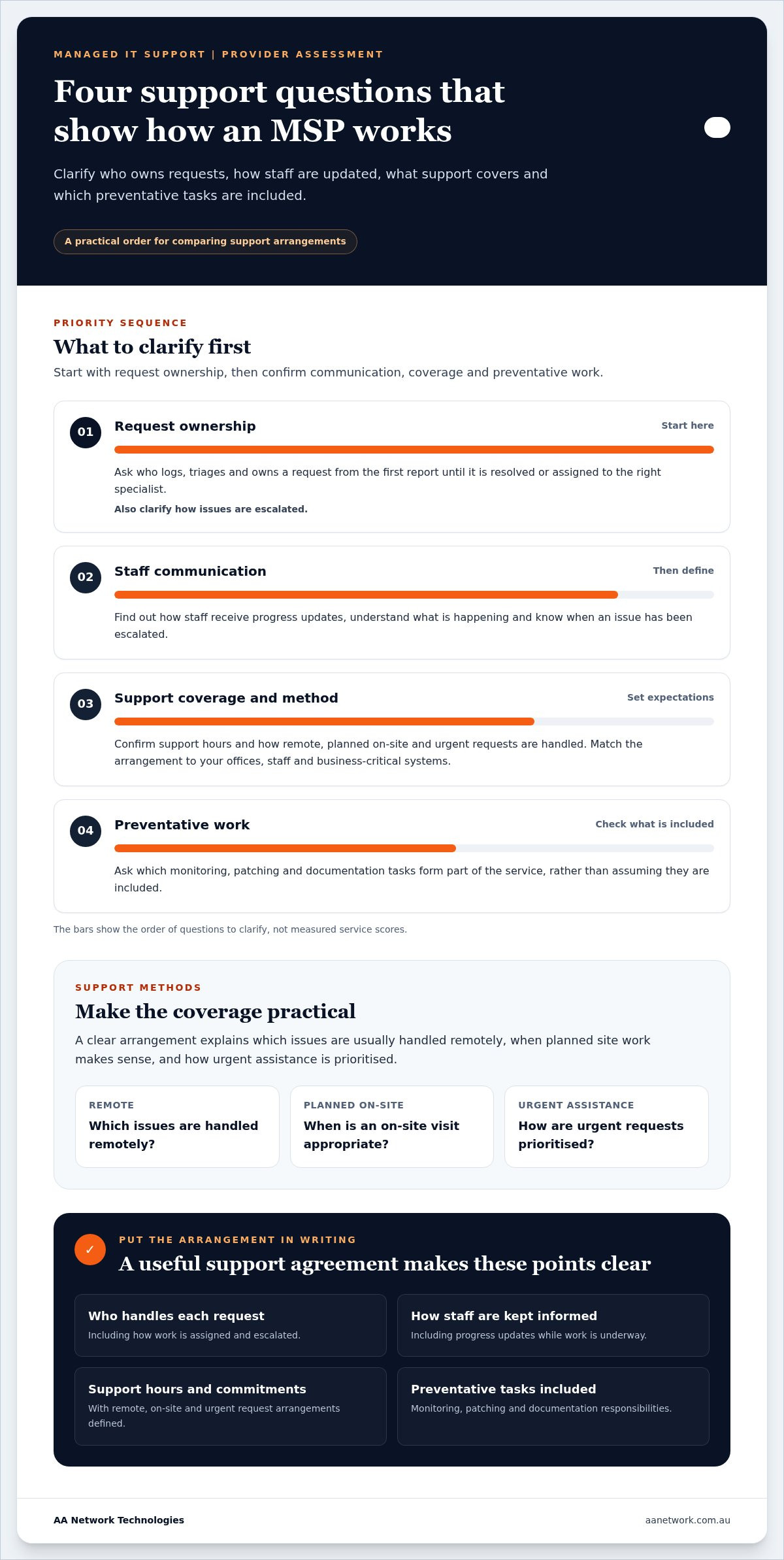
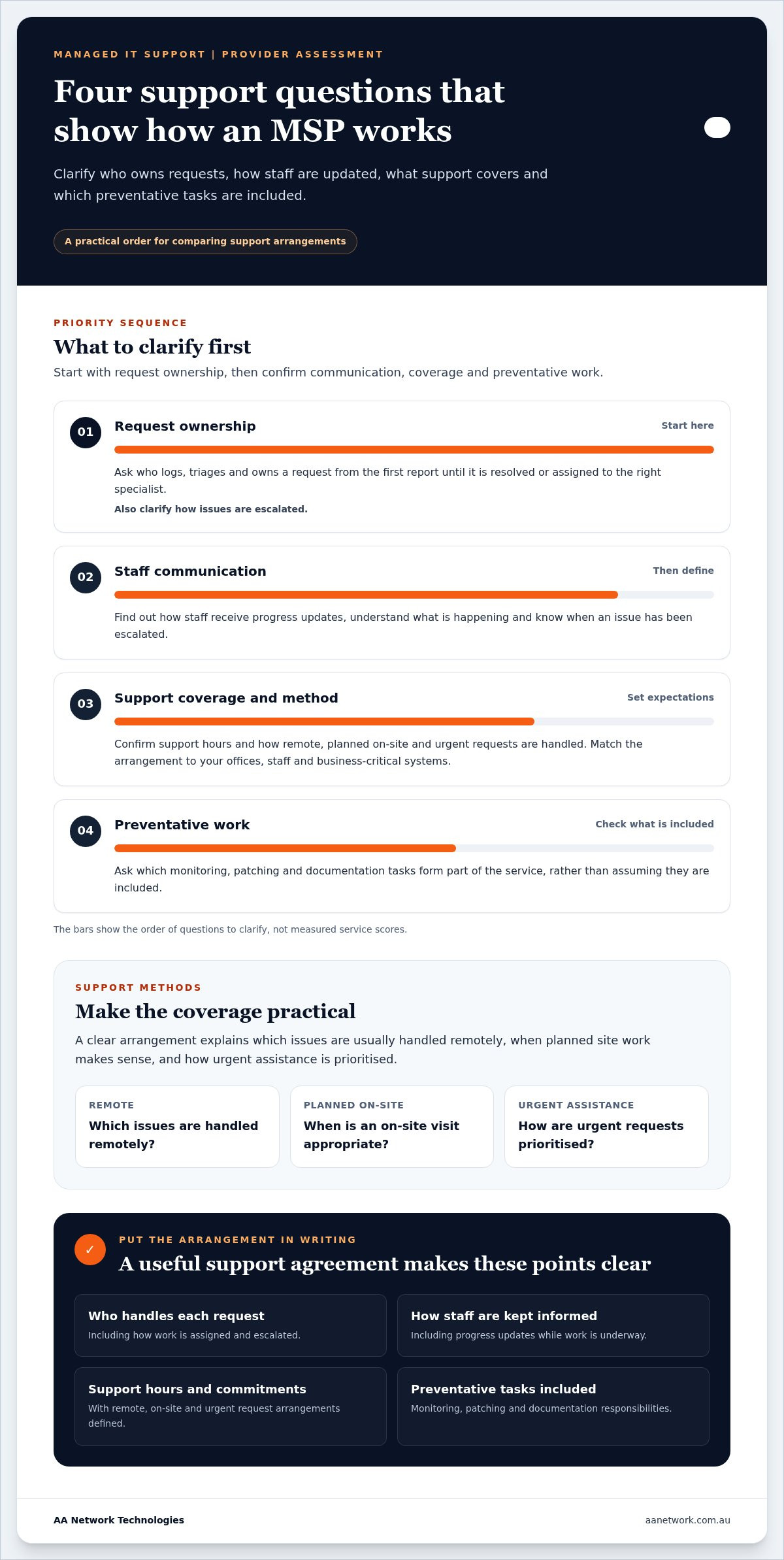
A support arrangement should make clear who takes responsibility after staff report an issue. Ask how requests are received, prioritised and assigned, and how staff are kept informed while work is underway. Without clear ownership, a request can stall between a help desk, a technician and a third-party software provider.
Who owns each support request from start to finish?
Ask what happens from the moment a staff member reports a problem until it’s resolved or assigned to someone with the right expertise. A clear process identifies who coordinates the request, explains how issues are escalated and sets expectations for progress updates in plain English.
Get the arrangements in writing, including support hours and any service commitments. The U.S. Department of Defense’s Mitigating Risks with Managed Service Providers also highlights the value of managing risks and responsibilities in MSP relationships. AA Network Technologies provides ongoing technical support and infrastructure management, connecting day-to-day requests with the work needed to maintain your business environment.
What support is remote, on-site or planned?
Clarify which issues are usually handled remotely, when planned on-site work is appropriate, and how urgent assistance is prioritised. Match the support method to your offices, staff and business-critical systems. A Sydney CBD office may need help coordinating site access, while a Parramatta business might want planned visits aligned with equipment or network work. Local presence makes in-person support practical, but it does not by itself set a particular response time.
Ask what preventative work is included. Monitoring can help identify developing issues, while patching keeps software maintained. Accurate documentation gives the support team a record of your systems and changes, reducing the need for staff to explain the same setup each time.
- Request handling: Who logs, triages and owns each request?
- Communication: How will staff receive updates and know when an issue is escalated?
- Coverage: What are the support hours, and how are remote, on-site and urgent requests handled?
- Preventative work: What monitoring, patching and documentation tasks are included?
AA Network Technologies supports businesses from its Sydney CBD and Parramatta offices. Read more about managed IT support in Sydney, or discuss your support requirements with the team.
Questions About Cyber Security, Backup and Business Continuity
Security and recovery responsibilities should be clear before an incident puts them to the test. Ask which controls the MSP manages, what remains your responsibility and how the provider verifies that backups can be restored. These questions help expose gaps between security tools, day-to-day management and recovery planning.
How should an MSP explain its security responsibilities?
Ask how the provider reviews and manages Microsoft 365, Entra ID, multi-factor authentication (MFA) and Conditional Access. Find out how staff accounts are protected, how access changes when someone joins or leaves, and who manages endpoint security and software patching. Least privilege means giving each person only the access needed for their role, limiting unnecessary access to business information.
The Australian Cyber Security Centre (ACSC) and Australian Signals Directorate (ASD) provide cybersecurity guidance, including the Essential Eight. Use these as reference points for discussing your security approach, not as proof that an MSP or your business is certified or compliant. Ask what work the provider performs, how it records that work and how it reports unresolved risks. AA Network Technologies provides managed IT support alongside cyber security services in Sydney.
How will the business know recovery can work?
Ask which systems and data are covered by backups, how long copies are retained and who is responsible for recovery planning. A backup plan needs to address restoration, not simply confirm that backups completed. Ask how restore tests are carried out, how results are recorded and who acts if a test identifies a problem.
Two terms help make recovery expectations practical. The recovery time objective (RTO) is how quickly a system needs to be restored after disruption. The recovery point objective (RPO) is the acceptable window of data loss, measured by how far back restored information may go. An RTO of several hours may be manageable for one system but disruptive for another. Likewise, losing a day of work may have a different impact from losing a short period of recent changes.
- Coverage: Which business systems, files and Microsoft 365 data are backed up?
- Testing: When are restores tested, and where are the results recorded?
- Ownership: Who makes recovery decisions and coordinates the work?
- Business impact: What downtime and data loss can each important system tolerate?
Record these decisions in your recovery plan, including who needs to be involved and how the business will continue operating during an outage. This gives your team and MSP a shared basis for responding, rather than relying on assumptions when systems are unavailable.
Questions to Compare MSP Proposals, Onboarding and Exit Plans
MSP proposals are difficult to compare when they describe services differently. Look past the headline price and check the scope, responsibilities, exclusions, reporting and project work. The questions to ask a managed service provider should help you understand what your team will receive and which tasks remain yours.
What should a clear proposal explain?
Look for named service areas and routine tasks, such as user support, monitoring, patching, Microsoft 365 administration or network management. Check how the proposal treats project work, third-party suppliers and escalations. Don’t assume two providers use the same definition of support or include the same work. Ask for unclear items to be explained in writing.
Use the same comparison record for each proposal. Note whether staff support is included, who manages system changes, and how work outside routine support is handled. This makes gaps visible without assuming there is one standard MSP package.
Question: What routine support and maintenance are included?
Evidence: A written scope that names tasks and exclusions.
Owner: The MSP or your business, identified for each task.
Follow-up: Record any gap or unclear responsibility.
Question: How are projects and reporting handled?
Evidence: A description of project boundaries and reporting.
Owner: The person coordinating each activity.
Follow-up: Clarify how work outside the ongoing service is managed.
How should onboarding and offboarding protect continuity?
Onboarding should build a usable picture of the environment: devices, systems, users, access, documentation, known risks and open support issues. Ask how the provider records this information and keeps it current. A structured handover helps prevent missed accounts or undocumented systems from slowing support or creating access problems.
Your business should retain ownership of its data, systems and appropriate administrative access. Ask how passwords and privileged access are controlled, how system documentation is provided, and how access is managed when staff or providers change. If the relationship ends, agree how knowledge, records and unresolved work will be handed over so support can continue without unnecessary disruption.
For project work involving a technology transition, see AA Network Technologies’ IT consulting and projects.
Review your current support scope or plan a technology transition with AA Network Technologies.
How AA Network Technologies Approaches Managed IT Partnership
The questions to ask a managed service provider should help you assess four things: whether the scope is clear, support has accountable ownership, security is practical, and your business retains control of its systems and information. Those points matter more than a long list of tools because they show whether the arrangement can support the way your team works.
What does a practical, accountable partnership look like?
AA Network Technologies is a founder-led, Sydney-based managed IT and cyber security firm. Its services connect day-to-day IT support with infrastructure management, security and backup responsibilities. Support is treated as part of maintaining the business environment, not just a series of isolated fixes. The approach focuses on understanding how the business operates, communicating clearly and keeping system information in the client’s hands.
Founder Ronit Sriwastav brings more than 10 years of hands-on ICT consulting, MSP operations and training experience. AA Network Technologies has offices in Sydney CBD and Parramatta, and supports businesses across surrounding service areas. See how its managed IT support in Sydney brings ongoing management and hands-on assistance together.
What is a useful next step for a Sydney business?
Before discussing a change in support, note how many people need support, where they work, which systems matter most and what IT issues regularly disrupt the day. Include any key security or recovery concerns. This gives the conversation a practical starting point and keeps the focus on work that affects staff and business continuity.
AA Network Technologies offers a free 30-minute IT Health Check to discuss your environment and identify areas that may need attention. It’s a practical way to talk through your setup and receive an informed recommendation, without committing to a new support arrangement. Bring your questions, current pain points and priorities. Clear answers should make the next decision easier, whether you’re reviewing an existing provider or planning ahead.
Choose an MSP That Takes Clear Ownership
The right questions to ask a managed service provider help you look beyond the proposal and understand how the relationship will work day to day. Focus on three essentials: support responsibilities are clear, security and recovery work has an owner, and your business keeps ownership of its systems and information. Compare providers on scope, communication and continuity, not just the tools they name.
AA Network Technologies is a founder-led Australian IT provider. Founder Ronit Sriwastav brings more than 10 years of hands-on ICT experience, supported by local, hands-on service from offices in Sydney CBD and Parramatta. A free 30-minute IT Health Check offers a practical opportunity to discuss your environment and identify priorities for your business.
Take your current pain points and priority systems into that conversation. Clear, practical answers can help you choose an IT support arrangement that fits your people and gives your business a sound basis for what comes next.
Frequently Asked Questions
What questions should I ask a managed service provider?
Ask who handles support requests, how issues are escalated, what security and backup tasks are included, and who owns your systems and documentation. Cover onboarding, reporting and what happens if the arrangement ends, too. Share your user numbers, locations, key systems and recurring IT problems so the provider can relate its answers to your operations.
How do I compare managed service provider proposals?
Compare proposals by scope and responsibility, not price alone. Check which routine support tasks, security controls, maintenance and reporting are included, along with exclusions and project boundaries. Record the evidence provided, who owns each task and any follow-up needed. This helps you spot differences without assuming every MSP uses the same service package or defines support in the same way.
Should an MSP provide on-site support?
On-site support can be useful for work that can’t be resolved remotely, such as planned equipment or network tasks. Clarify how remote requests, planned visits and urgent assistance are handled. AA Network Technologies has offices in Sydney CBD and Parramatta, and supports businesses across Barangaroo, Westmead, North Sydney, St Leonards, Chatswood, Macquarie Park, North Ryde, Burwood, Strathfield, Rhodes, Norwest, Bella Vista, Castle Hill and Blacktown.
What should an MSP include in a cyber security plan?
A cyber security plan should explain how identity, MFA, access controls, endpoint security and software patching are managed. It should also state who reviews Microsoft 365 settings, handles access changes and reports security gaps. Ask for practical actions and clear ownership rather than broad assurances. The ACSC and ASD Essential Eight can provide a useful reference for security discussions, but should not be treated as proof of certification or compliance.
How can I tell whether an MSP backup plan is adequate?
Check which systems and data are covered, how long backups are retained, who manages recovery planning and whether restore tests are recorded. A backup plan should address restoration, not simply confirm that a backup completed. Ask how quickly important systems could be restored, known as the recovery time objective, and how much recent data the business could tolerate losing, known as the recovery point objective.
What happens when a business changes managed service provider?
A well-planned transition records systems, users, access, documentation and unresolved issues, then transfers the information needed to maintain support. Confirm that your business retains ownership and appropriate access to its data and systems throughout the change. Plan how administrative accounts, passwords and records will be handed over, and agree who will coordinate outstanding work. Clear preparation helps reduce the risk of missing information disrupting staff or operations.