Choosing an IT Provider: Guide for Australian Businesses
A polished proposal doesn’t prove an IT provider will take ownership when your team can’t access a critical system. If you’re weighing up what to look for in an IT provider, focus on evidence and clear responsibilities, not just a list of services. Before you sign, ask the provider to explain support boundaries, response expectations and the security work it will manage.
The right fit depends on how your business operates. A firm with staff across Sydney CBD, Parramatta or other locations may need a clear plan for both remote assistance and on-site support. You’ll also want to know who manages backups, recovery, Microsoft 365 security, staff access and issues that need to be escalated.
This guide gives you a practical framework for comparing providers, even when their proposals use different terms. You’ll learn what evidence to request, how to check service fit and accountability, and what onboarding and handover should cover. The aim is to understand daily support, security and continuity before you commit, with no surprises about who is responsible for what.
- Start with your business’s users, systems and support needs so you can assess service fit beyond a provider’s feature list.
- When deciding what to look for in an IT provider, check how support, security, backups and recovery responsibilities are defined.
- Compare providers using written service scope, sample reports and clear escalation arrangements, not marketing labels alone.
- Clarify how remote support and on-site visits are arranged across your Sydney locations.
- Before committing, agree on an onboarding plan that records systems, user access, suppliers and unresolved issues.
Start with your business needs before assessing an IT provider
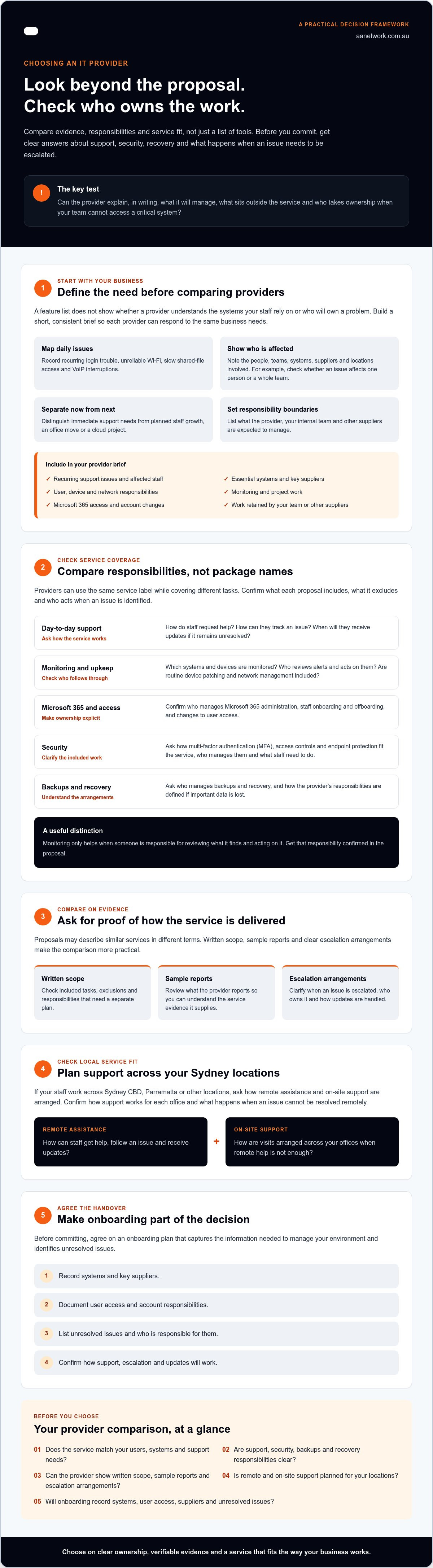
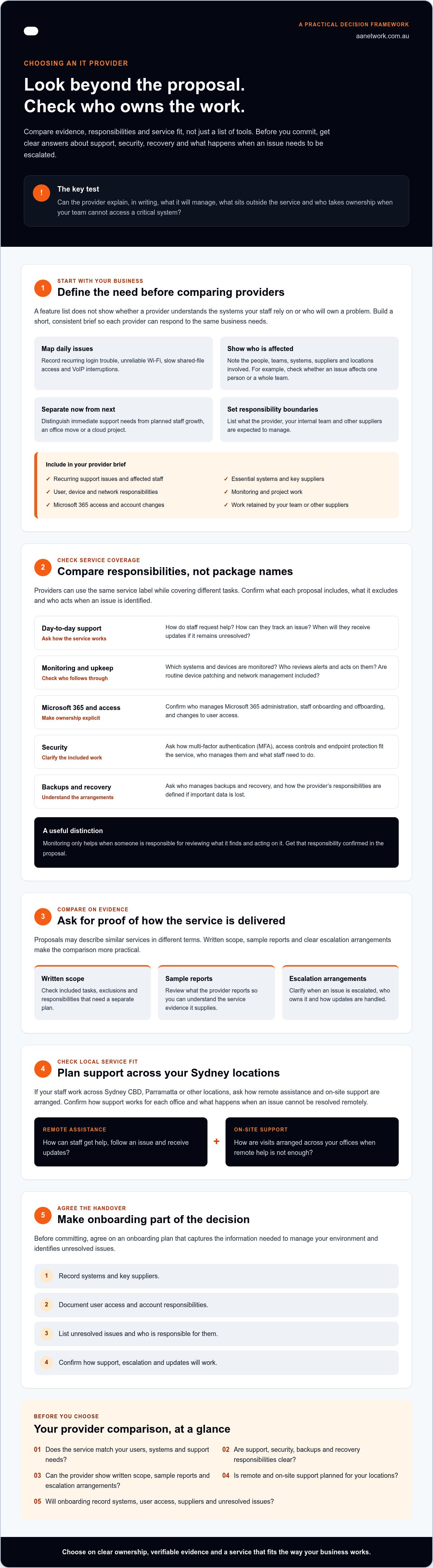
Choosing an IT provider based on a feature list alone can leave you paying for capabilities your team won’t use while essential responsibilities remain unclear. A list of tools doesn’t tell you whether the provider understands which systems staff rely on, what interrupts their work or who takes ownership when something goes wrong. Start with the business problems you need solved, then compare providers against that brief.
Managed Service Provider (MSP) describes a model where an external provider manages IT services on an ongoing basis. In practice, managed IT services involve proactive support, not just help after a fault occurs. The scope may include user support, monitoring and routine upkeep, but confirm exactly what each provider includes. Your goal is to find a service that fits how your business works, not simply to collect features.
Map the technology issues affecting daily work
Look back at the problems staff regularly report. Repeated login trouble, unreliable Wi-Fi, slow access to shared files or interruptions to business VoIP can all take time away from client work. Record what happens, who is affected and which systems or suppliers are involved. For example, note whether login issues affect one person or a whole team, and whether file access problems happen at one office or across locations. This gives providers something concrete to assess.
Then note what’s changing. Planned staff growth, an office move or a cloud project can affect the support your business needs. Separate these planned improvements from immediate issues so routine support doesn’t get confused with a one-off project.
Decide what the provider needs to take responsibility for
Before asking for proposals, define the work you expect the provider to own. Does the brief include user support, device and network management, monitoring or project work? For Microsoft 365, clarify who manages access and how staff onboarding and offboarding are handled. A missed access change can disrupt a new starter’s first day or leave an account active after someone has left.
Also list responsibilities that will stay with your internal team or another supplier. Clear boundaries help you compare proposals fairly and identify gaps before they affect staff.
Use this checklist to brief each prospective provider consistently:
- List recurring support issues and the staff affected.
- Name essential systems, key suppliers and the teams that rely on them.
- Separate urgent support needs from planned cloud or Microsoft 365 improvements.
- Specify expected responsibility for users, devices, networks, monitoring and projects.
- Identify who manages Microsoft 365 access, onboarding and offboarding.
- Record what your team or other suppliers will continue to manage.
This brief gives you a practical starting point for deciding what to look for in an IT provider. It also helps prospective providers explain where their service fits, what sits outside its scope and which tasks need a separate plan.
Check whether an IT provider covers support, security and continuity
Two providers can use the same service label and offer very different coverage. One may include device patching and Microsoft 365 administration, while another treats them as separate work. To decide what to look for in an IT provider, compare the responsibilities in each proposal, not just the headings or package names.
Managed IT support, cybersecurity and backup work together in day-to-day operations. A missed update can leave a device exposed or contribute to avoidable interruptions; unclear recovery arrangements can add delay if important data is lost. Forbes explains what an MSP can do for your business, but the provider’s written scope is what shows which tasks it will actually own.
Compare day-to-day support and proactive management
Ask how staff request help, how they can track an issue and when they’ll receive updates if it remains unresolved. Clarify which systems and devices are monitored, who reviews alerts and what happens when a problem is identified. Monitoring only helps if someone is responsible for assessing and acting on what it finds.
Check whether routine device patching, Microsoft 365 administration and network management are included, and note any exclusions. Compare the provider’s stated managed IT support services with your own requirements, then ask for each responsibility to be confirmed in the proposal.
Ask how security, backups and recovery are handled
Security shouldn’t be an undefined add-on. Ask how multi-factor authentication (MFA), access controls and endpoint protection fit the service, who manages them and what your staff need to do. For example, clarify who changes access when a team member leaves and who checks that the change is complete.
For backups, identify the data covered, including business files and relevant Microsoft 365 information. Ask how the provider checks that data can be restored, and who coordinates recovery if a system or file becomes unavailable. A backup without a clear restore process may not meet your operational needs.
Agree on recovery priorities in writing. Identify which systems the business needs back first, who makes decisions during recovery and what tasks remain with your team or another supplier. The written scope should also state what’s included, what sits outside the service and how issues are escalated. This gives both sides a shared understanding before an incident occurs.
If you’re weighing up how support and security responsibilities should fit together, you can discuss your IT requirements with AA Network Technologies.
Compare IT providers using evidence, accountability and clear terms
Proposals can sound similar while leaving different gaps in day-to-day service. Compare what each provider can show, who owns follow-up and what the written terms say. This gives you a consistent way to assess providers without relying on a universal score or a polished sales presentation.
Request evidence for service and security claims
Ask each provider for a redacted sample service report, a documented service scope and an example of how an issue is escalated. Look for useful detail: work completed, outstanding matters, risks identified and agreed next steps. A report should help you understand what needs attention, not just list technical activity.
Test accountability with a practical question: if monitoring identifies a device that needs attention, who reviews the alert, contacts your team and confirms the issue has been addressed? Also ask who will be your main contact and how service performance is reviewed. If a provider cites credentials or written commitments, check that they apply to the proposed work and can be independently verified.
If you need help shaping your brief before comparing proposals, the Australian Government’s Australian Small Business Advisory Services page explains an advisory option for eligible small businesses. Check the current programme details and eligibility directly.
Make the proposal and responsibilities easy to compare
Put each proposal into the same comparison format. Record recurring services, project work, exclusions, client responsibilities and review arrangements. This makes it easier to spot, for example, whether one proposal includes routine administration while another only covers requests raised by staff.
- Ownership: Who is responsible for each ongoing task, and who follows up unresolved issues?
- Communication: How are progress updates and service reviews handled?
- Exclusions: Which work requires a separate project or approval?
- Changes: How will the scope be reviewed if your user numbers, sites or requirements change?
- Commercial terms: What is the billing unit, what recurring work does it cover, and how are project charges approved?
Assess the commercial proposal against its written scope, not its headline figure. A lower quote may exclude work your team expected, while a broader service may include responsibilities you don’t need. Ask each provider to clarify unclear terms before comparing.
Your business should also retain clear ownership of its systems, records and administrative access. Confirm how documentation and access are handled during the relationship and if the arrangement ends. These details help protect continuity and make responsibilities clear on both sides.
For a practical review of your requirements and provider options, you can talk with AA Network Technologies.
Ask local IT providers how support works across Sydney
A provider’s local presence matters only if its support arrangements fit your workplace. Clarify which issues staff can raise remotely, when an on-site visit may be appropriate and how visits are requested and arranged. These details shape how your team gets assistance, particularly when a problem needs someone at the office.
If your staff work across several Sydney offices, ask how the provider coordinates support at each site. Explain your office access arrangements, staff locations, business hours and any site requirements. AA Network Technologies has confirmed locations in Sydney CBD and Parramatta, and provides local, hands-on support alongside remote service. For businesses in Barangaroo and nearby parts of the city, or across Parramatta and Westmead, ask how remote assistance and any required site visits would be organised. Confirm the arrangements that apply to your workplace before deciding.
Test whether the support model suits your workplace
Ask for examples of issues handled remotely and situations where an on-site visit may be needed. A Microsoft 365 access issue may be suitable for remote assistance, while a physical network problem could require attendance at your office. Clarify how staff raise requests, receive progress updates and know who is handling an unresolved issue.
Compare your requirements with the provider’s written Sydney managed IT support scope. Check that the arrangements cover your team’s actual work locations, not just your main office.
Use questions that reveal fit and accountability
Ask each provider the same practical questions. Their answers can show what to look for in an IT provider beyond a general claim of being local.
- Which issues can be handled remotely, and what may need an on-site visit?
- How do we request a visit, and who arranges access and timing?
- Who owns our service relationship and coordinates support with project work?
- How will you learn our systems, priorities and existing supplier arrangements?
- Who receives updates when a request affects staff or remains unresolved?
- How will you coordinate support across our Sydney offices?
Listen for clear answers about ownership, communication and practical arrangements. Ask who will be your main contact and how decisions are handled if that person is unavailable. The provider should also explain what information it needs from your team and existing suppliers to understand your environment.
If you’re considering a change, an IT Health Check can help identify questions to resolve before selecting a provider.
Discuss your support requirements with AA Network Technologies
Plan onboarding before choosing your IT provider
A provider change involves more than handing over a list of passwords. Systems, staff access, suppliers and unresolved issues all need a clear owner. Discussing onboarding before you commit helps you understand what the transition involves and what your team will need to contribute. Planning can reduce uncertainty, but it won’t guarantee a disruption-free change.
Confirm what happens during the handover
Ask the provider to explain how it will collect and check your IT documentation, asset details and supplier contacts. That may include records of key systems, devices, user accounts, network arrangements, Microsoft 365 administration and support agreements. If documentation is incomplete, agree who will find or recreate the missing information.
Access needs careful coordination. Decide who can approve account access, who will make changes and how appropriate user permissions will be checked. Your provider should understand which staff need access to which systems, while your business retains oversight of its own accounts and records.
Set out the timing and dependencies before work starts. Identify critical business dates, open IT projects and operations that can’t be interrupted without planning. If another provider or supplier is involved, confirm who will request information, coordinate the handover and follow up outstanding tasks. Make staff communication part of the plan too, so people know where to ask for help during the change.
A practical handover plan should record:
- Systems, devices and current IT documentation to be transferred or reviewed.
- User accounts, access approvals and responsibility for checking permissions.
- Supplier contacts, existing agreements and any information they need to provide.
- Open issues, planned projects and important business dates.
- Who will update staff and manage questions during the transition.
Agree on review points after onboarding. Use them to check whether the service matches the agreed scope, identify unresolved priorities and assign owners to outstanding work. Record decisions and next steps so early issues don’t disappear between meetings.
Make the next step straightforward
Use your business needs, written responsibilities, security and continuity arrangements, local support model and transition plan to make the final comparison. Ask each provider who will stay accountable for communication and decisions. With AA Network Technologies, you can also ask how its founder-led, hands-on approach would apply to your business and who would be involved in your support relationship.
Choose a provider with clear ownership and a practical plan
The strongest provider choice isn't the one with the longest feature list. It's the one whose written scope matches your business needs, makes support and security responsibilities clear, and sets out how the handover will work.
Keep your comparison grounded in evidence: check how issues are managed, who owns follow-up, what's included and excluded, and how remote and on-site support will work across your locations. A clear onboarding plan for systems, users, access and suppliers can also help your team understand what to expect during the change.
That's what to look for in an IT provider: a service that fits your operations, accountable people and clear next steps. AA Network Technologies is founder-led by Ronit Sriwastav, who brings over 10 years of hands-on ICT consulting, MSP operations and training experience. Its service scope includes managed IT, cybersecurity, Microsoft 365, backup, networks and communications, with confirmed locations in Sydney CBD, Parramatta and surrounding Sydney suburbs.
Start with a practical review of your needs and the responsibilities you want a provider to own.
A clear brief is a good first step towards technology support that works for your business.
Frequently Asked Questions
What should I look for in an IT provider for a small business?
Look for a provider whose written service scope matches your business needs and makes ownership clear. Check how staff request help, which systems and devices are covered, and who handles security, backups and recovery. Ask how the provider will learn your setup and manage the handover. For a small business, the right fit is a service that covers essential daily operations without leaving important tasks or responsibilities undefined.
How do I compare managed IT service providers?
Compare providers against the same brief, rather than relying on package names or feature lists. Review each proposal’s included services, exclusions, client responsibilities, escalation process and project charges. Request a sample service report and ask who follows up when monitoring identifies an issue. Then check how the provider communicates unresolved work and reviews service needs. This helps reveal the practical differences between proposals before you decide which one fits your business.
What questions should I ask an IT provider before signing a contract?
Ask what the recurring service includes, what costs extra and how project work is approved. Clarify how your staff contact support, how updates are provided and who escalates unresolved issues. Ask who manages Microsoft 365 access, onboarding and offboarding, and what your team must handle. Confirm how your business retains ownership of systems, records and access, and how the provider will coordinate with existing suppliers during onboarding.
Should an IT provider offer both support and cybersecurity?
Support and cybersecurity should be considered together, even if they appear as separate services in a proposal. Ask how routine support connects with tasks such as managing access, applying updates and responding to security issues. Clarify who is responsible for each task and where the service ends. A provider may offer both, but the important test is whether the written scope clearly explains how responsibilities are coordinated and who owns follow-up.
How can I check whether an IT provider is proactive?
Ask for evidence of the provider’s regular work, such as a sample service report, monitoring process and review notes. Find out what systems are monitored, who assesses alerts and how identified issues are assigned and followed through. Ask whether device patching and routine checks are included, and how unresolved risks are raised with you. Proactive support should have clear processes and named responsibilities, not just a general claim in a proposal.
Can a local IT provider support staff working across multiple locations?
Yes, but confirm how remote support and on-site assistance work at each location. Ask how visits are requested, who coordinates access and how staff receive updates. AA Network Technologies has confirmed locations in Sydney CBD and Parramatta, and supports businesses across Sydney areas including Barangaroo, Westmead, North Sydney, St Leonards, Chatswood, Macquarie Park, North Ryde, Burwood, Strathfield, Rhodes, Norwest, Bella Vista, Castle Hill and Blacktown. Check the arrangements for your sites directly.
What should happen when switching to a new IT provider?
Agree on a handover plan before support changes over. It should cover IT documentation, devices, systems, user accounts, access approvals, supplier contacts, open issues and project dates. Decide who will request information from the existing provider, coordinate staff communication and verify user permissions. Set review points after onboarding to assess service fit and assign owners to outstanding priorities. Planning helps clarify responsibilities, though it can’t guarantee a disruption-free transition.