IT Support North Sydney: Managed IT for Professional Firms
Practical IT support for North Sydney professional firms means proactive managed IT: monitored and patched systems, a reliable office network, secured Microsoft 365 and on-site help when remote support is not enough. When the office network drops out before a client meeting or a filing deadline, the cost is lost time, frustrated staff and a poor client experience, so business IT support needs to be more than a remote login and a ticket number. It needs a team that understands your environment, documents it properly and is accountable for keeping it stable.
This guide explains what practical managed IT looks like for growing firms, how to improve office network reliability, and what to ask before choosing or changing an IT provider.
Key Takeaways
- Proactive managed IT reduces avoidable disruption compared with a reactive break-fix arrangement.
- Office network reliability depends on sound design: internet redundancy, well-planned Wi-Fi, segmented networks and managed switching.
- Microsoft 365 identity, access and backup settings deserve regular review, not a one-off setup.
- The Essential Eight from the Australian Signals Directorate is a sensible baseline for prioritising security work.
- When choosing a provider, ask about documentation, escalation, on-site support and how a handover would be managed.
Common IT Challenges for Sydney Professional Firms
Legal, accounting, finance and other professional firms across the Sydney CBD and the Lower North Shore tend to share the same pressures: client data that must be protected, staff who move between the office and home, and little tolerance for downtime. Common problems include:
- Recurring Wi-Fi or connectivity issues that are never fully diagnosed.
- Microsoft 365 permissions that have grown untidy over time.
- Backups that exist but have not been test-restored.
- Knowledge of the environment held by one person, with little documentation.
Relying on a single internal person also creates risk when they are on leave or overloaded. A managed IT support arrangement gives you access to a broader team and a documented environment, alongside or instead of in-house staff.
What Proactive Managed IT Looks Like
Managed IT replaces the stop-start nature of break-fix support with ongoing monitoring, patching, user support and planning. Issues such as failing disks, expiring certificates or missed updates can be identified and addressed before they interrupt staff. The aim is a stable, well-documented environment and clear priorities for improvement, agreed with you rather than decided in isolation.
At AA Network Technologies, support is locally accountable. You deal with experienced people who know your environment, and on-site help is available for Sydney offices when remote work is not enough.
How to Improve Office Network Reliability for Sydney Firms
Many day-to-day complaints about slow or unreliable IT trace back to the office network. The following measures address the most common causes.
Internet redundancy (dual-WAN)
A second internet service from a different carrier or technology, combined with a firewall that supports automatic failover, keeps staff working if the primary link fails. Choose a backup path that does not share the same physical infrastructure where practical.
Well-planned Wi-Fi
Modern standards such as Wi-Fi 6 and Wi-Fi 6E help in busy offices, but placement and configuration matter as much as hardware. A site survey, sensible channel planning and centrally managed access points resolve most dead spots and drop-outs.
Network segmentation (VLANs)
Separating staff devices, guest Wi-Fi, printers, phones and building systems into their own network segments limits how far a problem or compromise can spread, and makes performance issues easier to isolate.
Managed switching and monitoring
Business-grade managed switches allow visibility of traffic, faults and power usage, and support quality-of-service settings for voice and video calls. Combined with monitoring and alerting, they help faults be found before staff report them. See our business networking and Wi-Fi services for how we approach this.
Microsoft 365 Security and Data Protection
For most firms, Microsoft 365 holds email, documents and collaboration. Practical priorities include enforcing multi-factor authentication, reviewing Conditional Access policies, tidying SharePoint and Teams permissions, and removing access promptly when staff leave. Our Microsoft 365 support covers these areas.
Microsoft's retention features are not a substitute for an independent backup. A dedicated backup service with regular test restores, plus agreed recovery time objectives, gives you a verified path back to normal operations after accidental deletion or ransomware.
Aligning with the Essential Eight
The Australian Signals Directorate's Essential Eight is a prioritised set of mitigation strategies, including patching, multi-factor authentication, application control and regular backups. It is a useful baseline for deciding what to improve first. The effort and cost to reach a given maturity level depend on your current environment, so start with an assessment rather than an assumed budget. Learn more about our cyber security services.
Questions to Ask Before Choosing or Changing IT Provider
- Who will actually support us, and how do escalations work?
- Is on-site support available for our office when needed?
- Will you document our network, accounts and Microsoft 365 configuration, and will we own that documentation?
- How would you manage the handover from our current provider?
- How are security improvements prioritised and reported to us?
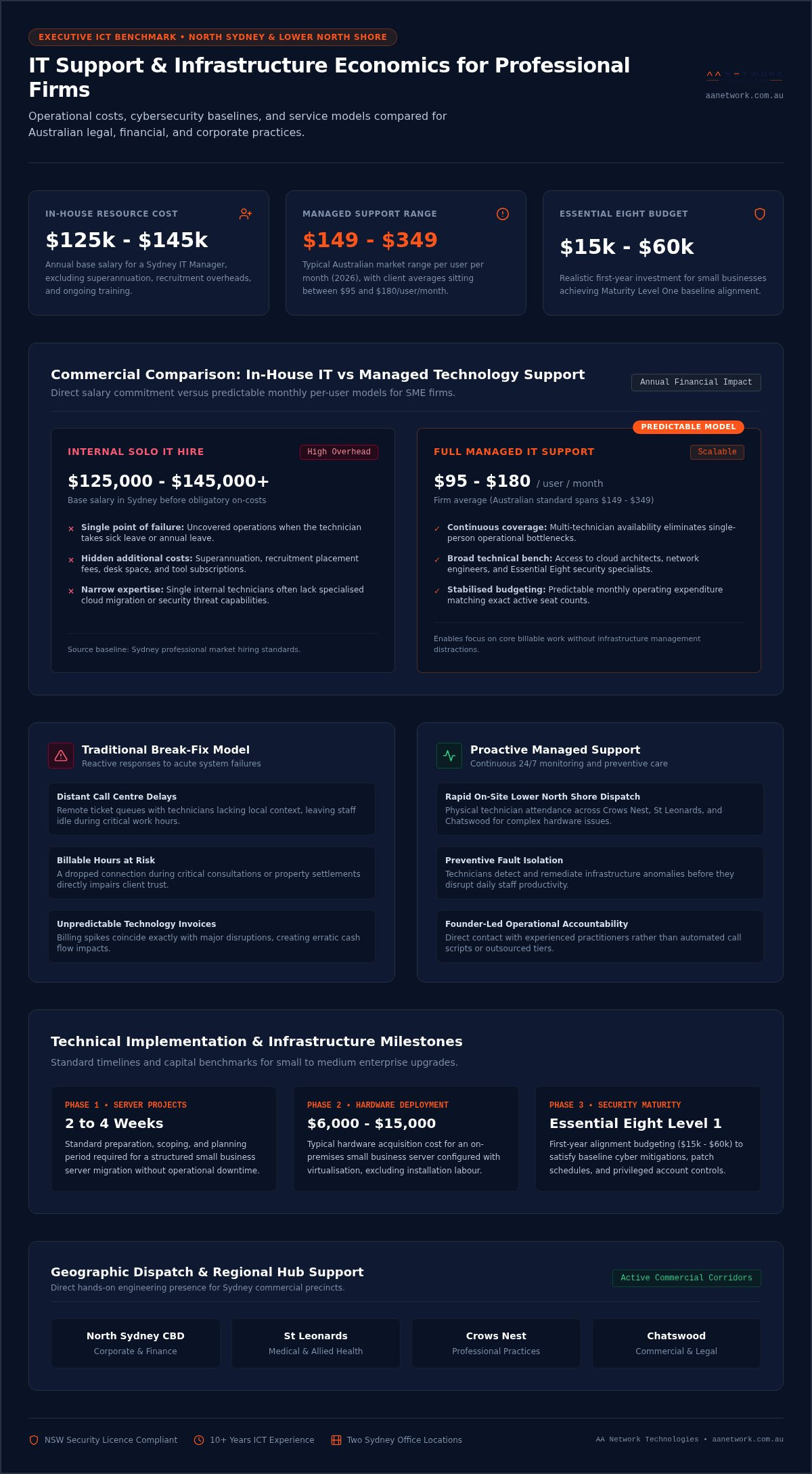
As a guide, most Sydney SMEs pay $95 to $180 per user per month for managed IT, but the final price should be agreed in writing once the scope is understood. Be cautious of any provider that commits to a fixed figure before understanding your environment. For a fuller list, see our guide to questions to ask a managed service provider and our IT support contract checklist.
Working with AA Network Technologies
AA Network Technologies is a managed IT services company supporting growing businesses across Sydney and Canberra. Our approach follows six stages: Discover, Assess, Transition, Secure, Manage and Improve, so changes are planned and documented rather than rushed. Agreements are month to month with 30 days' notice, with no lock-in contract.
If you want an independent view of your current environment, book a Free IT & Security Checkup. We agree the scope first, then provide clear findings and next steps. Planning to change IT providers? Switching IT Providers? Talk to Us.