5 Signs Your Sydney Business Needs Managed IT Support in 2026
Is your current technology setup a silent partner in your growth, or is it the handbrake holding your Sydney firm back? Many business owners in professional sectors like law or accounting feel the same frustration when staff lose hours to slow networks or unpredictable system drops. You probably realise that relying on a reactive "break-fix" model is no longer enough to protect your reputation or your bottom line in a year where cyber threats are more sophisticated than ever.
It is common to feel a sense of anxiety over whether your backups actually work or if you are meeting the latest Australian cyber security standards. This guide identifies the five critical signs your business needs managed IT support to move from constant firefighting to a more stable, productive environment. We will show you how to trade unpredictable monthly bills for fixed costs while ensuring your systems are resilient enough to handle modern threats.
We provide a clear checklist for owners in the Sydney CBD, Parramatta, and Western Sydney to evaluate their current operational risks. By the end of this article, you will know exactly how to reduce downtime and improve staff output through proactive technology management.
Key Takeaways
- Identify when your most technical staff are losing billable hours to basic troubleshooting instead of their primary professional roles.
- Recognise the signs your business needs managed IT to replace unpredictable emergency repair costs with a stable, planned monthly budget.
- Assess your current cyber security posture to ensure you meet Australian Privacy Principles and the requirements of the Essential Eight.
- Determine if your existing network and server setup is creating bottlenecks that prevent you from onboarding new staff or scaling operations.
- Understand why local, responsive support in areas like the Sydney CBD or Parramatta provides more accountability than automated offshore call centres.
Recurring Disruptions and the Rise of the Unofficial IT Manager
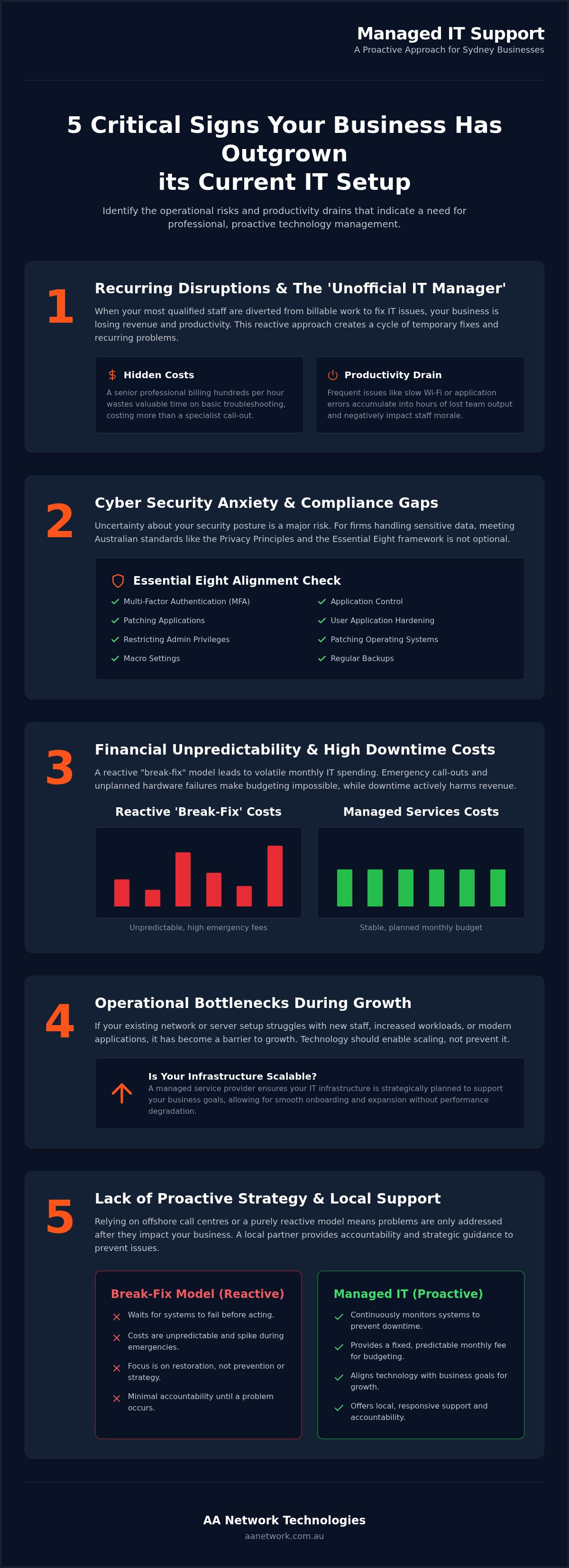
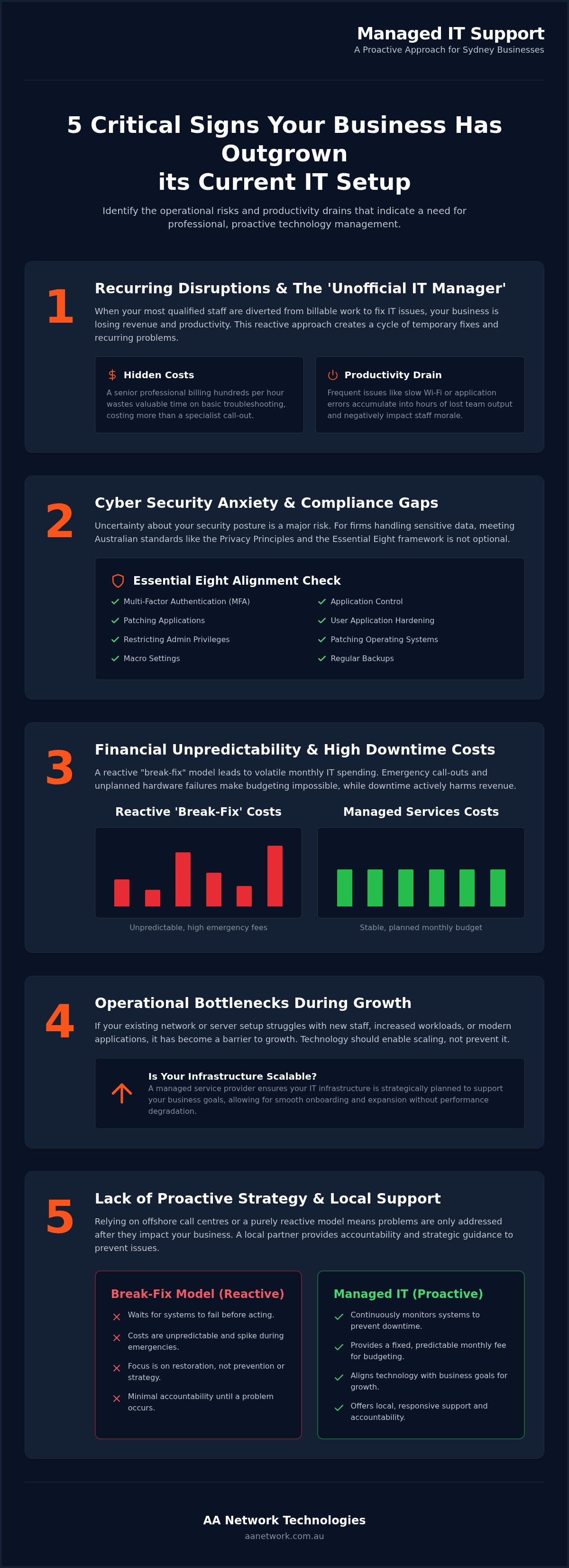
Is your most tech-savvy lawyer or office manager spending their Tuesday morning troubleshooting a firmware update? This is one of the clearest signs your business needs managed IT. When professional staff are diverted from their primary roles, you aren't just losing time; you're losing direct revenue. Many Sydney firms fall into the trap of letting an "unofficial IT manager" handle technical hurdles, unaware of the mounting commercial cost of these distractions.
The Hidden Cost of Staff Troubleshooting
Professional firms in the Sydney CBD or Parramatta often rely on the person who "knows computers" to fix network drops or printer errors. If a senior accountant billing several hundred dollars per hour spends 90 minutes wrestling with a server issue, that single incident costs your business significantly more than a professional call-out. You're paying a premium salary for basic technical labour while your actual billable work sits untouched. This inefficiency is a major drain on the profitability of small and medium enterprises.
There is also a hidden risk in these amateur fixes. An unofficial manager often applies "band-aid" solutions that get the system back online but fail to address the underlying cause. These quick patches create cumulative technical debt, eventually leading to more severe outages that can paralyse your whole office. Professional managed IT support in Sydney identifies these root causes to prevent the same problem from happening next week. It ensures your technology is handled by specialists who understand the long-term impact of every configuration change.
Persistent Performance Issues
Recurring disruptions like slow Wi-Fi or frequent Microsoft 365 application errors are rarely isolated events. They are symptoms of an infrastructure that is either poorly configured or reaching its end of life. If your team has adopted a "restart and hope" strategy for their workstations, your productivity is already compromised. These minor delays might only take five minutes each, but across a team of ten, they quickly add up to hours of lost output every week.
Staff morale also takes a hit when technology becomes a hurdle rather than a tool. Frustration grows when people can't complete basic tasks, and this energy eventually impacts your client service and professional reputation. Transitioning to professional Managed services shifts your business from reactive firefighting to a stable, proactive environment. This move ensures your network can handle the demands of a modern office without the constant need for manual intervention. If you've noticed your connection isn't keeping up with your workload, our business networking and Wi-Fi solutions can provide the stability your team needs to stay focused on their core responsibilities.
Cyber Security Anxiety and Compliance Gaps
Anxiety over data breaches is one of the most common signs your business needs managed IT. For Sydney firms handling sensitive client data, the stakes have never been higher. If you're unsure whether your staff are consistently using Multi-Factor Authentication (MFA) or if Conditional Access policies are active in your Microsoft 365 environment, you have a visibility gap. This uncertainty creates a significant risk of falling foul of the Australian Privacy Principles, which mandate that businesses take reasonable steps to protect personal information.
Relying on a single person's technical knowledge creates a dangerous single point of failure. If that individual leaves or is unavailable during a crisis, your security posture collapses. Professional Cyber Security in Sydney moves you away from this vulnerability by providing a team-based approach to monitoring and defence. This proactive stance is essential for maintaining the trust of your clients and meeting regulatory obligations.
Alignment with the Essential Eight
The Australian Signals Directorate (ASD) recommends the Essential Eight framework as the baseline for cyber resilience. For professional services in the Sydney CBD and North Sydney, implementing these controls is no longer optional. Unpatched software and a lack of application control are the primary entry points for malicious actors. Managed IT support provides the continuous monitoring needed to ensure these eight strategies are not just implemented once, but maintained daily.
Adopting these standards helps you stay ahead of the evolving threats outlined in resources like this guide on Cybersecurity for Small Businesses. Without professional oversight, it is difficult to prove your compliance or verify that your security controls are actually functioning as intended.
Data Protection and Backup Certainty
When was the last time your business performed a full system restore test? Having a backup is only half the battle; having a verified disaster recovery plan is what keeps your doors open. Law and accounting firms must ensure absolute data confidentiality and availability. A backup that hasn't been tested in six months is a liability, not a safety net. If you're concerned about your current protection levels, you can speak with our consultants to arrange a review of your current environment.
Financial Unpredictability and the Cost of Downtime
Unpredictable technology costs are one of the most stressful signs your business needs managed IT. If you find yourself dreading the end of the month because of "lumpy" invoices for emergency repairs, you are likely overpaying for a reactive service. Proactive maintenance is almost always more cost-effective than waiting for a system to fail. In a competitive market like Parramatta or the Sydney CBD, the true cost of an outage goes far beyond the technician's hourly rate. You are paying for the silence while your team waits for a fix.
Many Sydney business owners view IT spending as a series of expensive surprises. This usually happens because the current setup lacks a long-term strategy. When you move to a managed model, you trade those sudden spikes for a fixed monthly fee. This allows for accurate financial forecasting and ensures that your technology remains an asset rather than a recurring financial burden. It's about moving from a "break-fix" mindset to a governance model where your systems are monitored 24/7 to prevent issues before they occur.
Calculating the Real Price of an Outage
When calculating the impact of downtime, you must consider the total cost to the business. For a law firm or medical practice, 30 minutes of disconnected phones or inaccessible files can mean thousands of dollars in lost billable time and staff wages. If your staff are sitting idle because the server is down, you're still paying their salaries while generating zero revenue. This is the "hidden" cost that many firms fail to account for until a major failure occurs.
Reputational damage is even harder to quantify but equally devastating. If a client in the North Sydney business district cannot reach you during a critical window, their confidence in your professionalism drops. In the professional services sector, reliability is part of your brand. Managing this risk through professional managed IT support in Sydney ensures these disruptions are minimised. This proactive approach protects your bottom line and your standing in the local market.
Budgeting for Technology Growth
One of the biggest advantages of a managed service is the ability to plan for the future. Instead of dealing with technical obsolescence, you receive strategic IT consulting that aligns your technology with your business goals. This includes staying updated with international standards, such as the guidelines provided in Cybersecurity for Small Business, which helps you avoid costly compliance gaps.
A predictable monthly retainer allows you to allocate funds for growth rather than just survival. This model includes ongoing optimisations that keep your hardware relevant and your software secure. For a more detailed look at how this impacts your operations, you can read about The Benefits of IT Managed Services for Sydney Small Businesses in 2026. By planning your technology spend, you ensure your business remains agile and ready for whatever the 2026 market demands.
Operational Bottlenecks during Business Growth
Rapid expansion is a positive milestone, but it often exposes the limitations of an outdated technology setup. If it takes three days to configure a laptop for a new hire in your Parramatta office, your processes aren't keeping up with your ambition. Manual workarounds and "hand-me-down" hardware are classic signs your business needs managed IT. These operational friction points prevent you from scaling effectively and frustrate talented staff who expect reliable tools to do their jobs.
Your technology should be a catalyst for growth, not a hurdle. When your network or server setup can no longer handle your increasing user count, you risk systemic slowdowns that impact every department. Whether you are expanding into the Sydney CBD or opening a new branch in Norwest, you need a setup that is both secure and portable. If your team spends more time managing technical "workarounds" than focusing on clients, your growth is being throttled by your infrastructure.
Scaling IT Infrastructure Safely
Moving to Azure or performing a comprehensive Microsoft 365 optimisation is essential for firms that plan to grow in 2026. These cloud-based environments allow your infrastructure to expand instantly as you add new users. Professional management ensures this transition happens without data loss or significant downtime. It's about building a foundation that supports a team of fifty as easily as it once supported five.
Microsoft Intune plays a vital role here by allowing you to manage and secure devices across multiple locations. You can deploy security policies and software updates to a staff member's laptop in Macquarie Park as easily as one in the main office. A managed service provider organises a clear technology roadmap for the next 12 to 24 months, ensuring you don't waste capital on hardware that will be obsolete by next year.
Modernising Workflows with AI and Automation
If your team is bogged down by repetitive administrative tasks, you are losing valuable output. Modern managed IT support identifies specific opportunities for AI and automation to take over routine data entry or document management. This isn't about chasing trends; it's about practical efficiency gains that free your staff for high-value work. Implementing these tools requires professional advice to ensure they integrate safely with your existing security protocols.
Growth also demands a more sophisticated approach to hybrid work. If your remote access relies on unstable VPNs or unsecured personal devices, you are creating a massive security hole. A professional setup ensures your remote environment is just as resilient and efficient as your physical office. This oversight is critical for firms in high-stakes industries like law or construction, where data integrity and accessibility are paramount to daily operations.
Transitioning from Break-Fix to Managed IT Support
Moving away from a reactive model is a significant shift for any organisation. Once you recognise the signs your business needs managed IT, the next step is understanding how to transition without disrupting your daily operations. A professional onboarding process isn't an overnight switch. It begins with a comprehensive audit to document every server, workstation, and software licence in your environment. This documentation ensures your new partner takes full accountability for your system's health from the very first day.
The transition focuses on standardisation. By aligning your technology with industry best practices, a managed service provider (MSP) removes the "quirks" and "workarounds" that your unofficial IT manager likely relied on. This process reduces the likelihood of future outages and creates a stable platform for growth. It is the difference between surviving a technical crisis and preventing one from ever occurring.
The Value of Local On-Site Support
Many larger technology firms rely on offshore call centres where you are treated as a ticket number in a queue. For a professional firm in the Sydney CBD or Parramatta, this detached service is rarely sufficient. There is no substitute for a local technician who can physically visit your office to troubleshoot hardware issues or oversee a complex network rollout. A senior-led firm provides a level of personal investment that automated, faceless competitors simply cannot match.
This local presence is particularly important for hardware procurement and office setups. Whether you are setting up a new meeting room in North Sydney or upgrading servers in Western Sydney, having a practitioner who understands your physical office layout improves the quality of the result. Practitioners who take personal ownership of their clients' success ensure that your technology serves your people, not the other way around.
Selecting the Right Partner for Your Firm
Choosing a provider is about more than just comparing monthly fees. You need a partner who understands the specific compliance risks of your industry, such as the Australian Privacy Principles or the Essential Eight. When evaluating Managed IT Support in Sydney or IT Support in Parramatta, ask potential partners about their specific experience with professional services firms. Look for these indicators of a reliable partner:
- Direct access to senior consultants with hands-on ICT experience.
- A clear process for regular backup testing and full system restores.
- Expertise in Microsoft 365 optimisation and Azure cloud migrations.
- A proactive approach to security that meets Australian Signals Directorate standards.
The first step toward a more reliable setup is a professional audit. We offer a 30-minute review to identify immediate risks in your current environment and provide a clear roadmap for improvement. This review gives you the clarity needed to move from a "break-fix" cycle to a strategic partnership. You can book your review through our IT health check page to start the process of securing your business for 2026.
Securing Your Firm's Future Growth
Identifying the signs your business needs managed IT is the first move toward a more stable and profitable operation. Trading daily technical frustrations for a proactive partnership allows your team to focus on their primary professional roles without the distraction of recurring system drops or slow networks. You can trade unpredictable emergency repair bills for a fixed monthly budget that supports your financial forecasting and strategic long-term planning.
We understand the specific pressures and high stakes facing legal, accounting, and medical practices in the Sydney CBD and Parramatta. We provide the local, on-site presence required to keep your team productive and your client data secure against modern threats.
You don't have to carry the burden of technical management alone. We are ready to help you build a more reliable, secure, and efficient business that is ready for the challenges of 2026.
Frequently Asked Questions
What is the difference between break-fix and managed IT support?
Break-fix is a reactive model where you pay an hourly rate only when something fails. Managed IT support is a proactive partnership that provides continuous monitoring and maintenance for a fixed monthly fee. While break-fix might seem cheaper initially, it often leads to higher downtime costs and technical debt. Managed services focus on governance and prevention, ensuring your systems remain secure and efficient before a failure occurs.
How much does managed IT support typically cost for a Sydney small business?
The cost of professional IT management is generally calculated based on the number of users and the complexity of your infrastructure. Instead of unpredictable hourly bills for emergency repairs, you pay a consistent monthly retainer. This fee covers proactive maintenance, security monitoring, and strategic consulting. For a Sydney small business, this model provides financial predictability and ensures that your technology remains an asset rather than an ongoing financial drain.
Does my business need managed IT if we only have 10 employees?
Yes, smaller teams often face the same security and compliance risks as larger organisations. One of the common signs your business needs managed IT is when your staff lose billable hours to basic troubleshooting. Even with 10 employees, a data breach or server failure can cause significant financial damage. Managed services provide professional-grade security and reliability that is difficult to maintain manually with a small internal team.
Can a managed IT provider work with my existing internal IT person?
We frequently work alongside internal IT staff to provide specialised expertise and additional capacity. This co-managed approach allows your internal person to focus on day-to-day user support while we handle complex infrastructure, cyber security, and Microsoft 365 optimisation. It provides your business with a deeper bench of technical knowledge and ensures that critical tasks like backup verification and security patching are never overlooked during busy periods.
How does managed IT support help with cyber security compliance in Australia?
Managed IT support ensures your business aligns with essential Australian standards like the Australian Privacy Principles and the ACSC Essential Eight. We implement and monitor critical controls such as Multi-Factor Authentication (MFA), application patching, and restricted administrative privileges. This continuous oversight is vital for meeting regulatory obligations and protecting your reputation. We translate technical requirements into practical business defences that keep your client data secure and accessible.
What happens during a IT & Cyber Security Review?
During this review, we perform a high-level audit of your current infrastructure to identify immediate risks and bottlenecks. We examine your backup status, security posture, and network stability to see if your technology is hindering your growth. You will receive a practical summary of where your setup is failing and a roadmap for improvement. It is a low-friction way to determine if your current IT arrangement is creating unnecessary risk.
How quickly can a managed IT provider respond to an emergency?
Response times vary depending on the severity of the issue, but managed providers prioritise critical system failures to minimise downtime. Because we monitor your environment, we often identify and resolve potential issues before they cause a total outage. For Sydney businesses in the CBD or Parramatta, our local presence allows for rapid remote support and on-site assistance when hardware failures occur. This proactive approach is significantly faster than waiting for a break-fix technician.
Will managed IT support help us move to the cloud or Azure?
We specialise in cloud migration and can manage the entire transition to environments like Microsoft Azure. This process includes assessing your current workloads, planning the migration to avoid downtime, and optimising your Microsoft 365 setup for maximum efficiency. Moving to the cloud provides the scalability your business needs to grow without the burden of maintaining physical servers. We ensure your data remains secure and accessible throughout the entire transition.
Sources and further reading
- Essential Eight, Australian Signals Directorate
- Notifiable Data Breaches scheme, OAIC
- Microsoft 365 security documentation, Microsoft Learn
- Backups, Australian Signals Directorate
Reviewed by AA Network Technologies, October 2026. This article provides general information, not legal advice.
Book an IT & Cyber Security Review or talk to our Managed IT team.