Workflow Automation for Sydney Small Business: Practical Examples to Reclaim Your Time in 2026
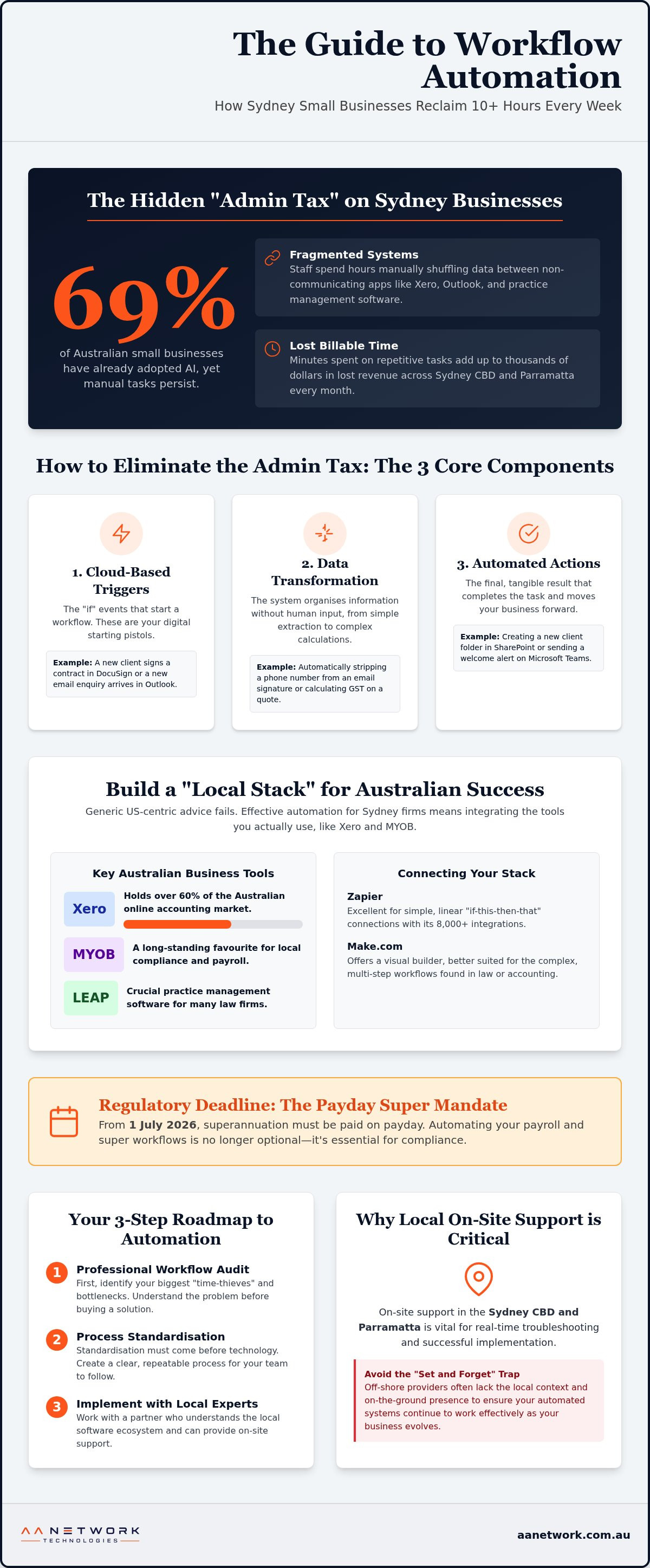
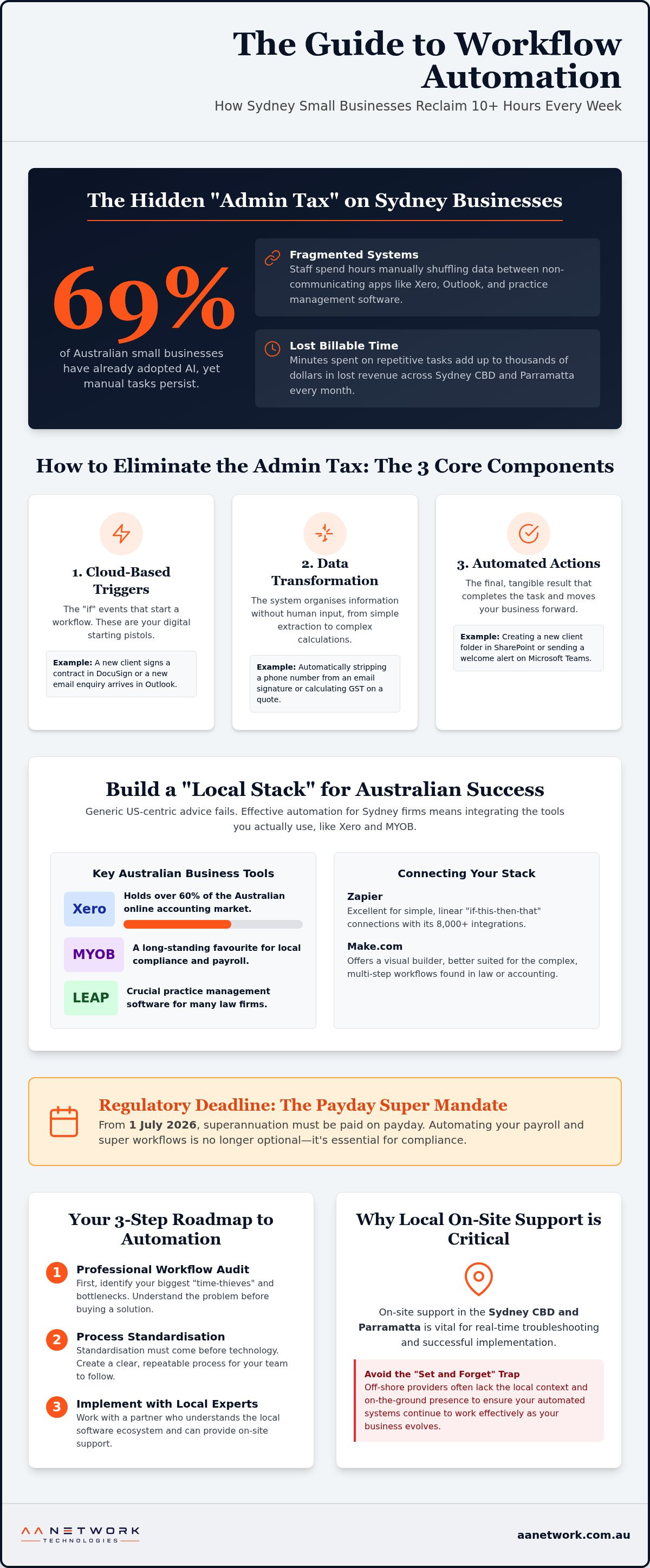
Despite this surge in adoption, many firms in the Sydney CBD and Parramatta still pay a heavy "Admin Tax." This is where high-cost staff spend hours manually shuffling data between Xero, Outlook, and practice management software. It's a common frustration; you've built a successful practice, yet you're still bogged down by fragmented systems that don't talk to each other. You might even worry that modernising these processes is too complex or risky for a small firm to handle alone.
The good news is that smart workflow automation Sydney small business owners are using today isn't about replacing your team. It's about freeing them for high-value billable work. In this guide, you'll discover how to eliminate 10 or more hours of admin every week through smooth tool integration. We'll explore practical examples tailored to the Australian market, including how to automate client onboarding and stay ahead of the July 2026 Payday Super mandate. By the end, you'll have a clear roadmap to turn your repetitive tasks into a reliable, automated engine that works as hard as you do.
Key Takeaways
- Learn why generic US-centric automation guides fail local firms and how to build a "local stack" using Australian favourites like Xero and MYOB.
- Explore practical examples for law and accounting practices, from automated document generation to real-time tax return status updates.
- Discover the exact steps workflow automation Sydney small business leaders take to reclaim 10 or more hours of administrative time every week.
- Identify your biggest "time-thieves" with a professional workflow audit and learn why process standardisation must come before technology.
- Understand why on-site support in the Sydney CBD and Parramatta is vital for troubleshooting and avoiding the "set and forget" trap of off-shore providers.
What is Workflow Automation for a Sydney Small Business?
At its heart, workflow automation Sydney small business owners rely on is the digital glue that binds disparate applications together. It isn't about replacing your team with robots. Instead, it's about creating a system where your software handles the boring, repetitive tasks that usually eat up your morning. To grasp how this works, we first need to define What is a workflow: a repeatable sequence of operations that turns raw inputs into a completed result. Automation simply removes the manual effort from that sequence.
Sydney businesses face unique pressures that make this efficiency vital. With some of the highest commercial rents and administrative labour costs in the world, local firms can't afford to have skilled staff performing manual data entry. We call this the "Admin Tax." It's the hidden cost of a solicitor spending forty minutes drafting a basic engagement letter or an accountant manually copying client details from an email into Xero. These minutes add up to thousands of dollars in lost billable time every month across the Sydney CBD and Parramatta.
The Core Components of a Modern Automated Office
A functional automated system usually consists of three distinct parts that work in silence behind the scenes:
- Cloud-based triggers: These are the "if" events, such as a new enquiry hitting your Outlook inbox or a client signing a contract in DocuSign.
- Data transformation: This is where the system organises information without human input. It might involve stripping a phone number from an email signature or calculating GST on a quote.
- Action steps: The final result, like automatically creating a new folder in SharePoint, updating a row in your practice management software, or sending a welcome alert to your team on Microsoft Teams.
There's a significant difference between simple "if-this-then-that" logic and the newer AI-driven agents. While traditional automation follows a rigid path, AI agents can now interpret the context of a document and make basic decisions, such as categorising a client's priority level based on the urgency of their message.
Why 2026 is the Year to Automate in Sydney
The technology has finally caught up with the needs of smaller firms. With the maturity of Microsoft Copilot and local Australian AI tools, you don't need a massive IT budget to build sophisticated systems. As labour costs continue to climb in the Sydney CBD and surrounding business hubs, the implementation gap between those who automate and those who don't is widening. Workflow automation is a non-negotiable competitive necessity for Australian firms in 2026 to maintain profitability amidst rising overheads.
The 'Local Stack': Integrating Australian Business Tools
Most automation guides you find online are written for the American market. They focus on software that doesn't always play nice with the tools Sydney firms actually use. When we look at What is Workflow Automation?, we see it's about removing friction. For a local business, that friction usually exists between Australian favourites like Xero, MYOB, and LEAP. Generic advice fails because it ignores the specific compliance needs and API quirks of our local software ecosystem.
Effective workflow automation Sydney small business owners implement starts with the "Local Stack." This involves using platforms like Zapier or Make.com as a bridge. While Zapier is excellent for simple connections with its 8,000 plus integrations, Make.com offers a visual builder better suited for the complex, multi-step workflows often found in law or accounting. These tools allow you to connect your legacy software to the cloud, ensuring data flows where it's needed without manual intervention. If you want to see how your current tools stack up, a quick IT health check can identify the gaps in your digital foundation.
Connecting Xero and MYOB to Your Client Portal
Integrating it with your client portal or CRM stops the "double-handling" of data that plagues many Sydney offices. By syncing these systems, you can automate debt collection and payment reminders based on real-time invoice status. This is particularly vital as we approach the 1 July 2026 Payday Super mandate. Automated payroll and superannuation workflows ensure you stay compliant with the ATO without adding hours of manual reporting to your week.
The Power of Microsoft 365 Optimisation
Your existing subscription is often an untapped goldmine. Microsoft 365 support Sydney firms rely on focuses on turning these tools into active participants in your business. With Power Automate, you can manage document approvals in SharePoint so that contracts are routed to the right partner automatically. In Microsoft Teams, AI now handles the heavy lifting by summarising meeting minutes and assigning tasks to staff based on the conversation. Strategic AI automation Sydney strategies turn M365 from a simple mailbox into a high-performance engine that drives your entire operation.
Practical Examples: Automation in Sydney Professional Services
For a workflow automation Sydney small business strategy to succeed, it must move beyond theory into the daily grind of your office. Whether you're a boutique law firm in the CBD or a busy accounting practice in Parramatta, the goal is the same: reclaim billable hours from the "Admin Tax" mentioned earlier. Understanding the strategic benefits of automation allows you to decide which tasks deserve a human touch and which are better left to a machine. This isn't just about speed; it's about accuracy in high-stakes environments.
Real estate agencies in Sydney's competitive market are already using these systems to ensure no lead goes cold after a Saturday inspection by automating follow-up emails and SMS reminders. Consultancies often find that off-the-shelf tools don't quite fit their unique project structures. In these cases, custom software development can bridge the gap between complex project management and accurate billable hour reporting. This ensures that every minute worked is a minute invoiced.
Example: The Automated Law Firm Onboarding
Law firms often struggle with the volume of paperwork required before a matter even begins. A modern automated onboarding process looks like this:
- Digital Intake: A client fills out a secure form on your website. This data automatically creates a new matter file in LEAP or Actionstep.
- Conflict and ID Checks: The system triggers automated conflict searches and sends a secure link for ID verification, reducing the risk of human error.
- Instant Engagement: Once verified, the system uses AI automation for small business to generate a bespoke engagement letter and sends it via DocuSign.
This turns a three-day manual process into a thirty-minute automated sequence. It allows your solicitors to focus on legal strategy rather than chasing signatures.
Example: The Zero-Touch Accounting Workflow
Accounting practices face a massive surge in workload during the EOFY period. A zero-touch workflow uses OCR technology to auto-sort receipts and bank statements as they arrive in a shared folder. Instead of staff manually chasing clients for missing documents, the system monitors the client folder and sends automated, friendly reminders for outstanding items. By the time the accountant sits down to work, the data is already clean, categorised, and synced with Xero. This creates smooth reporting dashboards that pull data from multiple sources, providing clients with real-time financial insights without extra manual labour.
Overcoming the 'Implementation Gap' in Your Business
Many workflow automation Sydney small business projects stall because they try to do too much too quickly. It's one thing to see the potential; it's another to weave it into a busy office without causing chaos. The "Implementation Gap" refers to the space between buying the software and actually seeing your team work more efficiently. To close this gap, you need to treat automation as a cultural shift, not just a technical one. You can't simply set and forget these tools and expect them to work without training your staff to embrace the change as an ally, not a threat to their roles.
Before you touch a single piece of software, you must standardise your processes. If you automate a mess, you just get a faster mess. This means documenting exactly how a task is performed today so the digital version follows a proven logic. Whether you're using Microsoft 365 features or considering custom builds, the goal is to create a predictable environment where technology supports human expertise rather than complicating it.
Step 1: The Workflow Audit
To find your biggest "time-thieves," ask your team to track their tasks for one full week. You're looking for repetitive manual actions that happen daily. Categorise these tasks into high value (billable client work) and low value (data entry, filing, or chasing signatures). Pay close attention to fragmented workflows where data gets stuck between systems. This often happens when a lead comes in through a website form but has to be manually typed into your CRM or practice management software. These gaps are your primary targets for reclamation.
Step 2: Designing the Solution
Once you've identified the friction points, map out the logic: "When X happens, then Y should occur." For example, when a client pays an invoice in Xero, a thank you email should be sent automatically. Before building, you must decide between using existing Microsoft 365 features or investing in bespoke builds. Selecting the most secure integration method is critical for compliance-heavy firms in the Sydney CBD and Parramatta. Consulting with a managed IT support Sydney partner ensures your new workflows are stable, secure, and integrated correctly from day one.
Closing the implementation gap requires a partner who understands the local business landscape. If you're ready to stop the manual grind and start scaling, book your free IT & Cyber Security Review to see exactly where your business is leaking time.
Why Local On-Site Support is Critical for Automation Success
Many firms fall into the "set and forget" trap. They hire an off-shore developer to build a sequence, only to have it break three months later when a software update rolls out. Without local support, you're left shouting into a support ticket void while your operations grind to a halt. Successful workflow automation Sydney small business owners choose is built on accountability. Having a partner who can physically visit your office in the Sydney CBD or Parramatta ensures that troubleshooting happens in real-time, not in a different time zone. It's the difference between a generic digital fix and a reliable business solution.
Automation isn't just about code; it's about culture. A developer in a distant call centre won't understand the specific pace of a Sydney law firm or the compliance nuances of the Australian tax system. We build bespoke tools that actually fit your unique business culture. This means your automated flows feel like a natural extension of your team's existing habits rather than a forced technical hurdle. When your technology mirrors the way you actually work, adoption is higher and frustration is lower.
The AA Network Technologies Advantage
We provide a high-touch alternative to faceless corporate IT. As a senior-led firm, AA Network Technologies takes personal ownership of your success. We don't just send a link; we work on-site to ensure your systems are robust. This strategic partnership aligns your technology with your long-term growth goals. We also maintain a security-first mindset. Automated workflows often move sensitive client data between apps, so we ensure every connection is encrypted and compliant with local privacy regulations. It's about giving you peace of mind that your data is as secure as it is efficient.
Start Your Automation Journey Today
You don't need to overhaul your entire office overnight. Once you see the time savings from one small change, the path forward becomes clear. AA Network Technologies offers a free IT & Cyber Security Review for Sydney firms to help you spot these opportunities. It's a no-pressure briefing designed to show you exactly where your business can reclaim lost hours. Book your free IT & Cyber Security Review today to see how we can automate your Sydney office and get you back to high-value billable work.
Secure Your Competitive Edge with Smarter Operations
Reclaiming your time isn't about an overnight overhaul; it's about fixing one "time-thief" at a time. By integrating the tools you already use, like Xero and Microsoft 365, you can eliminate the "Admin Tax" and focus on the high-value work that actually grows your firm. Implementing the smart workflow automation Sydney small business leaders use to scale is no longer a luxury in 2026. It is a fundamental necessity for staying profitable in a high-cost market.
AA Network Technologies provides the senior-led expertise needed to navigate this shift. As specialists in Microsoft 365 optimisation and AI integration, we offer the hands-on, on-site support that off-shore providers simply can't match. Whether you are based in the Sydney CBD or Parramatta, we take personal ownership of your technical management so you can get back to what you do best. We act as a proactive guardian for your systems, ensuring your automated flows remain secure and efficient as your business evolves.
Book your free IT & Cyber Security Review with our Sydney team to discover exactly where your office can reclaim ten hours of admin every week. Your future, more efficient office is just one conversation away.
Frequently Asked Questions
Is workflow automation expensive for a Sydney small business?
Automation is an investment that scales with your business needs. While bespoke builds involve project fees, many firms start with small, high-impact workflow automation Sydney small business strategies that use their existing Microsoft 365 subscriptions. By reducing the manual "Admin Tax" and freeing up billable hours, the system often offsets its own cost within the first few months of operation. It's about long-term value over short-term expense.
Will automation replace my current administrative staff?
Automation is designed to support your team, not replace them. It handles the repetitive, low-value tasks that often lead to staff burnout, such as manual data entry or chasing signatures. This allows your administrative staff to focus on higher-value client service and complex problem-solving. Most Sydney firms find that their team becomes more productive and engaged once the "boring" work is removed from their daily schedule.
How long does it take to see an ROI from business automation?
You can expect to see tangible results within the first three to six months. For a workflow automation Sydney small business setup, the ROI is measured in reclaimed hours and reduced error rates. If your team saves ten hours a week on document generation, that is over 500 hours a year returned to your bottom line. These efficiency gains accumulate quickly as you automate more processes across your practice.
Is my data secure when using third-party automation tools like Zapier?
Your data is secure if the integrations are configured with a security-first mindset. Professional tools like Zapier and Make use bank-level encryption to protect data while it moves between apps. However, it's vital to ensure your automated flows comply with Australian privacy regulations. We help local firms set up secure connections that prevent data leaks and maintain the integrity of sensitive client information at every step.
Can I automate my existing industry-specific software like LEAP or Xero?
Yes, integrating industry-specific software like LEAP, Actionstep, and Xero is a core part of modern automation. These platforms have open connections that allow them to "talk" to other tools in your office. This means you can automate everything from client onboarding to EOFY document collection. Connecting these specialised tools ensures that your data flows smoothly without the need for manual double-handling by your staff.
What happens if an automated workflow breaks or stops working?
If a workflow stops working due to a software update or API change, having local support is critical. Unlike off-shore providers, we provide on-site troubleshooting in the Sydney CBD and Parramatta to resolve issues immediately. We monitor your workflows to catch potential errors before they impact your operations. This proactive approach ensures your business remains resilient even when software providers change their technical specifications.
Do I need to be a "tech expert" to manage these automated systems?
You don't need to be a technical specialist to benefit from these systems. We handle the complex logic and backend configuration so you can focus on running your firm. Once the workflows are live, they run silently in the background. We provide simple training for your team to ensure they know how to interact with the new tools, making the transition as smooth and approachable as possible.
Sources and further reading
- Essential Eight, Australian Signals Directorate
- Notifiable Data Breaches scheme, OAIC
- Microsoft 365 security documentation, Microsoft Learn
Reviewed by AA Network Technologies, October 2026. This article provides general information, not legal advice.
Book an IT & Cyber Security Review or talk to our Managed IT team.